

Close Menu
Best in TechnologyBest in Technology
  • News
  • Phones
  • Laptops
  • Gadgets
  • Gaming
  • AI
  • Tips
  • More
    • Web Stories
    • Global
    • Press Release

Subscribe to Updates

Get the latest tech news and updates directly to your inbox.

What's On
Claude is getting ambitious with watermarking, and I can smell the problems from a mile away

Claude is getting ambitious with watermarking, and I can smell the problems from a mile away

16 August 2026
How Is Capcom’s RE Engine So Versatile?

How Is Capcom’s RE Engine So Versatile?

15 August 2026
Pixel’s Quick Settings are finally becoming properly customizable on Android 17

Pixel’s Quick Settings are finally becoming properly customizable on Android 17

15 August 2026
Facebook X (Twitter) Instagram
Just In
  • Claude is getting ambitious with watermarking, and I can smell the problems from a mile away
  • How Is Capcom’s RE Engine So Versatile?
  • Pixel’s Quick Settings are finally becoming properly customizable on Android 17
  • I switched from Windows to Mac after 25 years, and it’s the trackpad that converted me.
  • Puerto Rico Is Rationing Water. It Could’ve Avoided It by Harvesting Rainwater
  • You don’t need a document scanning app. Your iPhone has you covered
  • 5 Best Apple Watch Bands: Nike, Nomad, and Hermés (2026)
  • Apple’s latest refurb drop brings cheaper MacBooks, iPhone 16 Plus, and Apple Watches
Facebook X (Twitter) Instagram Pinterest Vimeo
Best in TechnologyBest in Technology
  • News
  • Phones
  • Laptops
  • Gadgets
  • Gaming
  • AI
  • Tips
  • More
    • Web Stories
    • Global
    • Press Release
Subscribe
Best in TechnologyBest in Technology
Home » How to turn off subtitles on Disney+
News

How to turn off subtitles on Disney+

News RoomBy News Room14 October 20245 Mins Read
Share Facebook Twitter Pinterest LinkedIn Tumblr Reddit Telegram Email
How to turn off subtitles on Disney+
Share
Facebook Twitter LinkedIn Pinterest Email

Whether you turned on subtitles on Disney Plus to help your kids remember the words to their favorite songs, or you turned down the volume while watching the new Marvel movie so you didn’t wake anyone up during naptime, you may not be sure how to turn them back off. While this can be frustrating, don’t panic (and don’t cancel your subscription!). Turning subtitles on and off is fairly simple once you know where the option is hiding.

Disney+ is the home of streaming for all things Disney, and includes both new original programming and their classic catalog. Thanks to their acquisitions over the last few years, it’s also the streaming home of Star Wars, Marvel, and National Geographic. That means there is plenty here to love for what you pay for the streaming service. The closed captioning option makes it easier to understand what’s being said on screen, and is a great tool for anyone with auditory processing issues, but it can get in the way for some viewers.

That’s why we’ve covered how to turn off the subtitles in Disney+ for you here, so that you can turn them off and get back to your show!

Having trouble with subtitles on your other streaming services, too? Check out this guide on how to disable subtitles on Netflix, as well as Max.

Note: Unless otherwise indicated, the first step for all of these devices is to launch the Disney+ app and pick a show or movie to watch. If you don’t have the Disney+ app, visit your device’s app store to download it for free. PC/Mac instructions apply to all browsers.

How to turn off Disney+ subtitles on Android

Step 1: While your show or movie is playing, tap your display.

Step 2: A Menu icon should appear on the left. When it does, select it.

Step 3: Your audio or subtitle options will pop up. Select the Off option under Subtitles.
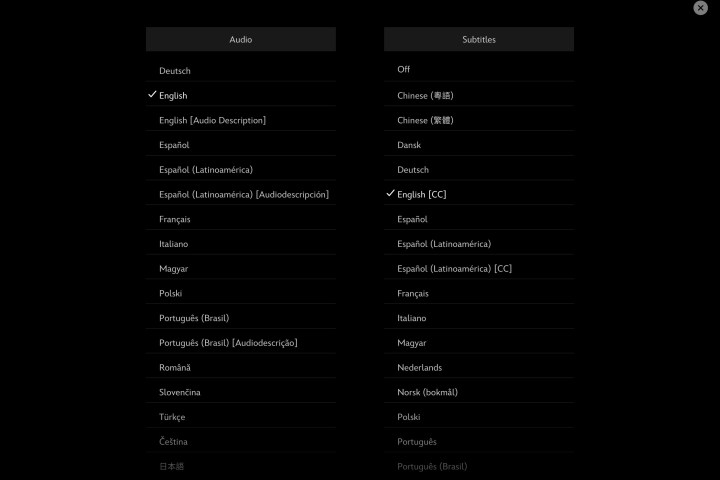
The subtitles menu for Disney Plus on iPad.

How to turn off Disney+ subtitles on iPhone and iPad

Step 1: While your show or movie is playing, tap your display.

Step 2: A variety of icons should appear in the upper-right corner. When they do, select the icon farthest to the right.
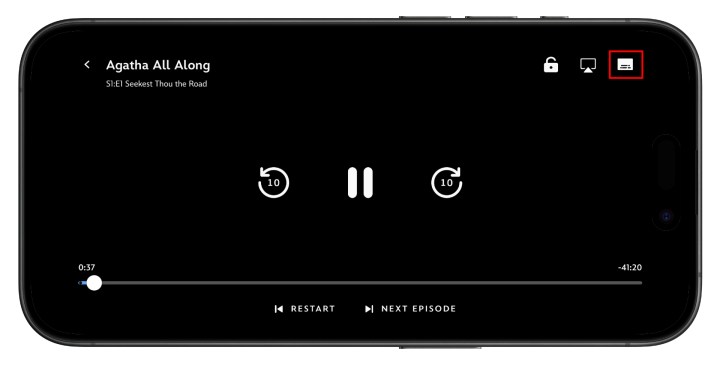
How to turn off subtitles on Disney+ on iPhone,

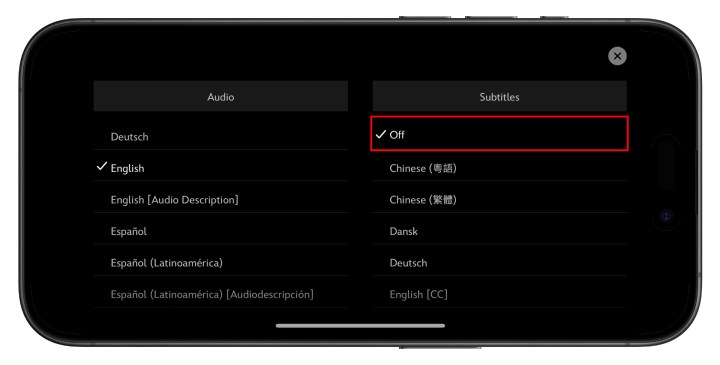
Step 3:  Your preferred audio or subtitle options will pop up. Select the Off option under Subtitles.

How to turn off subtitles on Disney+ on iPhone.

Step 4: Tap the X icon in the upper-right to continue playback.

How to turn off Disney+ subtitles on Roku

Step 1:  Once you’ve chosen a show or movie to watch, select Audio & Subtitles from the description page.

Step 2: Choose Off for Subtitles.

Step 3: Press the back button to exit the description page.

Step 4: Hit Play to start your movie or show.

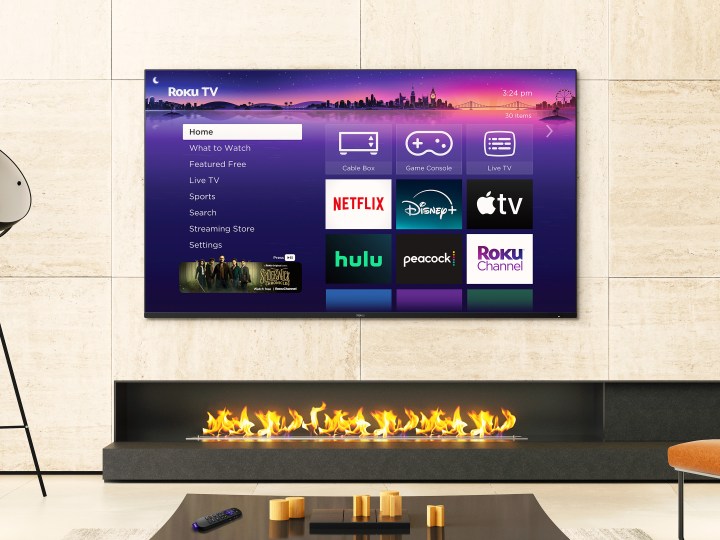
A handout picture of the Roku Pro Series television.

How to turn off Disney+ subtitles on newer Roku devices

If you have a newer Roku device, you can also turn off subtitles while your movie or show is playing.

Step 1: While your show or movie plays, press Up or Down on your remote.

Step 2: Select Audio & Subtitles.

Step 3: Your preferred audio or subtitle options will pop up. Select the Off option under Subtitles.

How to turn off Disney+ subtitles on Google Chromecast

Along with Chromecast, these directions will also work to turn off Disney+ subtitles with Google TV.

Step 1: While your show or movie is playing, select, or hover the mouse on your screen. If you are using Google TV, press the down button on your remote.

Step 2: A Menu icon should appear. When it does, hover over it or select it.

Step 3: Your preferred audio or subtitle options will pop up. Select the Off option under Subtitles.

Step 4: Select OK or the X icon to continue playback.

How to turn off Disney+ subtitles on Amazon Fire TV

Step 1: While your show or movie is playing, click up on your remote.

Step 2: A Menu icon should appear. When it does, select it.

Step 3: Your preferred audio or subtitle options will pop up. Select the Off option under Subtitles.

Step 4: Click the back button on your remote to close the menu.

How to turn off Disney+ subtitles on Apple TV

Step 1: If you’ve already got a show or movie streaming, swipe up or down on your remote to change the settings while it’s playing. If using a second- or third-generation Apple TV, hold the Center button down on your remote.

Step 2: Choose the Settings icon in the bottom-right corner of the screen.

The settings icon for how to turn off subtitles on Disney Plus.

Step 3: The Info, Audio, and Subtitles menu will appear. Scroll over to Subtitles and select Off.

Subtitles menu for how to turn off subtitles on Disney Plus.

How to turn off Disney+ subtitles on PlayStation 4 and PlayStation 5

Step 1: While your show or movie is playing, hit the Down button on your controller.

Step 2: A Dialogue icon should appear. When it does, select it.

Step 3: The console’s audio and subtitle menu will show up, and then you can click the Off setting under the Subtitles category.

How to turn off Disney+ subtitles on Xbox One and Xbox Series X/S

Step 1: Once your movie or show is going, use your controller to click the Down button. 

Step 2: A Dialogue icon should appear. When it does, select it.

Step 3: Your preferred audio or subtitle options will pop up. Select the Off option under Subtitles.
Hoe to turn off subtitles on Disney Plus on a Mac.

How to turn off Disney+ subtitles on PC or Mac

Step 1: When you’re watching your show, find the Menu option at the top-right corner of the display. The Menu button is a white square with black lines on it.

Step 2: The Audio & Subtitles menu will open.

Step 3: The available audio or subtitle options will pop up. Select the Off preference under Subtitles.

Step 4: Click the white “<” symbol to close the menu.


Share. Facebook Twitter Pinterest LinkedIn Tumblr Email
Previous ArticleDon Cheadle hints that one troubled Marvel movie could redeem Secret Invasion’s biggest twist
Next Article 3 action movies on Hulu you need to watch in October 2024

Related Articles

Claude is getting ambitious with watermarking, and I can smell the problems from a mile away
News

Claude is getting ambitious with watermarking, and I can smell the problems from a mile away

16 August 2026
Pixel’s Quick Settings are finally becoming properly customizable on Android 17
News

Pixel’s Quick Settings are finally becoming properly customizable on Android 17

15 August 2026
I switched from Windows to Mac after 25 years, and it’s the trackpad that converted me.
News

I switched from Windows to Mac after 25 years, and it’s the trackpad that converted me.

15 August 2026
Puerto Rico Is Rationing Water. It Could’ve Avoided It by Harvesting Rainwater
News

Puerto Rico Is Rationing Water. It Could’ve Avoided It by Harvesting Rainwater

15 August 2026
You don’t need a document scanning app. Your iPhone has you covered
News

You don’t need a document scanning app. Your iPhone has you covered

15 August 2026
5 Best Apple Watch Bands: Nike, Nomad, and Hermés (2026)
News

5 Best Apple Watch Bands: Nike, Nomad, and Hermés (2026)

15 August 2026
Demo
Top Articles
5 laptops to buy instead of the M4 MacBook Pro

5 laptops to buy instead of the M4 MacBook Pro

17 November 2024133 Views
ChatGPT o1 vs. o1-mini vs. 4o: Which should you use?

ChatGPT o1 vs. o1-mini vs. 4o: Which should you use?

15 December 2024112 Views
Costco partners with Electric Era to bring back EV charging in the U.S.

Costco partners with Electric Era to bring back EV charging in the U.S.

28 October 2024100 Views

Subscribe to Updates

Get the latest tech news and updates directly to your inbox.

Latest News
You don’t need a document scanning app. Your iPhone has you covered News

You don’t need a document scanning app. Your iPhone has you covered

News Room15 August 2026
5 Best Apple Watch Bands: Nike, Nomad, and Hermés (2026) News

5 Best Apple Watch Bands: Nike, Nomad, and Hermés (2026)

News Room15 August 2026
Apple’s latest refurb drop brings cheaper MacBooks, iPhone 16 Plus, and Apple Watches News

Apple’s latest refurb drop brings cheaper MacBooks, iPhone 16 Plus, and Apple Watches

News Room15 August 2026
Most Popular
The Spectacular Burnout of a Solar Panel Salesman

The Spectacular Burnout of a Solar Panel Salesman

13 January 2025137 Views
5 laptops to buy instead of the M4 MacBook Pro

5 laptops to buy instead of the M4 MacBook Pro

17 November 2024133 Views
ChatGPT o1 vs. o1-mini vs. 4o: Which should you use?

ChatGPT o1 vs. o1-mini vs. 4o: Which should you use?

15 December 2024112 Views
Our Picks
I switched from Windows to Mac after 25 years, and it’s the trackpad that converted me.

I switched from Windows to Mac after 25 years, and it’s the trackpad that converted me.

15 August 2026
Puerto Rico Is Rationing Water. It Could’ve Avoided It by Harvesting Rainwater

Puerto Rico Is Rationing Water. It Could’ve Avoided It by Harvesting Rainwater

15 August 2026
You don’t need a document scanning app. Your iPhone has you covered

You don’t need a document scanning app. Your iPhone has you covered

15 August 2026

Subscribe to Updates

Get the latest tech news and updates directly to your inbox.

Facebook X (Twitter) Instagram Pinterest
  • Privacy Policy
  • Terms of use
  • Advertise
  • Contact Us
© 2026 Best in Technology. All Rights Reserved.

Type above and press Enter to search. Press Esc to cancel.