


Close Menu
Best in TechnologyBest in Technology
  • News
  • Phones
  • Laptops
  • Gadgets
  • Gaming
  • AI
  • Tips
  • More
    • Web Stories
    • Global
    • Press Release

Subscribe to Updates

Get the latest tech news and updates directly to your inbox.

What's On
How Is Capcom’s RE Engine So Versatile?

How Is Capcom’s RE Engine So Versatile?

15 August 2026
Pixel’s Quick Settings are finally becoming properly customizable on Android 17

Pixel’s Quick Settings are finally becoming properly customizable on Android 17

15 August 2026
I switched from Windows to Mac after 25 years, and it’s the trackpad that converted me.

I switched from Windows to Mac after 25 years, and it’s the trackpad that converted me.

15 August 2026
Facebook X (Twitter) Instagram
Just In
  • How Is Capcom’s RE Engine So Versatile?
  • Pixel’s Quick Settings are finally becoming properly customizable on Android 17
  • I switched from Windows to Mac after 25 years, and it’s the trackpad that converted me.
  • Puerto Rico Is Rationing Water. It Could’ve Avoided It by Harvesting Rainwater
  • You don’t need a document scanning app. Your iPhone has you covered
  • 5 Best Apple Watch Bands: Nike, Nomad, and Hermés (2026)
  • Apple’s latest refurb drop brings cheaper MacBooks, iPhone 16 Plus, and Apple Watches
  • Zyzz Was the Original Looksmaxxer. His Rise and Untimely Death Feel More Relevant Than Ever
Facebook X (Twitter) Instagram Pinterest Vimeo
Best in TechnologyBest in Technology
  • News
  • Phones
  • Laptops
  • Gadgets
  • Gaming
  • AI
  • Tips
  • More
    • Web Stories
    • Global
    • Press Release
Subscribe
Best in TechnologyBest in Technology
Home » How to find your lost AirPods case with Apple’s Find My feature
News

How to find your lost AirPods case with Apple’s Find My feature

News RoomBy News Room17 June 20243 Mins Read
Share Facebook Twitter Pinterest LinkedIn Tumblr Reddit Telegram Email
How to find your lost AirPods case with Apple’s Find My feature
Share
Facebook Twitter LinkedIn Pinterest Email

Losing your AirPods case can be frustrating and is probably one of the biggest problems you might run into with the earbuds. Fortunately, Apple has integrated a solution to help locate your lost items through its powerful Find My app. Here’s how to use this feature to find your lost AirPods case, whether it be for your AirPods Pro or AirPods, two of the best wireless earbuds on the market.

Get prepared before you lose it

Your AirPods can only be located using the Find My app if you set them up to do so when you purchased them. Luckily, Apple has made this process easy for you. When you paired your AirPods with your iPhone or other Apple device, the earbuds automatically linked up with the Find My app. Without pairing, you wouldn’t have been able to use the AirPods in the first place, so you almost certainly already performed this important step.

Using the Find My app

If you’ve misplaced your AirPods case and need help finding it, don’t worry. If its close, you should be able to find them via Bluetooth, regardless of the AirPods model.

If you have AirPods (3rd generation, AirPods Pro, or AirPods Max, you should be able to locate the case using the Find My network from Apple. This means that even if your AirPods are offline, out of Bluetooth range, or have a low battery, you can still use the network of Apple devices to find them.

Step 1: Tap on the Find My app on your paired device, such as your iPhone or iPad.

Step 2: Next, tap on the Devices tab. This is the location where you should find every Apple device that’s paired with your Apple ID.

Step 3: Scroll and select your AirPods from the list.

Step 4: Look at the map on the Find My app. If the map shows that your AirPods are nearby, you can use the app to play a sound to help locate them. To do so, tap the Play Sound button.

Step 5: If the AirPods case is not nearby and the model supports the Find My network, you can use the app’s built-in navigation system to locate it. Look on the map to find its general location, then tap Find, then follow the directions on the screen to find your AirPods.

If you own an older pair of AirPods, you can check the map to see its Last Known Location, which is where the earbuds were last connected to your iPhone.

Screenshots showing steps to find lost AirPods in the Find My app on iPhone.

What if AirPods are truly lost?

If you can’t find your AirPods using the previous tools, you can report them as missing in the Find My app. In the app, under the AirPods, scroll down and enable Lost Mode.

Follow the onscreen instructions to lock your device. As part of this process, you’ll also be asked to add a contact phone number or email. If someone finds your AirPods, a message conveying this information will show on their iPhone.

Note: Your missing AirPods can only work with your Apple ID, so whoever finds them won’t be able to use them.

screenshot showing lost mode in the Find My app on iPhone.
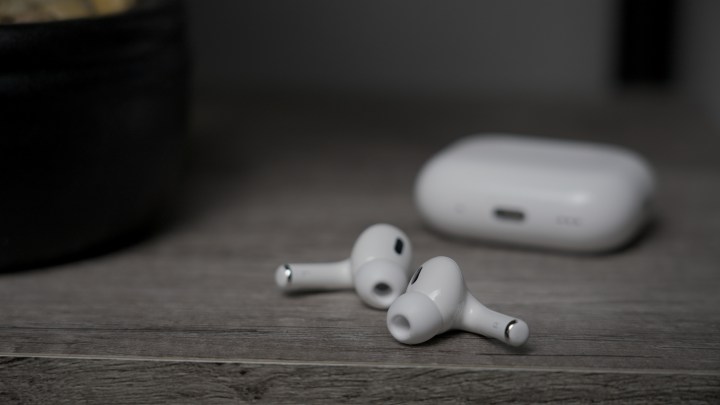
The Apple AirPods Pro 2 with USB-C and MagSafe buds on a table with case in the background.

So the AirPods need to be in the case?

Unfortunately, to find your AirPods using the steps above, the AirPods will need to be placed in the AirPods case, unless you own AirPods Pro (2nd generation). If you have AirPods Pro (2nd generation), you can still find the case even if the AirPods aren’t in it.

If you have the AirPods case, but lost one of the AirPods, you can replace it by contacting Apple.

Editors’ Recommendations


Share. Facebook Twitter Pinterest LinkedIn Tumblr Email
Previous ArticleReview: McLaren Artura Spider Hybrid
Next Article Black Myth: Wukong is a perfect chaser for Stellar Blade fans

Related Articles

Pixel’s Quick Settings are finally becoming properly customizable on Android 17
News

Pixel’s Quick Settings are finally becoming properly customizable on Android 17

15 August 2026
I switched from Windows to Mac after 25 years, and it’s the trackpad that converted me.
News

I switched from Windows to Mac after 25 years, and it’s the trackpad that converted me.

15 August 2026
Puerto Rico Is Rationing Water. It Could’ve Avoided It by Harvesting Rainwater
News

Puerto Rico Is Rationing Water. It Could’ve Avoided It by Harvesting Rainwater

15 August 2026
You don’t need a document scanning app. Your iPhone has you covered
News

You don’t need a document scanning app. Your iPhone has you covered

15 August 2026
5 Best Apple Watch Bands: Nike, Nomad, and Hermés (2026)
News

5 Best Apple Watch Bands: Nike, Nomad, and Hermés (2026)

15 August 2026
Apple’s latest refurb drop brings cheaper MacBooks, iPhone 16 Plus, and Apple Watches
News

Apple’s latest refurb drop brings cheaper MacBooks, iPhone 16 Plus, and Apple Watches

15 August 2026
Demo
Top Articles
5 laptops to buy instead of the M4 MacBook Pro

5 laptops to buy instead of the M4 MacBook Pro

17 November 2024133 Views
ChatGPT o1 vs. o1-mini vs. 4o: Which should you use?

ChatGPT o1 vs. o1-mini vs. 4o: Which should you use?

15 December 2024112 Views
Costco partners with Electric Era to bring back EV charging in the U.S.

Costco partners with Electric Era to bring back EV charging in the U.S.

28 October 2024100 Views

Subscribe to Updates

Get the latest tech news and updates directly to your inbox.

Latest News
5 Best Apple Watch Bands: Nike, Nomad, and Hermés (2026) News

5 Best Apple Watch Bands: Nike, Nomad, and Hermés (2026)

News Room15 August 2026
Apple’s latest refurb drop brings cheaper MacBooks, iPhone 16 Plus, and Apple Watches News

Apple’s latest refurb drop brings cheaper MacBooks, iPhone 16 Plus, and Apple Watches

News Room15 August 2026
Zyzz Was the Original Looksmaxxer. His Rise and Untimely Death Feel More Relevant Than Ever News

Zyzz Was the Original Looksmaxxer. His Rise and Untimely Death Feel More Relevant Than Ever

News Room15 August 2026
Most Popular
The Spectacular Burnout of a Solar Panel Salesman

The Spectacular Burnout of a Solar Panel Salesman

13 January 2025137 Views
5 laptops to buy instead of the M4 MacBook Pro

5 laptops to buy instead of the M4 MacBook Pro

17 November 2024133 Views
ChatGPT o1 vs. o1-mini vs. 4o: Which should you use?

ChatGPT o1 vs. o1-mini vs. 4o: Which should you use?

15 December 2024112 Views
Our Picks
Puerto Rico Is Rationing Water. It Could’ve Avoided It by Harvesting Rainwater

Puerto Rico Is Rationing Water. It Could’ve Avoided It by Harvesting Rainwater

15 August 2026
You don’t need a document scanning app. Your iPhone has you covered

You don’t need a document scanning app. Your iPhone has you covered

15 August 2026
5 Best Apple Watch Bands: Nike, Nomad, and Hermés (2026)

5 Best Apple Watch Bands: Nike, Nomad, and Hermés (2026)

15 August 2026

Subscribe to Updates

Get the latest tech news and updates directly to your inbox.

Facebook X (Twitter) Instagram Pinterest
  • Privacy Policy
  • Terms of use
  • Advertise
  • Contact Us
© 2026 Best in Technology. All Rights Reserved.

Type above and press Enter to search. Press Esc to cancel.