

Close Menu
Best in TechnologyBest in Technology
  • News
  • Phones
  • Laptops
  • Gadgets
  • Gaming
  • AI
  • Tips
  • More
    • Web Stories
    • Global
    • Press Release

Subscribe to Updates

Get the latest tech news and updates directly to your inbox.

What's On
I Tested the Best Cat Water Fountains—These Are Worth Buying

I Tested the Best Cat Water Fountains—These Are Worth Buying

16 August 2026
Meta and Google just got beaten by an AI giant you might not expect

Meta and Google just got beaten by an AI giant you might not expect

16 August 2026
It’s Never Too Early to Start Planning for the Next Two Solar Eclipses

It’s Never Too Early to Start Planning for the Next Two Solar Eclipses

16 August 2026
Facebook X (Twitter) Instagram
Just In
  • I Tested the Best Cat Water Fountains—These Are Worth Buying
  • Meta and Google just got beaten by an AI giant you might not expect
  • It’s Never Too Early to Start Planning for the Next Two Solar Eclipses
  • I played around with the Pixel 11 Pro Fold. I think Google finally saw the right focus points
  • Someone Finally Fixed Installing Apps on a Mac
  • Review: TerraMow V1000
  • Review: Samsung Galaxy Z Fold8 and Z Fold8 Ultra
  • Astronomers Discover the Existence of a Black Hole Star
Facebook X (Twitter) Instagram Pinterest Vimeo
Best in TechnologyBest in Technology
  • News
  • Phones
  • Laptops
  • Gadgets
  • Gaming
  • AI
  • Tips
  • More
    • Web Stories
    • Global
    • Press Release
Subscribe
Best in TechnologyBest in Technology
Home » Google Assistant’s Quick Phrases Comes to Pixel Buds Pro: Here’s How to Use It
Phones

Google Assistant’s Quick Phrases Comes to Pixel Buds Pro: Here’s How to Use It

News RoomBy News Room14 December 20233 Mins Read
Share Facebook Twitter Pinterest LinkedIn Tumblr Reddit Telegram Email
Google Assistant’s Quick Phrases Comes to Pixel Buds Pro: Here’s How to Use It
Share
Facebook Twitter LinkedIn Pinterest Email

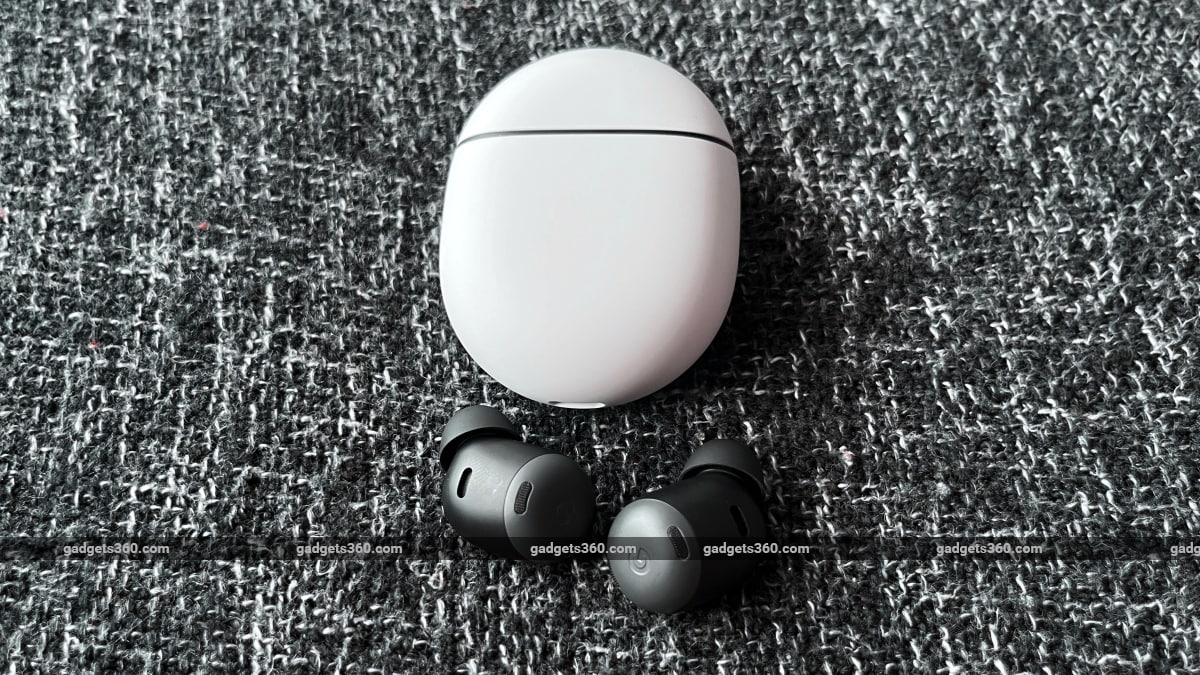
After being made available on other Pixel devices such as smartphones, tablets and nest devices, Google has finally brought Google Assistant Quick Phrases feature to its Pixel Buds Pro. Launched more than a year ago, the Pixel Buds Pro was already quite smart thanks to several built-in Google features, like Translate and more. Quick Phrases, which is another Google Assistant feature, now makes it easier to use your phone without the need to say “Hey Google” before your voice command.

What are Quick Phrases?

Quick Phrases are an easier way to use voice commands. Users can simply say the command, instead of using the wake-up phrase (or hotword) like “Hey Google” before speaking out the command/task for Google Assistant. The feature has been available on Google’s Pixel devices since the Pixel 6 series and has only been made available on the Pixel Buds Pro (officially) today.

While the feature sounds exciting, it is mainly used to complete a task rather than starting it. On Pixel devices, users can simply say “accept” or “decline” to deal with an incoming call. Alarms can be snoozed as well by just saying the word “snooze”. A timer can be stopped by simply saying the word “stop”.

What’s new?

This may sound very convenient and to an extent, they truly are, but it’s still very limited in terms of functionality versus the regular “Hey Google” voice commands which have fewer limitations and are far more in number and versatility. For now, Pixel devices only support a handful of commands which include, answering, declining, and silencing calls, and the ability to snooze and stop alarms and timers. The new Pixel Buds Pro update lets you use the first three quick phrases to control calls without summoning the Google Assistant first.

How do I enable it?

Enabling Quick Phrases on your Pixel Buds Pro is quite easy. Open the Settings app and type out “Quick Phrases”. Once in the section, simply toggle ON the settings to turn on each quick phrase scenario. You can also check out which devices support which quick phrase scenario in the same section.

There are a couple of downsides to activating it. There’s a good chance that an unknown incoming call may be accepted by the phone if you happen to be conversing with someone and happen to use any of the quick phrases in a sentence. There’s also a chance that someone else’s voice (standing near you) may trigger the same. And lastly, if the Google assistant detects a word that sounds very similar to any of the above three quick phrases, then it’ll be triggered. Also users will need to select only one language in Google Assistant Settings and supported languages only include English, French, German, Italian, Japanese, and Spanish for now.


Share. Facebook Twitter Pinterest LinkedIn Tumblr Email
Previous ArticleMarvel’s Spider-Man 2 New Game Plus, Audio Descriptions Delayed To Next Year
Next Article Moms For Liberty Is Tearing Itself Apart

Related Articles

Vivo V60 Launched in India With Snapdragon 7 Gen 4 SoC, 50-Megapixel Telephoto Camera: Price, Features
Phones

Vivo V60 Launched in India With Snapdragon 7 Gen 4 SoC, 50-Megapixel Telephoto Camera: Price, Features

12 August 2025
OnePlus Said to Be Testing Display With 165Hz Refresh Rate; Might Arrive on Midrange Smartphone
Phones

OnePlus Said to Be Testing Display With 165Hz Refresh Rate; Might Arrive on Midrange Smartphone

12 August 2025
Flipkart Independence Day Sale 2025 Begins Tomorrow: Deals on iPhone 16, Samsung Galaxy S24, and More
Phones

Flipkart Independence Day Sale 2025 Begins Tomorrow: Deals on iPhone 16, Samsung Galaxy S24, and More

12 August 2025
Honor X7c 5G Specifications Teased Ahead of India Launch; Will Feature 5,200mAh Battery, Snapdragon 4 Gen 2 SoC
Phones

Honor X7c 5G Specifications Teased Ahead of India Launch; Will Feature 5,200mAh Battery, Snapdragon 4 Gen 2 SoC

12 August 2025
Samsung Galaxy A07 Design, Colour Options, Key Features Leaked; Tipped to Get Six Android OS Upgrades
Phones

Samsung Galaxy A07 Design, Colour Options, Key Features Leaked; Tipped to Get Six Android OS Upgrades

12 August 2025
Realme P4 Series Key Specifications Confirmed Ahead of Launch in India on August 20
Phones

Realme P4 Series Key Specifications Confirmed Ahead of Launch in India on August 20

12 August 2025
Demo
Top Articles
5 laptops to buy instead of the M4 MacBook Pro

5 laptops to buy instead of the M4 MacBook Pro

17 November 2024133 Views
ChatGPT o1 vs. o1-mini vs. 4o: Which should you use?

ChatGPT o1 vs. o1-mini vs. 4o: Which should you use?

15 December 2024112 Views
Costco partners with Electric Era to bring back EV charging in the U.S.

Costco partners with Electric Era to bring back EV charging in the U.S.

28 October 2024100 Views

Subscribe to Updates

Get the latest tech news and updates directly to your inbox.

Latest News
Review: TerraMow V1000 News

Review: TerraMow V1000

News Room16 August 2026
Review: Samsung Galaxy Z Fold8 and Z Fold8 Ultra News

Review: Samsung Galaxy Z Fold8 and Z Fold8 Ultra

News Room16 August 2026
Astronomers Discover the Existence of a Black Hole Star News

Astronomers Discover the Existence of a Black Hole Star

News Room16 August 2026
Most Popular
The Spectacular Burnout of a Solar Panel Salesman

The Spectacular Burnout of a Solar Panel Salesman

13 January 2025137 Views
5 laptops to buy instead of the M4 MacBook Pro

5 laptops to buy instead of the M4 MacBook Pro

17 November 2024133 Views
ChatGPT o1 vs. o1-mini vs. 4o: Which should you use?

ChatGPT o1 vs. o1-mini vs. 4o: Which should you use?

15 December 2024112 Views
Our Picks
I played around with the Pixel 11 Pro Fold. I think Google finally saw the right focus points

I played around with the Pixel 11 Pro Fold. I think Google finally saw the right focus points

16 August 2026
Someone Finally Fixed Installing Apps on a Mac

Someone Finally Fixed Installing Apps on a Mac

16 August 2026
Review: TerraMow V1000

Review: TerraMow V1000

16 August 2026

Subscribe to Updates

Get the latest tech news and updates directly to your inbox.

Facebook X (Twitter) Instagram Pinterest
  • Privacy Policy
  • Terms of use
  • Advertise
  • Contact Us
© 2026 Best in Technology. All Rights Reserved.

Type above and press Enter to search. Press Esc to cancel.