




If you constantly forget where you store important documents, Gemini’s latest update might actually help.
Google will soon roll out a new Gemini feature that remembers item locations as described by you. It arrives alongside four other Android updates arriving this month as the September Android Drop.
So what exactly does this new Gemini feature do?
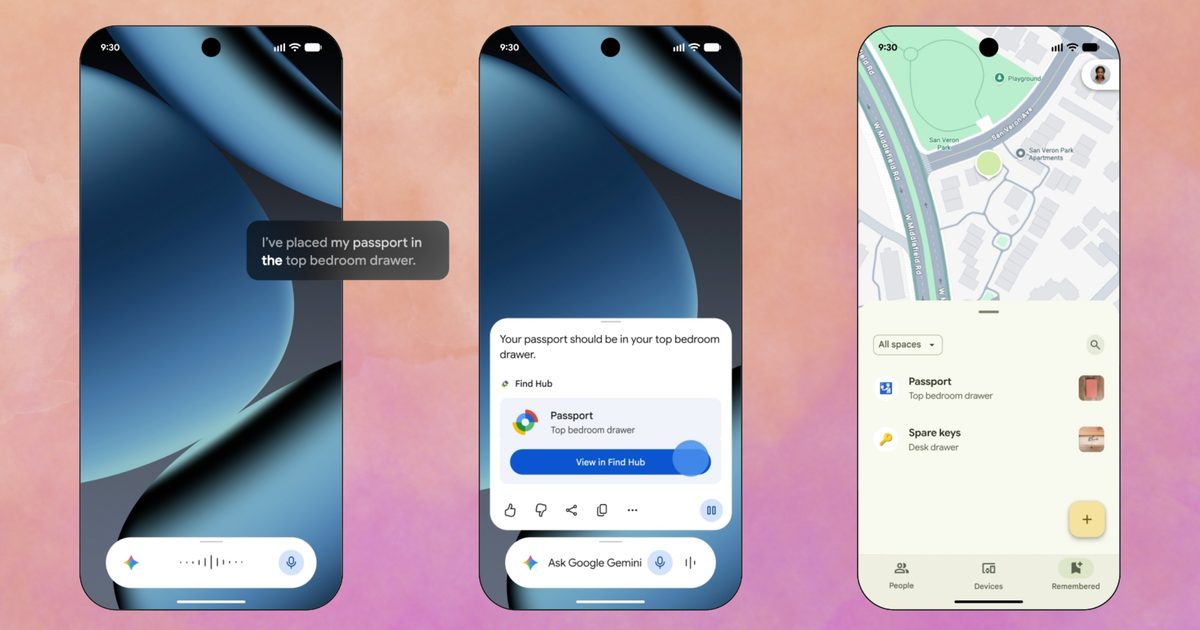
When the feature arrives, you should be able to tell Gemini something like “I put my passport in the bedroom drawer,” toss in a photo, and make it save that location in Find Hub. No accessory required, nothing to pair or charge or change batteries of.
Later, when you’ve forgotten again (and it looks like Google’s counting on it), just ask Gemini where you left it or open Find Hub directly and check the ‘remembered’ items tab. The feature needs Android 16 or newer. Further, it only works in countries where both Gemini and Find Hub are available.
However, it’s worth understanding that this isn’t the same as tracking. Gemini will merely remember what you told it, and that’s it. To be honest, I’ve been doing that in the Notes app on my iPhone, and I don’t really understand why Google wants to know where you keep your important documents.
What else is rolling out this month?
Motion Assist, a feature that targets carsickness from staring at your phone (a stationary object) in a moving vehicle. It overlays small bubbles on your screen that move along to the motion of the ride.
Finally, three relatively smaller but equally important additions will round out the September Drop. The first one, Guided vision, is aimed at blind and low-vision users. It narrates whatever your camera sees during a Gemini Live session, including reading labels or menus aloud.
Google Keep will soon live directly inside a Google Messages thread. This will let a group build a shared list without leaving the conversation. Chat themes let you swap in custom backgrounds and colors per conversation. Both of those last two are already live today, while the others will arrive later this month.


.jpg "Best Amazon Labor Day Deals (2026): Sony, Shark, Anker")