



Close Menu
Best in TechnologyBest in Technology
  • News
  • Phones
  • Laptops
  • Gadgets
  • Gaming
  • AI
  • Tips
  • More
    • Web Stories
    • Global
    • Press Release

Subscribe to Updates

Get the latest tech news and updates directly to your inbox.

What's On
Electronic Arts Has Been Fully Acquired By Trio Of Investor

Electronic Arts Has Been Fully Acquired By Trio Of Investor

5 August 2026
ChatGPT Pro replaced Gemini Notebook as my favorite research app, and I didn’t see it coming

ChatGPT Pro replaced Gemini Notebook as my favorite research app, and I didn’t see it coming

4 August 2026
The Pixel Watch 5 just leaked in full before Google’s August 12 event

The Pixel Watch 5 just leaked in full before Google’s August 12 event

4 August 2026
Facebook X (Twitter) Instagram
Just In
  • Electronic Arts Has Been Fully Acquired By Trio Of Investor
  • ChatGPT Pro replaced Gemini Notebook as my favorite research app, and I didn’t see it coming
  • The Pixel Watch 5 just leaked in full before Google’s August 12 event
  • Samsung takes on Dolby Vision 2 with its new HDR format hitting Prime Video this month
  • T-Mobile’s new financing plan sounds great until you realize what it’s preparing you for
  • Action RPG Crimson Moon Joins Busy September Release Calendar
  • The OnePlus 16 could crank things up with a 200MP camera and a massive battery
  • Mistral Is in the Right Place at the Right Time
Facebook X (Twitter) Instagram Pinterest Vimeo
Best in TechnologyBest in Technology
  • News
  • Phones
  • Laptops
  • Gadgets
  • Gaming
  • AI
  • Tips
  • More
    • Web Stories
    • Global
    • Press Release
Subscribe
Best in TechnologyBest in Technology
Home » ChatGPT Pro replaced Gemini Notebook as my favorite research app, and I didn’t see it coming
News

ChatGPT Pro replaced Gemini Notebook as my favorite research app, and I didn’t see it coming

News RoomBy News Room4 August 20264 Mins Read
Share Facebook Twitter Pinterest LinkedIn Tumblr Reddit Telegram Email
ChatGPT Pro replaced Gemini Notebook as my favorite research app, and I didn’t see it coming
Share
Facebook Twitter LinkedIn Pinterest Email

I’ve been using Gemini Notebook ever since it launched, and for the longest time, it was my go-to app for just about everything. Whether I was researching a topic, organizing work, or studying something new, it became one of those apps I instinctively opened without thinking. When Google kept adding new features, I genuinely believed it had secured a permanent spot in my workflow.

Then, almost without realizing it, ChatGPT Pro took over. I’ve been using its Work mode for a while now, and somewhere along the way, it replaced Gemini Notebook. Of course, it wasn’t an overnight switch. I kept bouncing between the two for weeks, but I gradually found myself reaching for ChatGPT every single time instead. At some point, I realized I hadn’t opened Gemini Notebook in days. Now, I honestly don’t use it at all.

Everything I need, all in one place

Using ChatGPT Work feels surprisingly similar to using Gemini Notebook. I open Work mode and start with an idea. Most of the time, my prompt is as simple as, “Let’s talk about this X topic.” From there, ChatGPT starts building a workspace around that idea. One thing I really like is how everything stays organized. On the right, you’ll see two panels: Outputs and Sources. Sources is exactly what it sounds like — it’s where all the references used for the project live. Personally, I prefer adding my own sources because I still don’t completely trust AI to pick the right ones every time. If ChatGPT does pull in references automatically, I almost always verify them before relying on the information. That’s just how I like to work. If you’re more comfortable letting AI handle the research, though, you absolutely can. It’s flexible enough to support both approaches.

The Outputs panel is where things get really interesting. This is where ChatGPT can turn your research into something tangible, whether that’s a document, a spreadsheet, or even a website. I’ve already built several sites using Work mode, and it’s honestly one of my favorite features. If you’re curious about that workflow, I’ve covered it in more detail here. What I enjoy most, though, is that Work mode isn’t just a place to dump information. Like Gemini Notebook, it becomes a workspace where I can ask follow-up questions, challenge ideas, refine my research, and keep building on everything I’ve collected. Since all my sources remain visible alongside the conversation, it’s easy to add new references, remove outdated ones, or quickly jump back to the original material whenever I need to fact-check something.

Why I never looked back?

At this point, you’re probably thinking that if ChatGPT Work feels so much like Gemini Notebook, why switch at all? I had the same question when I first started using it. The answer is simple: Work mode is only one part of what I’m paying for. Once I’m done researching or studying, I don’t have to jump to another app to get things done. I can schedule reminders, ask ChatGPT to send me a message later, get a briefing of my day every morning, or automate small tasks that I’d normally have to remember myself. It’s actually like an assistant that sticks with me throughout the day.
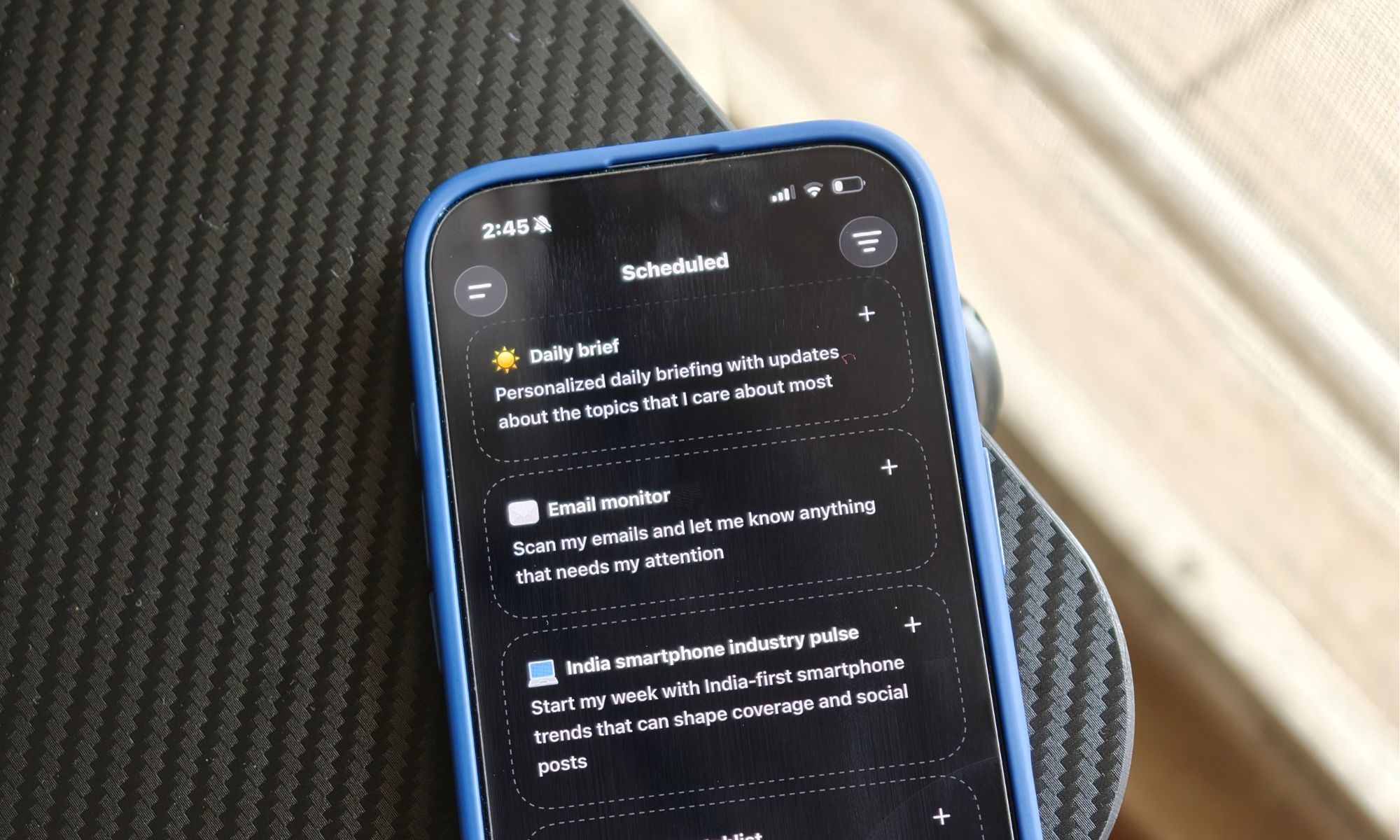
Electronics, Mobile Phone, Phone

Then there’s the new Shopping mode, which has quickly become one of my favorite additions. I recently finished setting up my work desk and needed a comfortable office chair with proper lower back support. Instead of opening half a dozen browser tabs and comparing reviews myself, I simply asked ChatGPT, “Help me find a good work chair with proper lower back support.” Within minutes, it had shortlisted several great options, compared their features, highlighted the pros and cons of each, and made the whole decision much easier. I still made the final choice, of course, but it saved me a surprising amount of time. That’s exactly the kind of AI experience I want — taking care of all the tedious research. And that’s only scratching the surface. The same subscription lets me generate images, create short videos, build websites, write documents, analyze files, and automate countless little tasks that would otherwise eat into my day. Instead of juggling a collection of different AI tools, I now have one place that handles almost everything I need.

Electronics, Mobile Phone, Phone

Gemini Notebook is still an excellent research tool, and I genuinely enjoyed using it. But once ChatGPT Pro became the app I could research, create, automate, and even shop with, I gradually stopped opening Gemini Notebook altogether. That’s when I realized I was replacing an entire workflow. ChatGPT Pro just fit the way I work better from start to finish.
Share. Facebook Twitter Pinterest LinkedIn Tumblr Email
Previous ArticleThe Pixel Watch 5 just leaked in full before Google’s August 12 event
Next Article Electronic Arts Has Been Fully Acquired By Trio Of Investor

Related Articles

The Pixel Watch 5 just leaked in full before Google’s August 12 event
News

The Pixel Watch 5 just leaked in full before Google’s August 12 event

4 August 2026
Samsung takes on Dolby Vision 2 with its new HDR format hitting Prime Video this month
News

Samsung takes on Dolby Vision 2 with its new HDR format hitting Prime Video this month

4 August 2026
T-Mobile’s new financing plan sounds great until you realize what it’s preparing you for
News

T-Mobile’s new financing plan sounds great until you realize what it’s preparing you for

4 August 2026
The OnePlus 16 could crank things up with a 200MP camera and a massive battery
News

The OnePlus 16 could crank things up with a 200MP camera and a massive battery

4 August 2026
Mistral Is in the Right Place at the Right Time
News

Mistral Is in the Right Place at the Right Time

4 August 2026
CMF’s first open-ear earbuds are here with a Smart Dial charging case that lets you control music
News

CMF’s first open-ear earbuds are here with a Smart Dial charging case that lets you control music

4 August 2026
Demo
Top Articles
5 laptops to buy instead of the M4 MacBook Pro

5 laptops to buy instead of the M4 MacBook Pro

17 November 2024133 Views
ChatGPT o1 vs. o1-mini vs. 4o: Which should you use?

ChatGPT o1 vs. o1-mini vs. 4o: Which should you use?

15 December 2024111 Views
Costco partners with Electric Era to bring back EV charging in the U.S.

Costco partners with Electric Era to bring back EV charging in the U.S.

28 October 2024100 Views

Subscribe to Updates

Get the latest tech news and updates directly to your inbox.

Latest News
Action RPG Crimson Moon Joins Busy September Release Calendar Gaming

Action RPG Crimson Moon Joins Busy September Release Calendar

News Room4 August 2026
The OnePlus 16 could crank things up with a 200MP camera and a massive battery News

The OnePlus 16 could crank things up with a 200MP camera and a massive battery

News Room4 August 2026
Mistral Is in the Right Place at the Right Time News

Mistral Is in the Right Place at the Right Time

News Room4 August 2026
Most Popular
The Spectacular Burnout of a Solar Panel Salesman

The Spectacular Burnout of a Solar Panel Salesman

13 January 2025137 Views
5 laptops to buy instead of the M4 MacBook Pro

5 laptops to buy instead of the M4 MacBook Pro

17 November 2024133 Views
ChatGPT o1 vs. o1-mini vs. 4o: Which should you use?

ChatGPT o1 vs. o1-mini vs. 4o: Which should you use?

15 December 2024111 Views
Our Picks
Samsung takes on Dolby Vision 2 with its new HDR format hitting Prime Video this month

Samsung takes on Dolby Vision 2 with its new HDR format hitting Prime Video this month

4 August 2026
T-Mobile’s new financing plan sounds great until you realize what it’s preparing you for

T-Mobile’s new financing plan sounds great until you realize what it’s preparing you for

4 August 2026
Action RPG Crimson Moon Joins Busy September Release Calendar

Action RPG Crimson Moon Joins Busy September Release Calendar

4 August 2026

Subscribe to Updates

Get the latest tech news and updates directly to your inbox.

Facebook X (Twitter) Instagram Pinterest
  • Privacy Policy
  • Terms of use
  • Advertise
  • Contact Us
© 2026 Best in Technology. All Rights Reserved.

Type above and press Enter to search. Press Esc to cancel.