


Close Menu
Best in TechnologyBest in Technology
  • News
  • Phones
  • Laptops
  • Gadgets
  • Gaming
  • AI
  • Tips
  • More
    • Web Stories
    • Global
    • Press Release

Subscribe to Updates

Get the latest tech news and updates directly to your inbox.

What's On
X’s creator payouts are changing, and original content is the new currency

X’s creator payouts are changing, and original content is the new currency

10 August 2026
Apple Reminders sucked for project management until I learned this feature

Apple Reminders sucked for project management until I learned this feature

10 August 2026
I’ve used the Pixel 10 Pro a year. I hope Google fixes these nagging issues on the Pixel 11 Pro

I’ve used the Pixel 10 Pro a year. I hope Google fixes these nagging issues on the Pixel 11 Pro

10 August 2026
Facebook X (Twitter) Instagram
Just In
  • X’s creator payouts are changing, and original content is the new currency
  • Apple Reminders sucked for project management until I learned this feature
  • I’ve used the Pixel 10 Pro a year. I hope Google fixes these nagging issues on the Pixel 11 Pro
  • MIT researchers found a new Spectre attack that can slip past Intel and AMD defenses
  • The $1,500 flagship might be closer than you think
  • Apple going circular could make the Watch better at being a watch
  • Intel Arc G3 Extreme Tested: Intel has finally arrived in handheld gaming
  • Logitech’s PRO X2 SUPERSTRIKE HITS differently — and it made me rethink clicking
Facebook X (Twitter) Instagram Pinterest Vimeo
Best in TechnologyBest in Technology
  • News
  • Phones
  • Laptops
  • Gadgets
  • Gaming
  • AI
  • Tips
  • More
    • Web Stories
    • Global
    • Press Release
Subscribe
Best in TechnologyBest in Technology
Home » Apple Reminders sucked for project management until I learned this feature
News

Apple Reminders sucked for project management until I learned this feature

News RoomBy News Room10 August 20265 Mins Read
Share Facebook Twitter Pinterest LinkedIn Tumblr Reddit Telegram Email
Apple Reminders sucked for project management until I learned this feature
Share
Facebook Twitter LinkedIn Pinterest Email

For the longest time, I used Apple Reminders only for capturing quick tasks. Thanks to its Siri integration, Reminders let me add tasks quickly so nothing would fall through the cracks. However, when it came to managing big projects, I always moved to a more powerful task manager like OmniFocus or Things 3. 

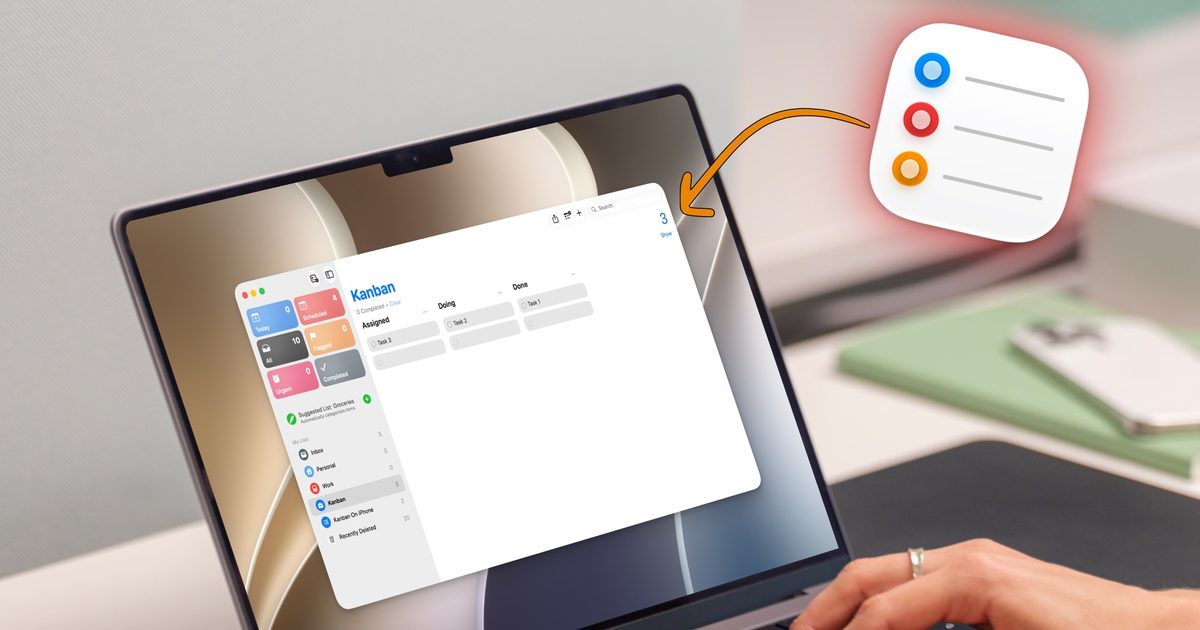
That changed the day I stumbled onto the Column view. Apple added this feature with the iOS 17 and macOS Sonoma updates, and somehow I completely missed it. But once I discovered and got the hang of it, Reminders finally started to feel like a real project management tool instead of a glorified sticky note.

So what is a Kanban board?

If you have never used one, a Kanban board is a visual way to track how your work is moving along. Instead of one long list, you get columns that represent different stages of a task, and cards that move across those columns as the work progresses.

A simple setup might consist of only three columns: Assigned, Doing, and Done. You start a task in Assigned, drag it to Doing when you start working, and slide it into Done when you finish the task. 

This helps you keep a visual track of all your tasks and makes managing projects so much easier than following a single daunting task list. I will show you how you can also set it up to manage your projects using Apple Reminders. 

The trick is hiding inside sections

Reminders does not call this feature Kanban in the app, which is probably why so many people, including me, might miss it. The magic comes from combining two features Apple added with iOS 17: Sections and the Columns view. Sections let you break a single list into labeled groups, and the Columns view turns those groups into a board you can actually work with.

Setting up a Kanban board on Mac

While this feature works on iPhone, iPad, and Mac, it really shines on the iPad and the Mac, as you get more space for the board. So, let’s start with setting up the Kanban board on the Mac.

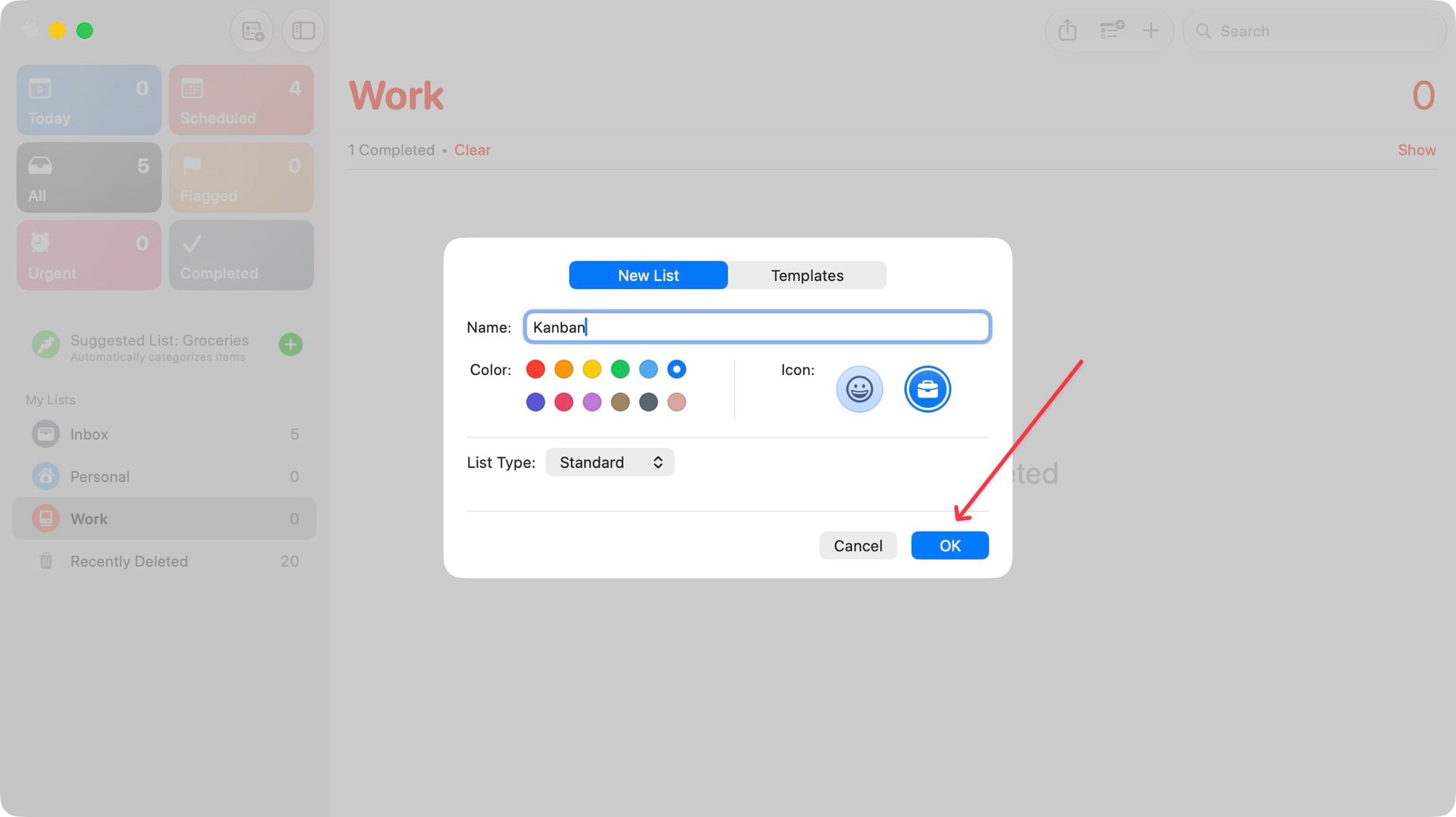
Launch Reminders and go to File → New List or hit the keyboard shortcut ⌘⇧N to create a new board. Enter a name, assign an icon, and tap the Okay button to create it. 
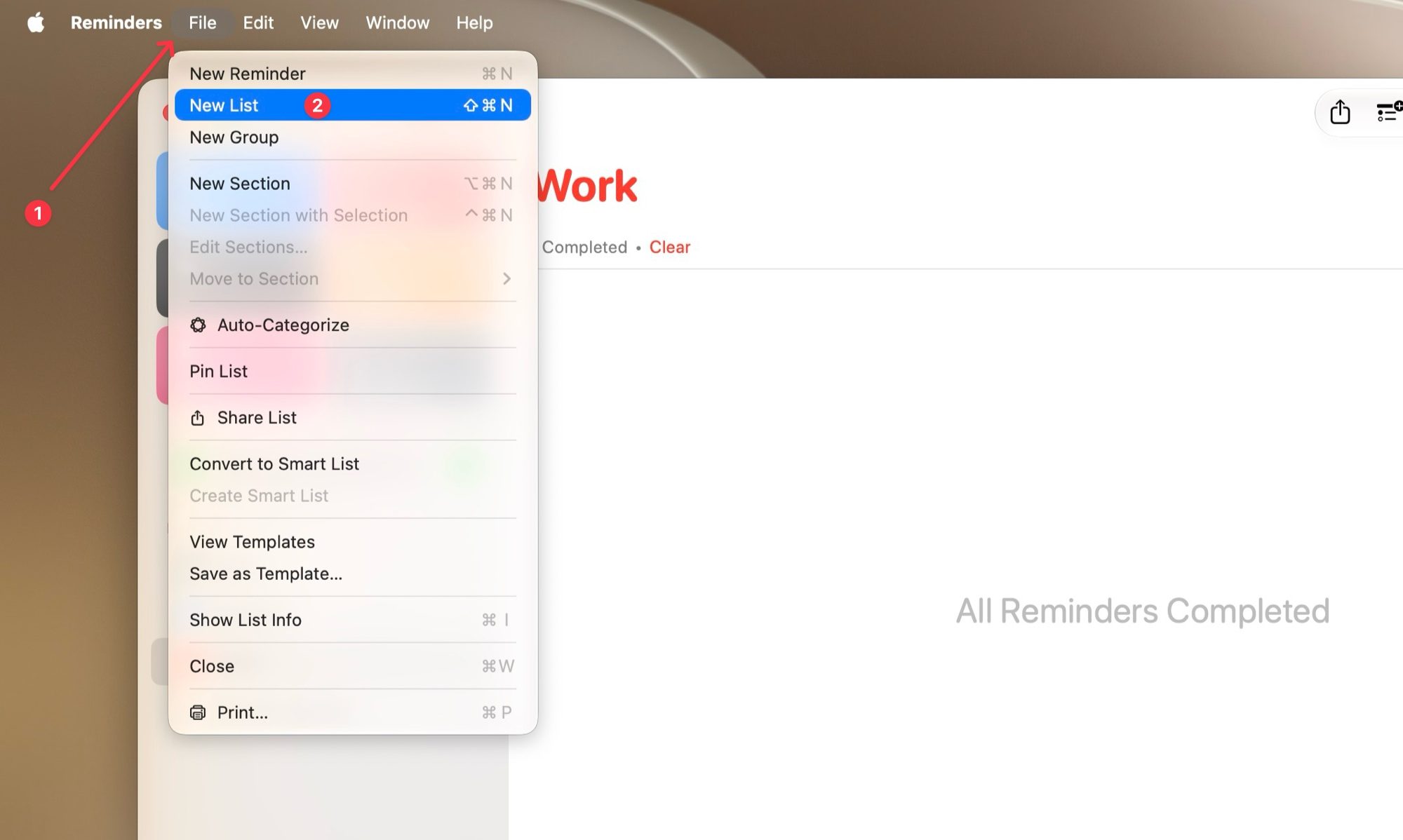
File, Page, Text
creating a new reminers list

To add a section, you can either use the keyboard shortcut ⌘⌥N or right-click on an empty space inside your list and choose Add Section. Name each section and hit Return to save.
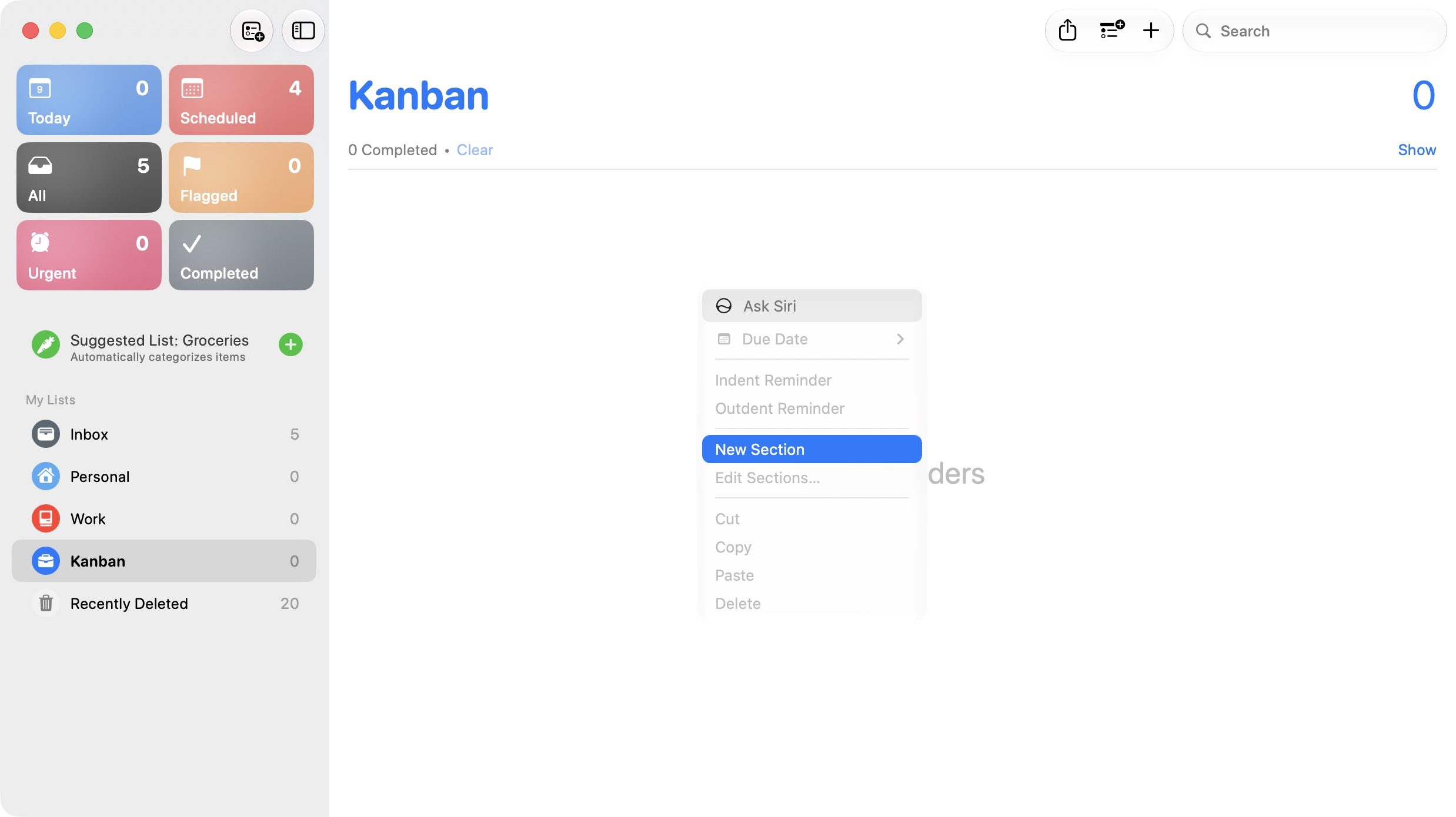
adding sections in reminders

Add your tasks under the right sections, then click the View menu at the top and choose the Columns option.
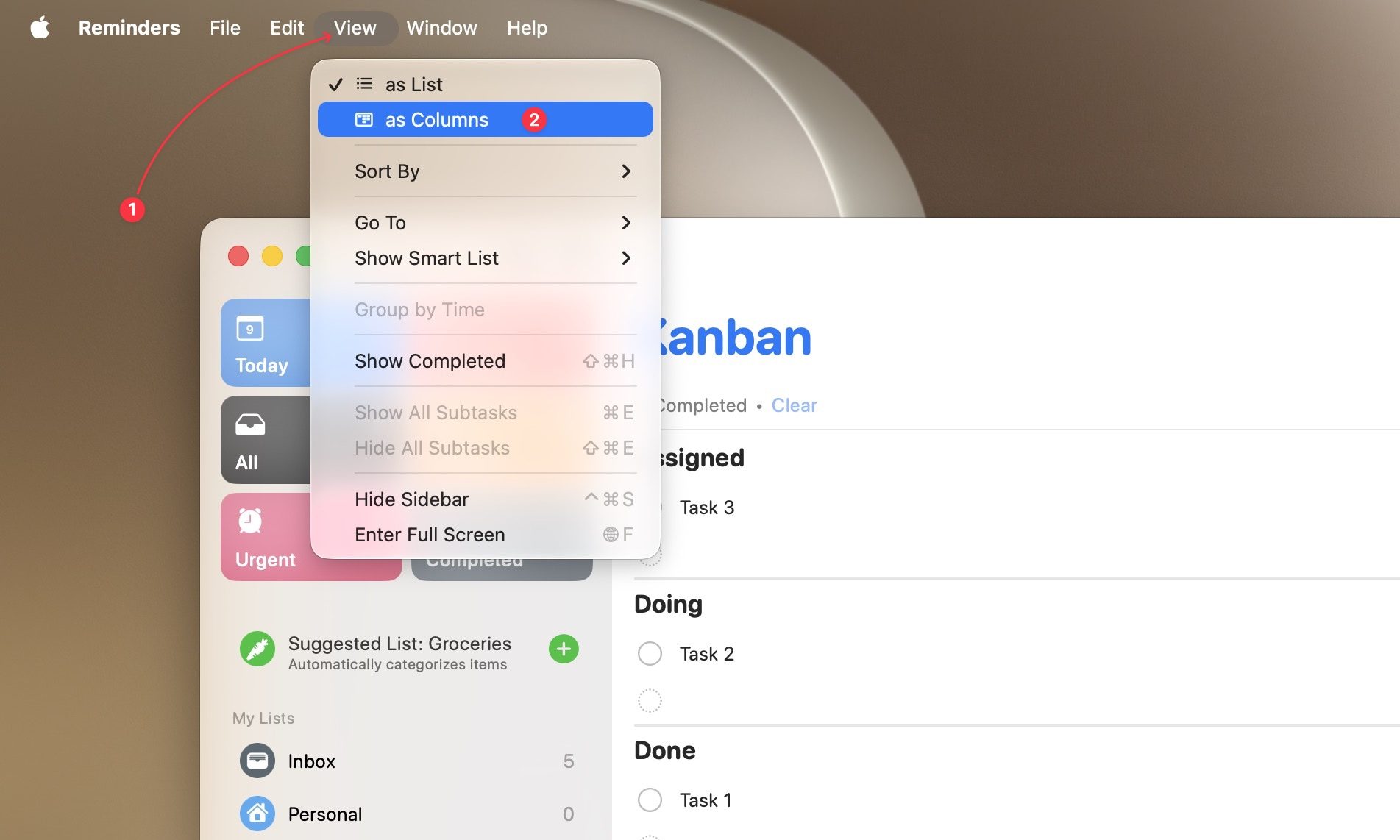
Switching to column view in reminders

Your list flips into a board layout. From there, you can drag cards between columns and click the checkmark to finish tasks.
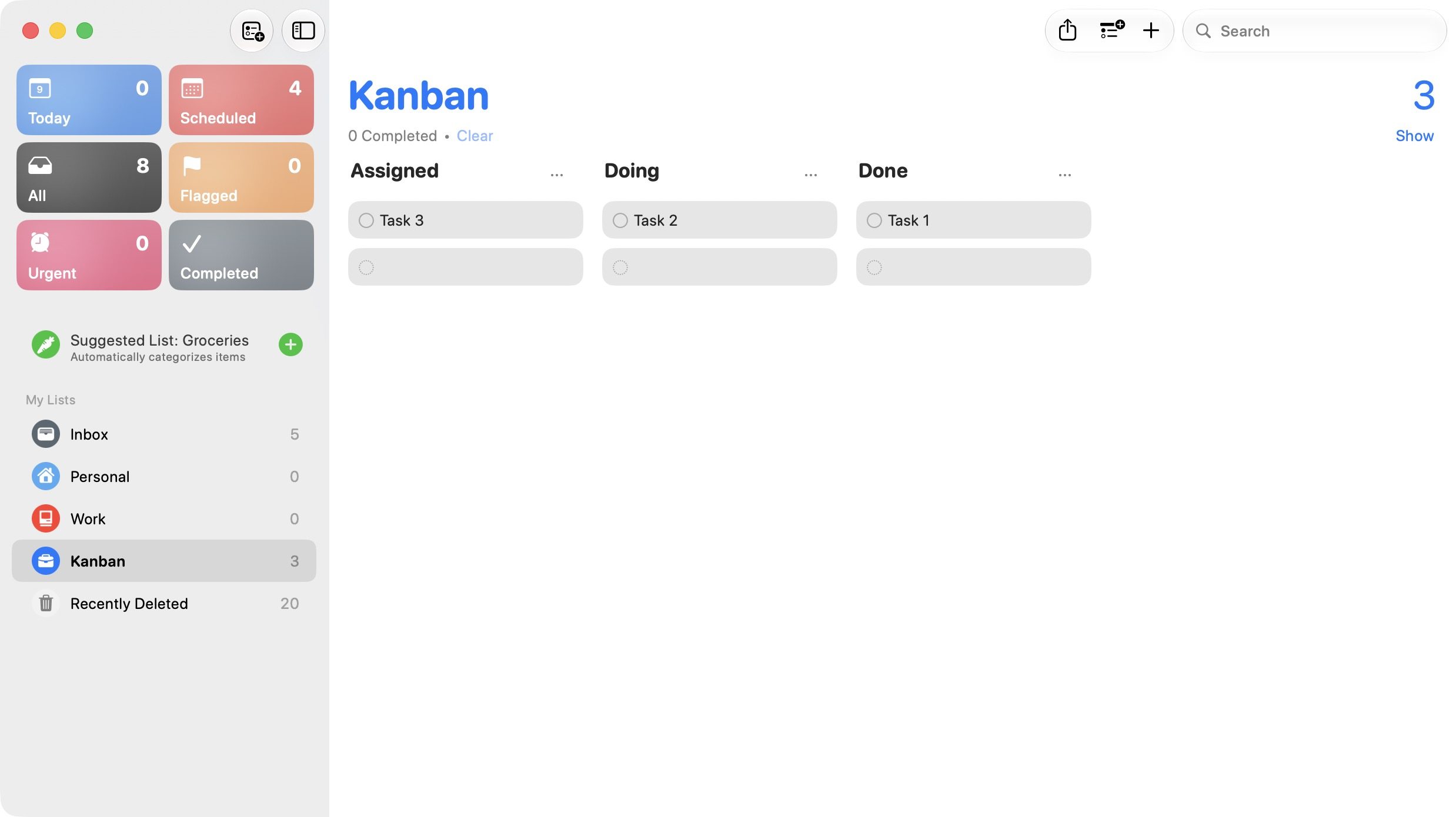
Kanban view in apple reminders

Setting up a Kanban board on iPhone

The good news is you do not have to build this twice. Since Reminders syncs across your devices, any board you create on Mac will appear on your iPhone. But if you would rather start there instead, the process is nearly identical.

Open Reminders and tap the add list button in the top-right, then give it a name and hit the checkmark to save it.
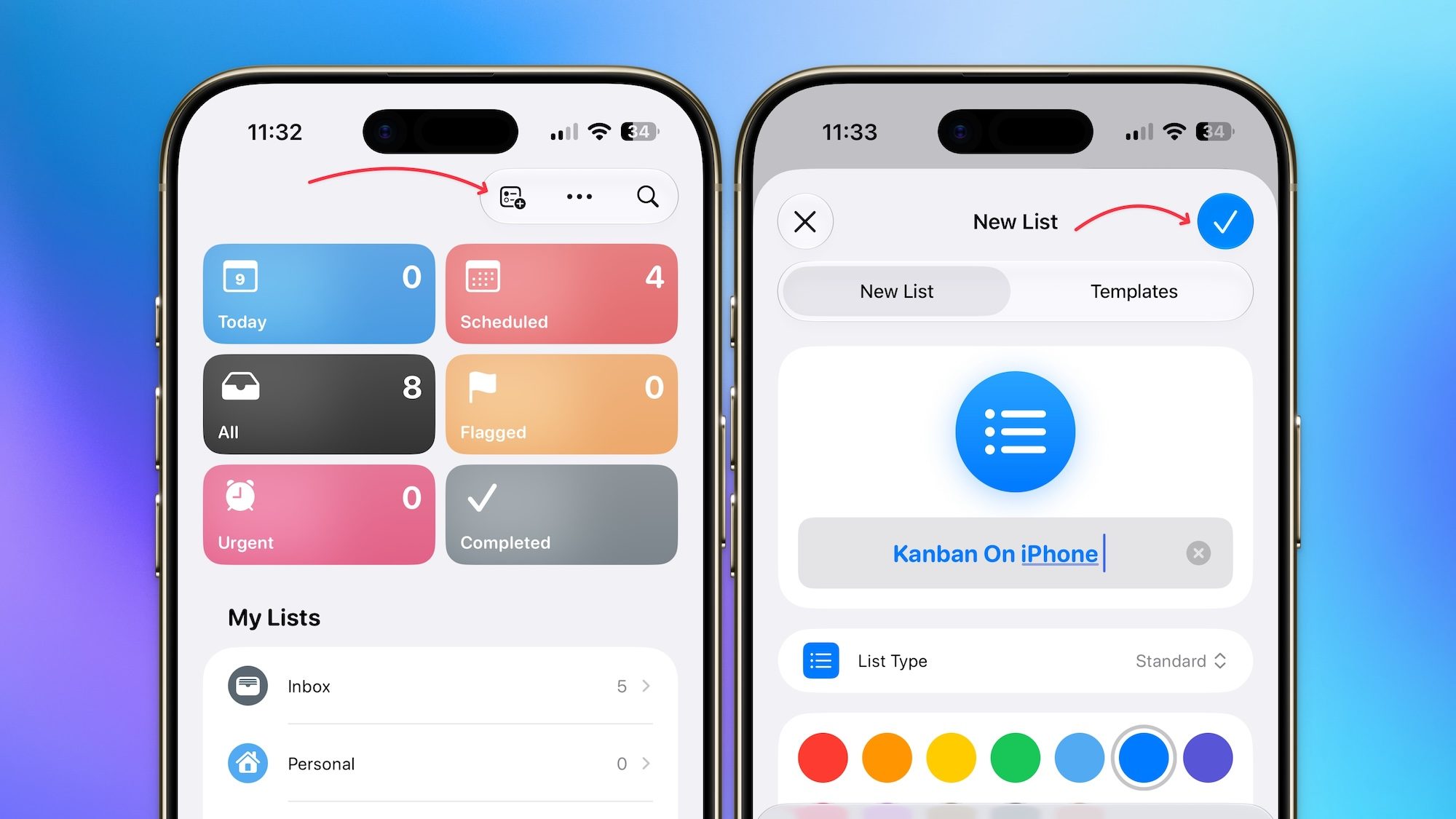
adding a new list on iPhone

Next, tap the three-dot menu inside your new list and use the New Section button to add a section. Similarly, use the New Section button to add as many sections as you want.
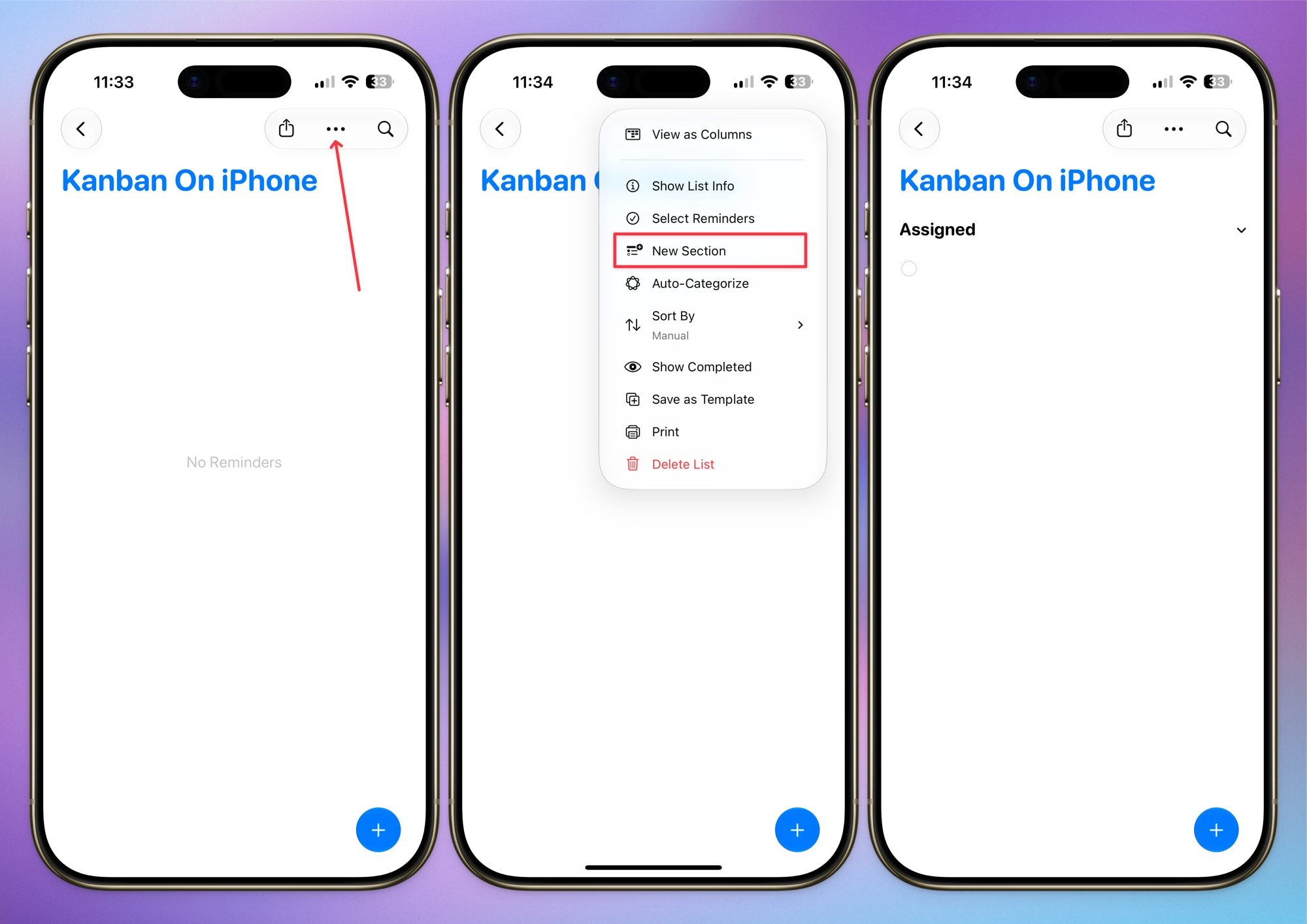
Adding a new section in apple reminders list

Once your sections exist, start adding tasks under the section they belong to. When you are ready to see everything laid out as a board, tap the three-dot menu again and select View as Columns. Just like that, your plain list turns into an actual Kanban board.
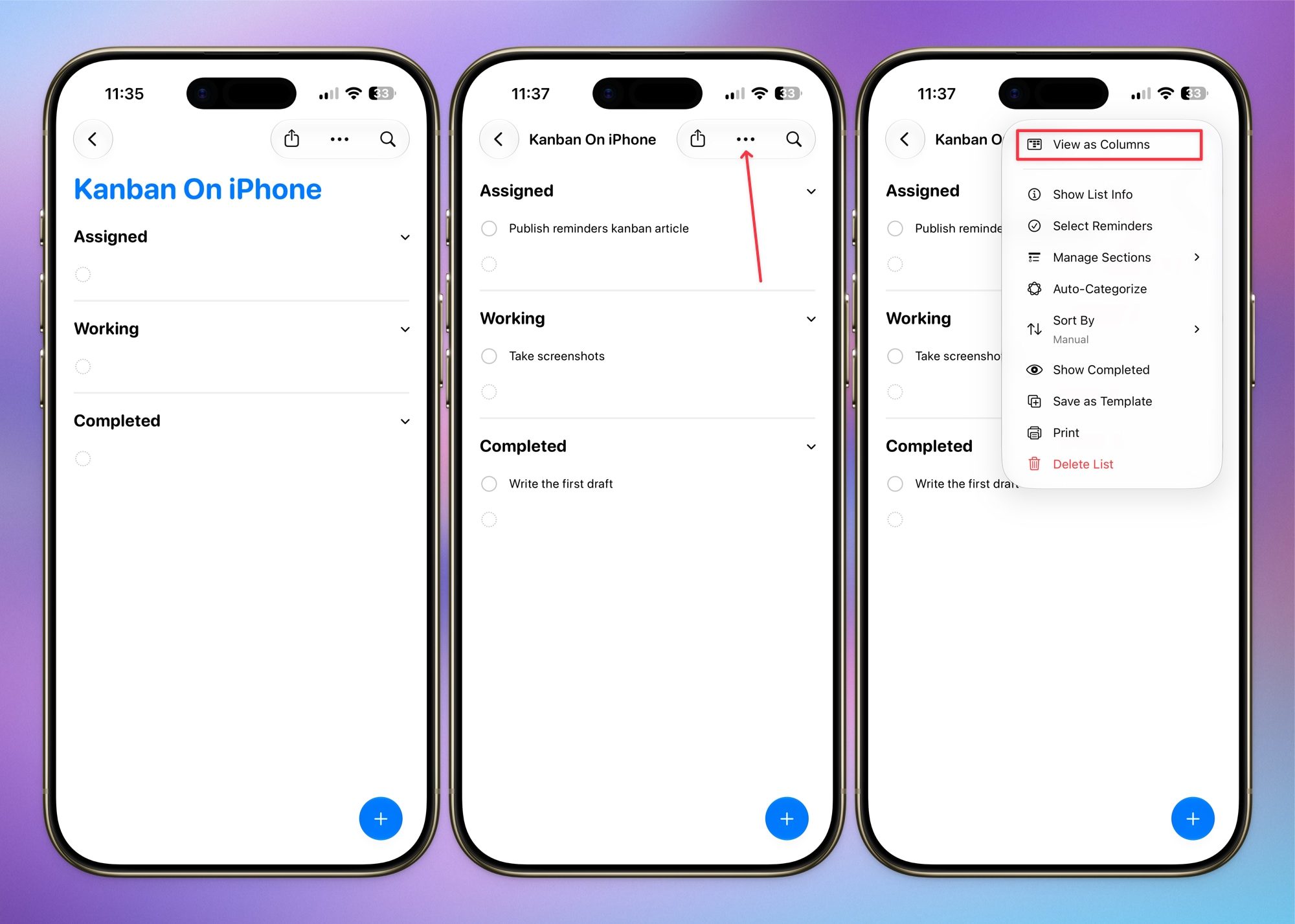
turning into column view

Moving a task is as easy as holding and dragging the card from one column into the next. When something is complete, tap the checkmark circle, and it will disappear from the board.
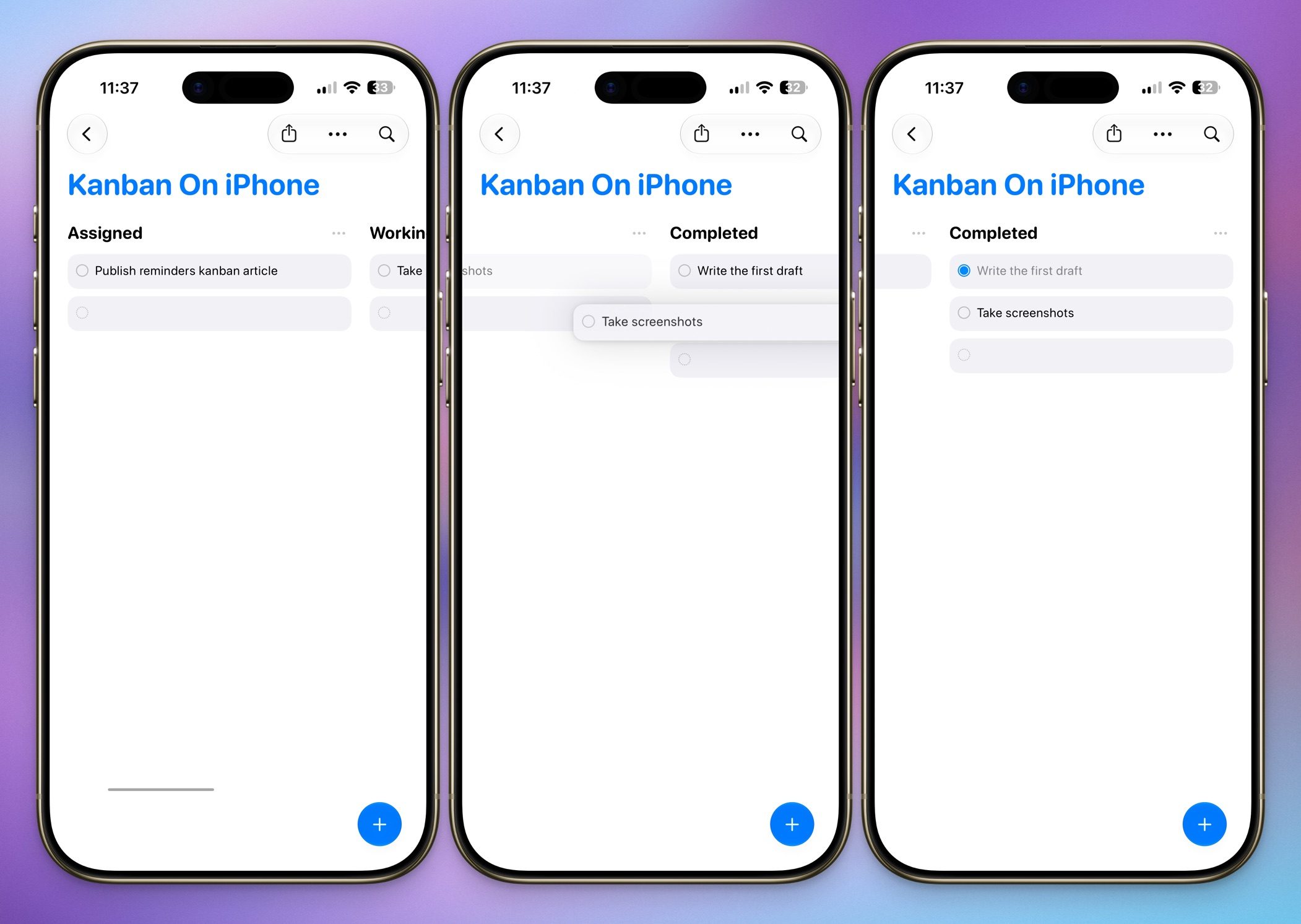
dragging tasks into different columns

A few things worth knowing

Switching to Column view does not take away from what you already use Reminders for. You can still attach due dates, notes, images, and subtasks to any task sitting inside a column, so nothing is lost in the process. 
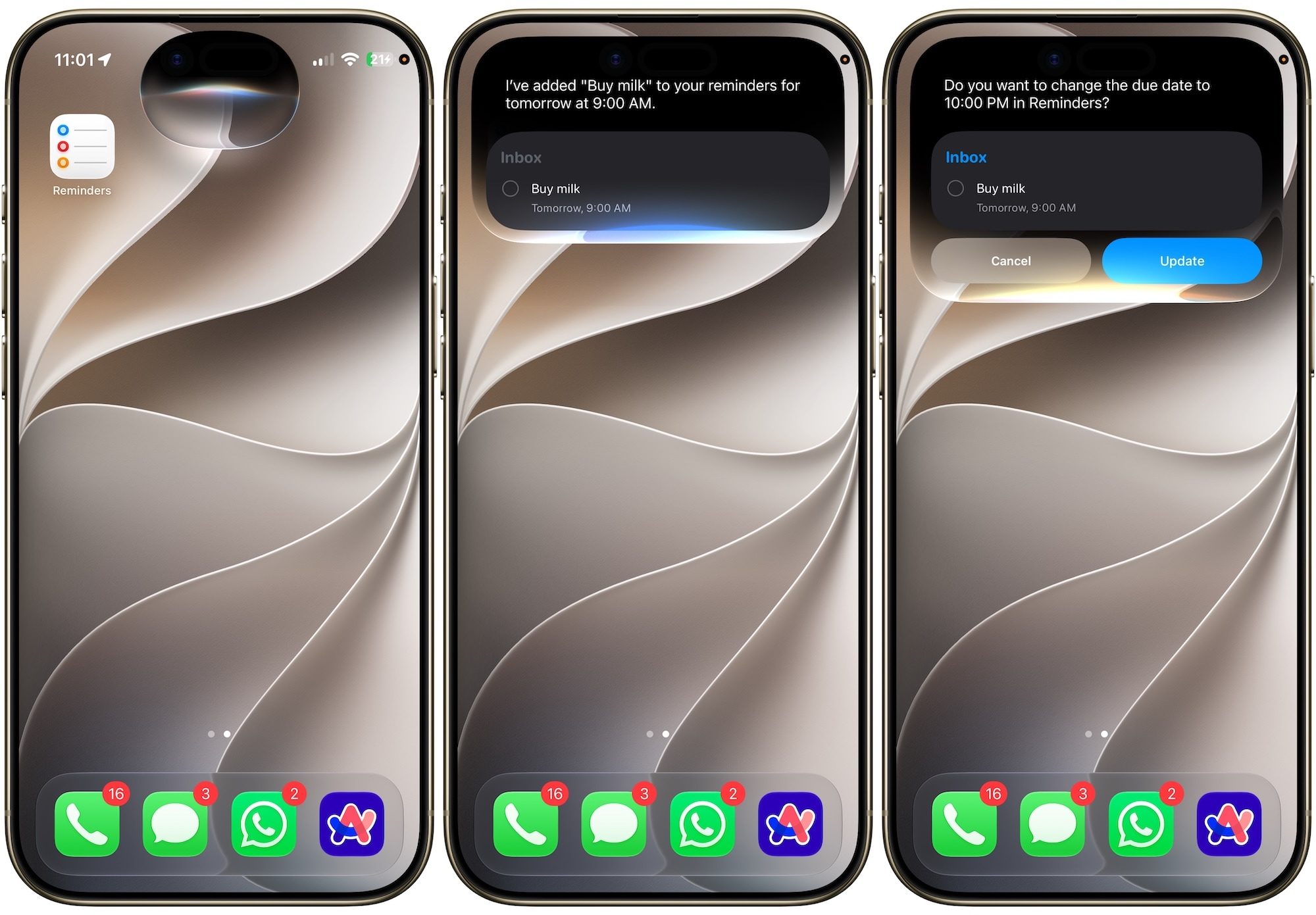
Adding reminders via siri on iPhone

You also do not have to stop at a basic three-column setup. Add as many sections as your workflow actually needs. Mine ended up looking a lot more detailed than Assigned, Doing, and Done.

Why this actually changed how I use Reminders

I run a fairly involved workflow for planning and publishing content, and before this, I was juggling separate apps for regular tasks and projects. Now I set up sections for every stage a task passes through, from idea to research to drafting to editing, and I can watch everything move across the board in one glance.

This is not going to replace a dedicated project management tool if you are running a large team or need heavy automation. But if you want a lightweight way to actually see your workload instead of scrolling through an endless checklist, this hidden Column view gets the job done, and it is already sitting on your phone for free.

If you have not tried it yet, give it a shot. Once you set up your first board, going back to a plain checklist feels almost impossible.
Share. Facebook Twitter Pinterest LinkedIn Tumblr Email
Previous ArticleI’ve used the Pixel 10 Pro a year. I hope Google fixes these nagging issues on the Pixel 11 Pro
Next Article X’s creator payouts are changing, and original content is the new currency

Related Articles

X’s creator payouts are changing, and original content is the new currency
News

X’s creator payouts are changing, and original content is the new currency

10 August 2026
I’ve used the Pixel 10 Pro a year. I hope Google fixes these nagging issues on the Pixel 11 Pro
News

I’ve used the Pixel 10 Pro a year. I hope Google fixes these nagging issues on the Pixel 11 Pro

10 August 2026
MIT researchers found a new Spectre attack that can slip past Intel and AMD defenses
News

MIT researchers found a new Spectre attack that can slip past Intel and AMD defenses

10 August 2026
The ,500 flagship might be closer than you think
News

The $1,500 flagship might be closer than you think

10 August 2026
Apple going circular could make the Watch better at being a watch
News

Apple going circular could make the Watch better at being a watch

10 August 2026
Intel Arc G3 Extreme Tested: Intel has finally arrived in handheld gaming
News

Intel Arc G3 Extreme Tested: Intel has finally arrived in handheld gaming

9 August 2026
Demo
Top Articles
5 laptops to buy instead of the M4 MacBook Pro

5 laptops to buy instead of the M4 MacBook Pro

17 November 2024133 Views
ChatGPT o1 vs. o1-mini vs. 4o: Which should you use?

ChatGPT o1 vs. o1-mini vs. 4o: Which should you use?

15 December 2024112 Views
Costco partners with Electric Era to bring back EV charging in the U.S.

Costco partners with Electric Era to bring back EV charging in the U.S.

28 October 2024100 Views

Subscribe to Updates

Get the latest tech news and updates directly to your inbox.

Latest News
Apple going circular could make the Watch better at being a watch News

Apple going circular could make the Watch better at being a watch

News Room10 August 2026
Intel Arc G3 Extreme Tested: Intel has finally arrived in handheld gaming News

Intel Arc G3 Extreme Tested: Intel has finally arrived in handheld gaming

News Room9 August 2026
Logitech’s PRO X2 SUPERSTRIKE HITS differently — and it made me rethink clicking News

Logitech’s PRO X2 SUPERSTRIKE HITS differently — and it made me rethink clicking

News Room9 August 2026
Most Popular
The Spectacular Burnout of a Solar Panel Salesman

The Spectacular Burnout of a Solar Panel Salesman

13 January 2025137 Views
5 laptops to buy instead of the M4 MacBook Pro

5 laptops to buy instead of the M4 MacBook Pro

17 November 2024133 Views
ChatGPT o1 vs. o1-mini vs. 4o: Which should you use?

ChatGPT o1 vs. o1-mini vs. 4o: Which should you use?

15 December 2024112 Views
Our Picks
MIT researchers found a new Spectre attack that can slip past Intel and AMD defenses

MIT researchers found a new Spectre attack that can slip past Intel and AMD defenses

10 August 2026
The ,500 flagship might be closer than you think

The $1,500 flagship might be closer than you think

10 August 2026
Apple going circular could make the Watch better at being a watch

Apple going circular could make the Watch better at being a watch

10 August 2026

Subscribe to Updates

Get the latest tech news and updates directly to your inbox.

Facebook X (Twitter) Instagram Pinterest
  • Privacy Policy
  • Terms of use
  • Advertise
  • Contact Us
© 2026 Best in Technology. All Rights Reserved.

Type above and press Enter to search. Press Esc to cancel.