

Close Menu
Best in TechnologyBest in Technology
  • News
  • Phones
  • Laptops
  • Gadgets
  • Gaming
  • AI
  • Tips
  • More
    • Web Stories
    • Global
    • Press Release

Subscribe to Updates

Get the latest tech news and updates directly to your inbox.

What's On
OpenAI shrinks GPT-5.4 for speed and lower costs

OpenAI shrinks GPT-5.4 for speed and lower costs

18 March 2026
The 4 Best Monitor Arms

The 4 Best Monitor Arms

18 March 2026
Google Home update soups up Gemini and fixes frustrating papercuts

Google Home update soups up Gemini and fixes frustrating papercuts

18 March 2026
Facebook X (Twitter) Instagram
Just In
  • OpenAI shrinks GPT-5.4 for speed and lower costs
  • The 4 Best Monitor Arms
  • Google Home update soups up Gemini and fixes frustrating papercuts
  • A Quantum Leap for the Turing Award
  • Remember the Nokia Twist and Motorola Flipout? This handheld brings their weirdest trick back
  • People are quitting ChatGPT and Gemini over privacy concerns
  • OnePlus 15T finally gets a launch date, bringing big things in a small package
  • Best Amazon Spring deals on Hisense TVs: Mini-LED and Canvas models at major discounts
Facebook X (Twitter) Instagram Pinterest Vimeo
Best in TechnologyBest in Technology
  • News
  • Phones
  • Laptops
  • Gadgets
  • Gaming
  • AI
  • Tips
  • More
    • Web Stories
    • Global
    • Press Release
Subscribe
Best in TechnologyBest in Technology
Home » Have Android 14? Here’s how to easily customize your lock screen
News

Have Android 14? Here’s how to easily customize your lock screen

News RoomBy News Room25 December 20233 Mins Read
Share Facebook Twitter Pinterest LinkedIn Tumblr Reddit Telegram Email
Have Android 14? Here’s how to easily customize your lock screen
Share
Facebook Twitter LinkedIn Pinterest Email

Smartphone users unlock their phones, on average, an incredible 150 times a day. That means you’re going to see your lock screen an awful lot, so it should absolutely be something you like looking at. Even if you’re only seeing it for a few seconds while you press your finger to the screen or wait for your face to be scanned, those seconds add up, so why not look at something that makes you smile?

It’s quick and easy to make changes to your Android smartphone’s lock screen, and you can change a number of different elements of it — from the background image to the clock style and font. You can even change exactly what shows up on there, so you can keep private information private. Here’s how to customize your lock screen in Android 14.

How to open the lock screen customization menu

Opening your lock screen customization menu is easy, and you don’t need to go much further than your lock screen itself.

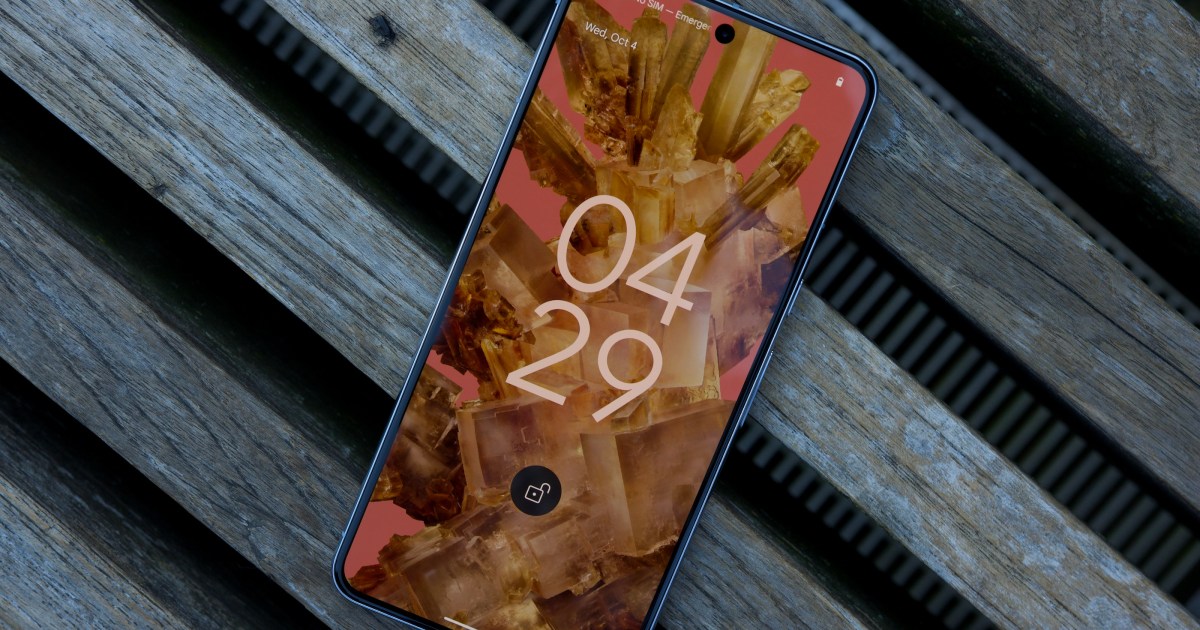
Step 1: Open your phone and long-press on the display. Select Customize lock screen when it appears at the bottom of the screen.
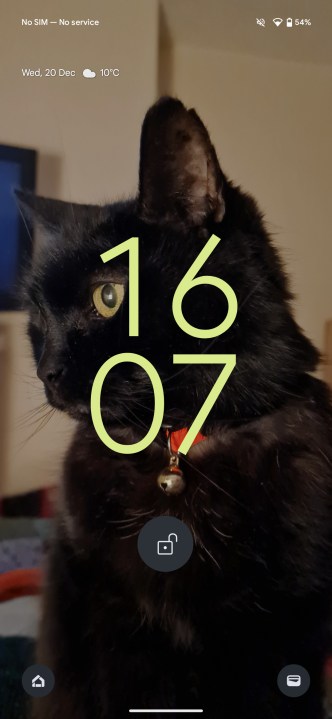
The Android 14 lock screen.

Step 2: If not automatically unlocked through facial recognition, you’ll now need to unlock your phone.
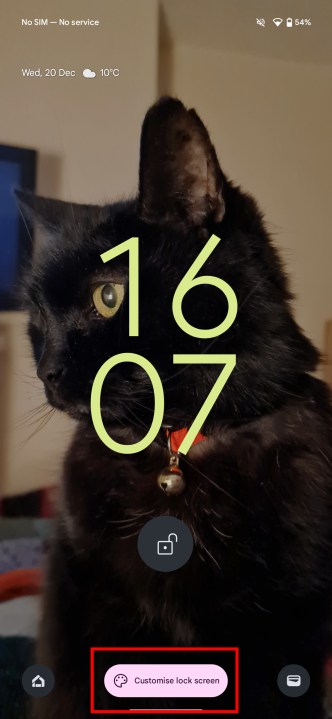
The Android 14 lock screen with the customization option.

Step 3: You’ll find yourself in your customization menu now.
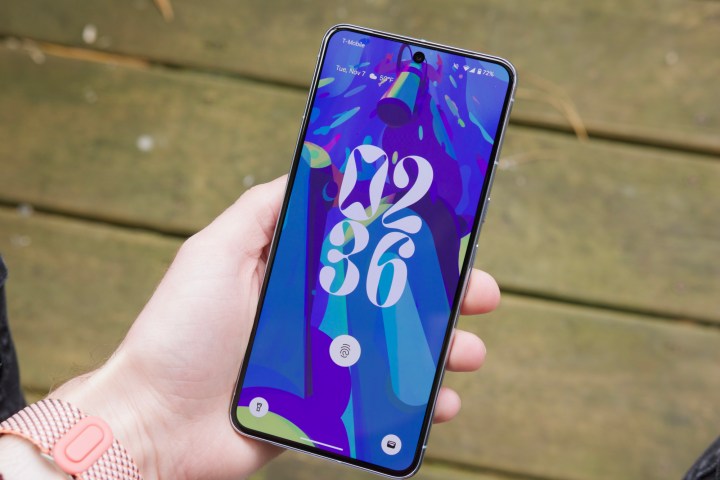
Someone holding the Google Pixel 8 Pro, showing its lock screen.

How to change your lock screen’s wallpaper, clock style, and more

Now you’re in your customization menu, you’ll need to know how to use it to change your lock screen.

We’ll start with the clock options.

Step 1: From the menu, swipe left and right on the small version of your lock screen to swap between clock layouts.
Changing the lock screen clock design in Android 14.

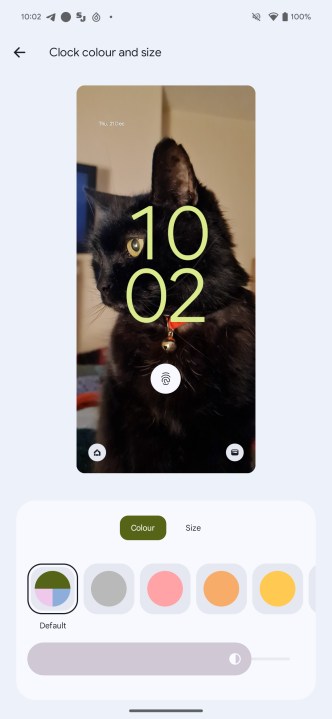
Step 2: Select Clock color and size to change the color and size of your chosen clock face. For the size, you can only pick between Small, which puts the clock in the top-left corner, or Dynamic, which changes the clock size to match your lock screen’s content.

Step 3: You can also change the clock color to match the color theme of your device from the main customization menu.
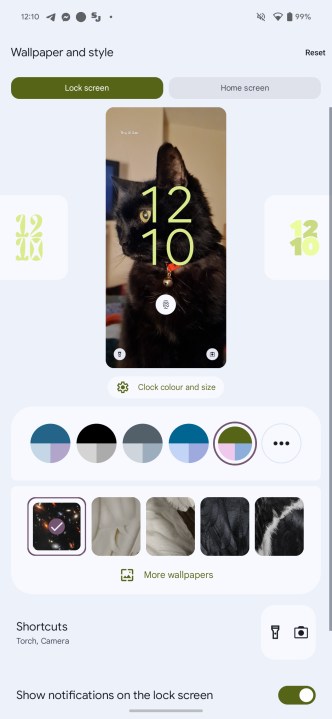
The Android 14 lock screen customization menu.

Step 4: Below this, you can choose a wallpaper. Select More wallpapers to find more options.

Step 5: Now, you can change the two app shortcuts in the bottom corners of your lock screen by choosing Shortcuts. Select Left shortcut and Right shortcut and select the apps or functions you want in both of those areas.
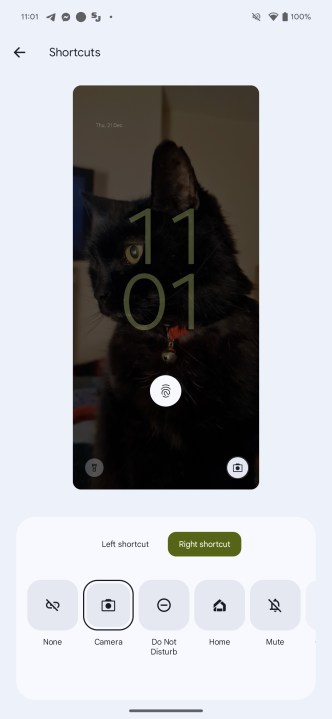
Changing the lock screen shortcuts in Android 14.

Step 6: Show notifications on the lock screen is the box you need to untick if you don’t want any notifications on your lock screen.
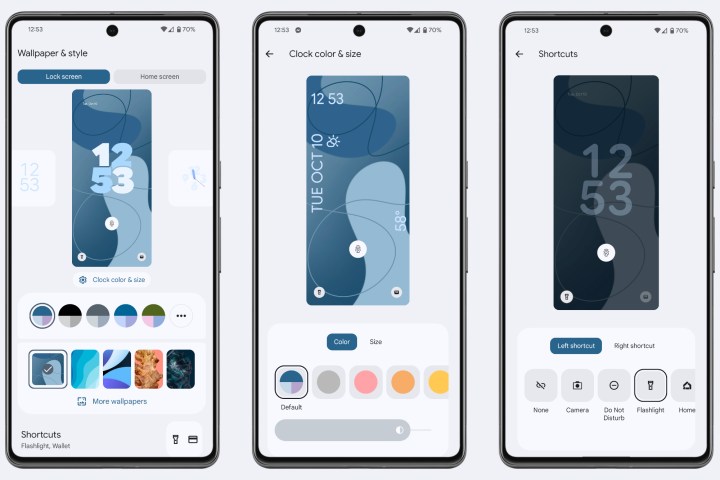
Screenshots of Android 14's lock screen customization options.

How to change even more lock screen options

That’s not all, either. You can go even deeper, changing whether device controls show, whether Now Playing identifies nearby songs, whether the screen wakes up when you get new notifications, and more.

Step 1: To access these options, select More lock screen options.
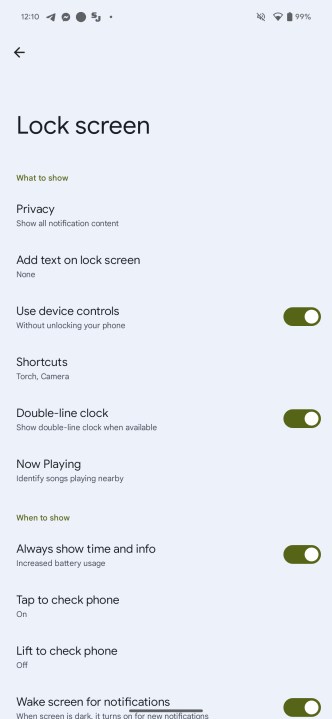
The advanced lock screen options in Android 14.

Step 2: There are too many options here to dive into in any depth, but some interesting options you may want to explore are the Privacy options, which can let you screen out notifications from sensitive apps, and whether you want the lock screen to Always show time and info — as turning this off can help to save battery life.

Editors’ Recommendations


Share. Facebook Twitter Pinterest LinkedIn Tumblr Email
Previous ArticleHow to gameshare on Xbox One
Next Article 5 great Netflix movies to watch after Christmas

Related Articles

OpenAI shrinks GPT-5.4 for speed and lower costs
News

OpenAI shrinks GPT-5.4 for speed and lower costs

18 March 2026
The 4 Best Monitor Arms
News

The 4 Best Monitor Arms

18 March 2026
Google Home update soups up Gemini and fixes frustrating papercuts
News

Google Home update soups up Gemini and fixes frustrating papercuts

18 March 2026
A Quantum Leap for the Turing Award
News

A Quantum Leap for the Turing Award

18 March 2026
Remember the Nokia Twist and Motorola Flipout? This handheld brings their weirdest trick back
News

Remember the Nokia Twist and Motorola Flipout? This handheld brings their weirdest trick back

18 March 2026
People are quitting ChatGPT and Gemini over privacy concerns
News

People are quitting ChatGPT and Gemini over privacy concerns

18 March 2026
Demo
Top Articles
5 laptops to buy instead of the M4 MacBook Pro

5 laptops to buy instead of the M4 MacBook Pro

17 November 2024130 Views
ChatGPT o1 vs. o1-mini vs. 4o: Which should you use?

ChatGPT o1 vs. o1-mini vs. 4o: Which should you use?

15 December 2024111 Views
Costco partners with Electric Era to bring back EV charging in the U.S.

Costco partners with Electric Era to bring back EV charging in the U.S.

28 October 2024100 Views

Subscribe to Updates

Get the latest tech news and updates directly to your inbox.

Latest News
People are quitting ChatGPT and Gemini over privacy concerns News

People are quitting ChatGPT and Gemini over privacy concerns

News Room18 March 2026
OnePlus 15T finally gets a launch date, bringing big things in a small package News

OnePlus 15T finally gets a launch date, bringing big things in a small package

News Room18 March 2026
Best Amazon Spring deals on Hisense TVs: Mini-LED and Canvas models at major discounts News

Best Amazon Spring deals on Hisense TVs: Mini-LED and Canvas models at major discounts

News Room18 March 2026
Most Popular
The Spectacular Burnout of a Solar Panel Salesman

The Spectacular Burnout of a Solar Panel Salesman

13 January 2025137 Views
5 laptops to buy instead of the M4 MacBook Pro

5 laptops to buy instead of the M4 MacBook Pro

17 November 2024130 Views
ChatGPT o1 vs. o1-mini vs. 4o: Which should you use?

ChatGPT o1 vs. o1-mini vs. 4o: Which should you use?

15 December 2024111 Views
Our Picks
A Quantum Leap for the Turing Award

A Quantum Leap for the Turing Award

18 March 2026
Remember the Nokia Twist and Motorola Flipout? This handheld brings their weirdest trick back

Remember the Nokia Twist and Motorola Flipout? This handheld brings their weirdest trick back

18 March 2026
People are quitting ChatGPT and Gemini over privacy concerns

People are quitting ChatGPT and Gemini over privacy concerns

18 March 2026

Subscribe to Updates

Get the latest tech news and updates directly to your inbox.

Facebook X (Twitter) Instagram Pinterest
  • Privacy Policy
  • Terms of use
  • Advertise
  • Contact Us
© 2026 Best in Technology. All Rights Reserved.

Type above and press Enter to search. Press Esc to cancel.