

Close Menu
Best in TechnologyBest in Technology
  • News
  • Phones
  • Laptops
  • Gadgets
  • Gaming
  • AI
  • Tips
  • More
    • Web Stories
    • Global
    • Press Release

Subscribe to Updates

Get the latest tech news and updates directly to your inbox.

What's On
Castlevania: Belmont’s Curse Has ‘No AI,’ Developer Evil Empire Says

Castlevania: Belmont’s Curse Has ‘No AI,’ Developer Evil Empire Says

17 July 2026
Another Apple price hike just landed, this time on Apple One

Another Apple price hike just landed, this time on Apple One

17 July 2026
AWS Billing Glitch Hits Customers With Billion-Dollar Fees

AWS Billing Glitch Hits Customers With Billion-Dollar Fees

17 July 2026
Facebook X (Twitter) Instagram
Just In
  • Castlevania: Belmont’s Curse Has ‘No AI,’ Developer Evil Empire Says
  • Another Apple price hike just landed, this time on Apple One
  • AWS Billing Glitch Hits Customers With Billion-Dollar Fees
  • Dishonored | Replay – Game Informer
  • Apple Music just got pricier
  • What Cities From Chicago to Washington, DC, Look Like Under a Blanket of Wildfire Smoke
  • Magic: The Gathering Unveils Its 2027 In-Universe Sets, Including Underwater Adventure And Giant Robots
  • I found five mechanical keyboards I’d happily recommend for Back-to-School
Facebook X (Twitter) Instagram Pinterest Vimeo
Best in TechnologyBest in Technology
  • News
  • Phones
  • Laptops
  • Gadgets
  • Gaming
  • AI
  • Tips
  • More
    • Web Stories
    • Global
    • Press Release
Subscribe
Best in TechnologyBest in Technology
Home » WhatsApp: how to use bold, italics, and strikethrough in your messages
News

WhatsApp: how to use bold, italics, and strikethrough in your messages

News RoomBy News Room18 May 20244 Mins Read
Share Facebook Twitter Pinterest LinkedIn Tumblr Reddit Telegram Email
WhatsApp: how to use bold, italics, and strikethrough in your messages
Share
Facebook Twitter LinkedIn Pinterest Email

WhatsApp offers many features that traditional SMS or iMessage don’t. Besides free-of-cost messaging or calling services without geographical restrictions, all of its functionality is available across platforms without discrimination based on your operating system or its web client. To highlight parts of any message, you can also use special formatting — a feature that is rare among messaging apps.

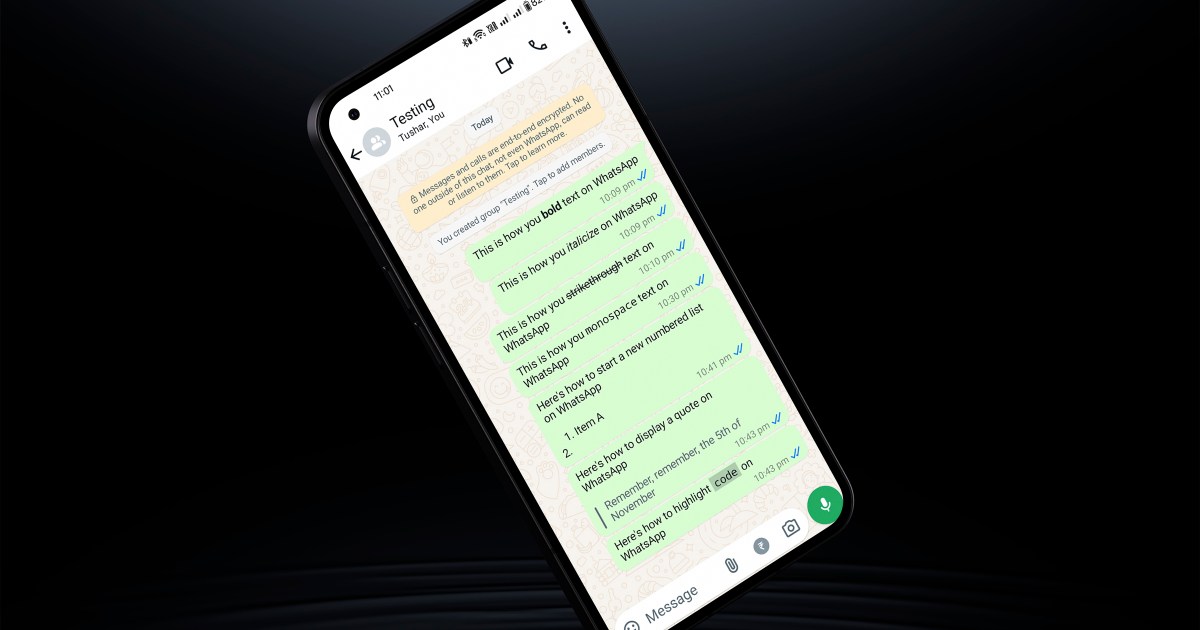
Over the years, WhatsApp has gained extensive markup features, not only to format text, but also to make lists or quote text. The following sections take you through the simple steps to format text on WhatsApp to make your messages more structured and compelling.

How to bold text in WhatsApp using symbols

There are broadly two ways to add formatting to your WhatsApp texts, and the first one involves using simple markup notations similar to word processors such as Microsoft Word or Google Docs. Here is how you can bold, italicize, or strikthrough text messages using symbols.
To bold any part of the text, use asterisks ( * ) before and after that portion.

How to italicize text on WhatsApp.

How to italicize text in WhatsApp using symbols

You can italicize text by using underscore ( _ ) symbols on both sides of the text.

How to strikethrough text on WhatsApp.

How to strikethrough text in WhatsApp using symbols

To strikethrough a part of your text, add the text between two squiggly dashes, aka tilde ( ~ ), symbols.

How to monospace on WhatsApp.

How to monospace text in WhatsApp using symbols

To change your entire — or part of the — message to a monospace font* place the desired portion between three backticks ( “` ). Note, this symbol is different from the standard apostrophe, which is either straight, curly, or forward-leaning.

How to format text in WhatsApp using quick toggles

Besides the standard markup options to bold, italicize, strikethrough, or monospace text on WhatsApp, you can use another method as discussed below.

Step 1: While typing the message, tap and hold to select the portion you want to format.

Step 2: When you lift your thumb from the screen, a menu will pop-up. Here you can tap the bold or italicize options to change the text accordingly. On desktop, you can also use keyboard shortcuts like Ctrl + B (or Command + B) to format text directly.
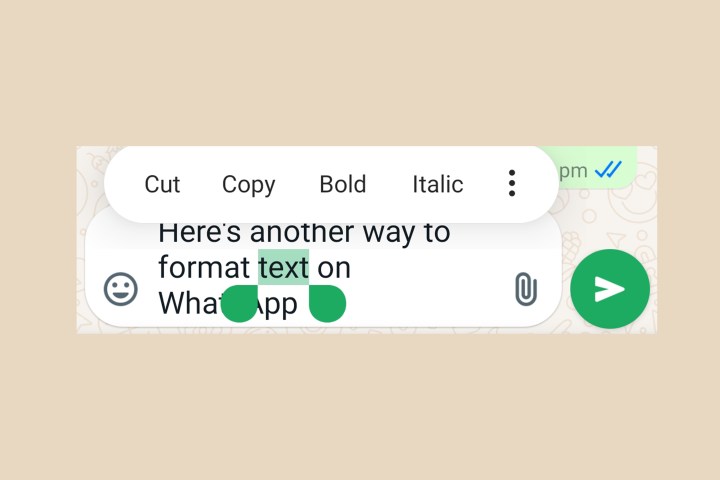
How to format text on WhatsApp.

Step 3: Tap the three-dot button to access other options such as strikethrough and monospace.
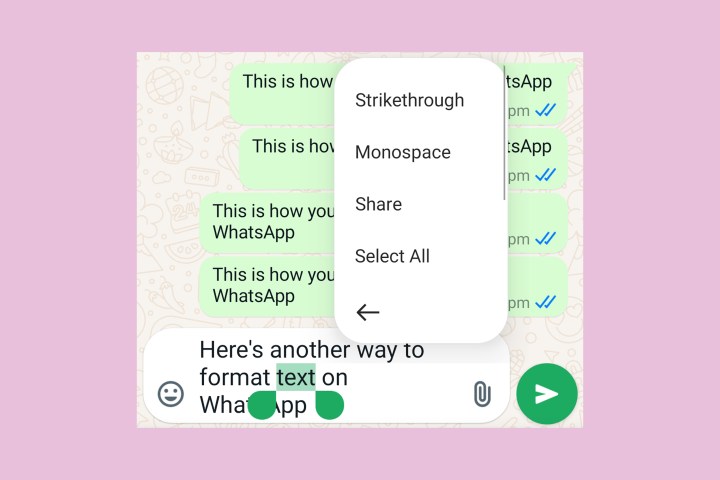
How to format text on WhatsApp.

How to add a list or use advanced markup in WhatsApp messages

Besides standard formatting features, WhatsApp recently added the option to create numbered or bulleted lists within messages using markup text similar to the first method we discussed above. In addition, you can use advanced formatting options such as indent and code view on WhatsApp with the simple steps listed below.

Step 1: To start a bulleted list, start a new line with an asterisk ( * ) or a dash ( – ).
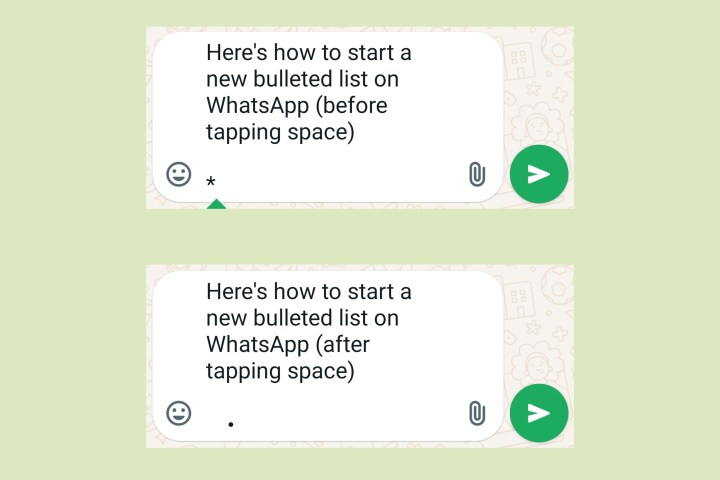
How to add a bullet list on WhatsApp.

Step 2: For a numbered list, simply start a new line with a number and period followed by a space — similar to a Word document. For instance, start a new numbered list with “1. “. Now when you tap/press Enter to start a new line, there will be an automatic increment in the number.

If you just want to type these characters without converting it to a list, simply press backspace and WhatsApp will change it back to normal text.

How to add a numbered list on WhatsApp

Step 3: To display text as a quote, add a greater-than symbol ( > ) at the beginning of a new line with the desired text succeeding it.
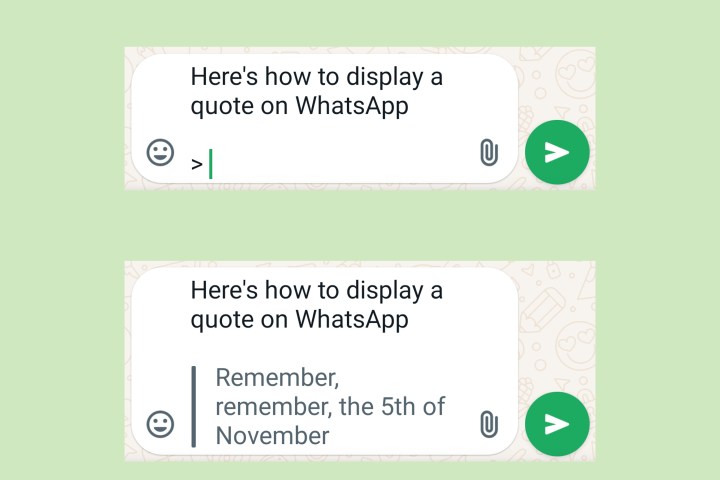
How to quote text on WhatsApp.

Step 4: Lastly, to highlight any special text as code, simply enclose the text between single backticks ( ` ) on either side.
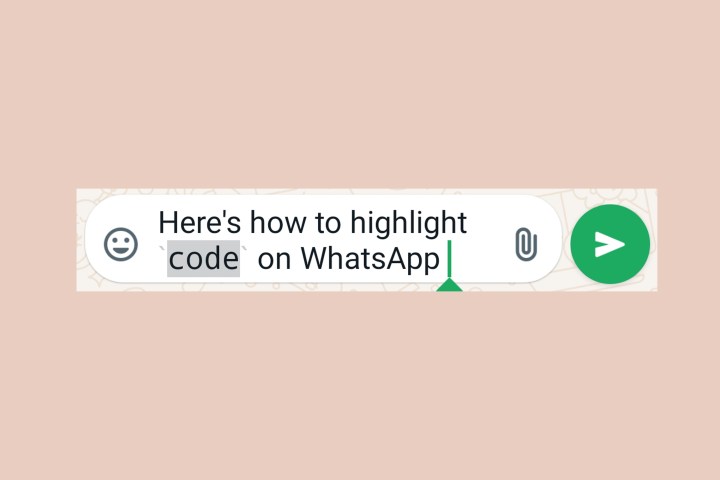
How to display code on WhatsApp.

With these simple steps, you can easily organize the flow of information in your messages. Whether you’re sending an important work message or simply making a list for an upcoming trip, these formatting options can be very useful. Even better is the fact that they appear consistently on all platforms — whether you are using WhatsApp on mobile, on the desktop, or with web app.

Editors’ Recommendations



Share. Facebook Twitter Pinterest LinkedIn Tumblr Email
Previous ArticleThe best survival games
Next Article GTA 6: release date window, trailer, gameplay, and more

Related Articles

Another Apple price hike just landed, this time on Apple One
News

Another Apple price hike just landed, this time on Apple One

17 July 2026
AWS Billing Glitch Hits Customers With Billion-Dollar Fees
News

AWS Billing Glitch Hits Customers With Billion-Dollar Fees

17 July 2026
Apple Music just got pricier
News

Apple Music just got pricier

17 July 2026
What Cities From Chicago to Washington, DC, Look Like Under a Blanket of Wildfire Smoke
News

What Cities From Chicago to Washington, DC, Look Like Under a Blanket of Wildfire Smoke

17 July 2026
I found five mechanical keyboards I’d happily recommend for Back-to-School
News

I found five mechanical keyboards I’d happily recommend for Back-to-School

17 July 2026
ICE Is Using Data Broker Tools to ‘Identify Unaccompanied Minors’ and ‘Fraud’
News

ICE Is Using Data Broker Tools to ‘Identify Unaccompanied Minors’ and ‘Fraud’

17 July 2026
Demo
Top Articles
5 laptops to buy instead of the M4 MacBook Pro

5 laptops to buy instead of the M4 MacBook Pro

17 November 2024133 Views
ChatGPT o1 vs. o1-mini vs. 4o: Which should you use?

ChatGPT o1 vs. o1-mini vs. 4o: Which should you use?

15 December 2024111 Views
Costco partners with Electric Era to bring back EV charging in the U.S.

Costco partners with Electric Era to bring back EV charging in the U.S.

28 October 2024100 Views

Subscribe to Updates

Get the latest tech news and updates directly to your inbox.

Latest News
What Cities From Chicago to Washington, DC, Look Like Under a Blanket of Wildfire Smoke News

What Cities From Chicago to Washington, DC, Look Like Under a Blanket of Wildfire Smoke

News Room17 July 2026
Magic: The Gathering Unveils Its 2027 In-Universe Sets, Including Underwater Adventure And Giant Robots Gaming

Magic: The Gathering Unveils Its 2027 In-Universe Sets, Including Underwater Adventure And Giant Robots

News Room17 July 2026
I found five mechanical keyboards I’d happily recommend for Back-to-School News

I found five mechanical keyboards I’d happily recommend for Back-to-School

News Room17 July 2026
Most Popular
The Spectacular Burnout of a Solar Panel Salesman

The Spectacular Burnout of a Solar Panel Salesman

13 January 2025137 Views
5 laptops to buy instead of the M4 MacBook Pro

5 laptops to buy instead of the M4 MacBook Pro

17 November 2024133 Views
ChatGPT o1 vs. o1-mini vs. 4o: Which should you use?

ChatGPT o1 vs. o1-mini vs. 4o: Which should you use?

15 December 2024111 Views
Our Picks
Dishonored | Replay – Game Informer

Dishonored | Replay – Game Informer

17 July 2026
Apple Music just got pricier

Apple Music just got pricier

17 July 2026
What Cities From Chicago to Washington, DC, Look Like Under a Blanket of Wildfire Smoke

What Cities From Chicago to Washington, DC, Look Like Under a Blanket of Wildfire Smoke

17 July 2026

Subscribe to Updates

Get the latest tech news and updates directly to your inbox.

Facebook X (Twitter) Instagram Pinterest
  • Privacy Policy
  • Terms of use
  • Advertise
  • Contact Us
© 2026 Best in Technology. All Rights Reserved.

Type above and press Enter to search. Press Esc to cancel.