

Close Menu
Best in TechnologyBest in Technology
  • News
  • Phones
  • Laptops
  • Gadgets
  • Gaming
  • AI
  • Tips
  • More
    • Web Stories
    • Global
    • Press Release

Subscribe to Updates

Get the latest tech news and updates directly to your inbox.

What's On
Hostinger Promo Code: 79% Off for July 2026

Hostinger Promo Code: 79% Off for July 2026

14 July 2026
This website is a goldmine if you love Mac menu bar apps

This website is a goldmine if you love Mac menu bar apps

14 July 2026
OnePlus is ending its US operations pretty soon, says report

OnePlus is ending its US operations pretty soon, says report

14 July 2026
Facebook X (Twitter) Instagram
Just In
  • Hostinger Promo Code: 79% Off for July 2026
  • This website is a goldmine if you love Mac menu bar apps
  • OnePlus is ending its US operations pretty soon, says report
  • Microsoft is finally fixing the worst thing about Windows Search, but you can’t try it just yet
  • How to install iOS 27 public beta on your iPhone?
  • Google Home Speaker (2026) review: Smarter and punchier, with a subscription pinch
  • Siri AI Is Becoming Apple’s Everything Tool
  • How to install macOS 27 Golden Gate public beta on your Mac?
Facebook X (Twitter) Instagram Pinterest Vimeo
Best in TechnologyBest in Technology
  • News
  • Phones
  • Laptops
  • Gadgets
  • Gaming
  • AI
  • Tips
  • More
    • Web Stories
    • Global
    • Press Release
Subscribe
Best in TechnologyBest in Technology
Home » Review: Work Louder Creator Board
News

Review: Work Louder Creator Board

News RoomBy News Room17 December 20233 Mins Read
Share Facebook Twitter Pinterest LinkedIn Tumblr Reddit Telegram Email
Review: Work Louder Creator Board
Share
Facebook Twitter LinkedIn Pinterest Email

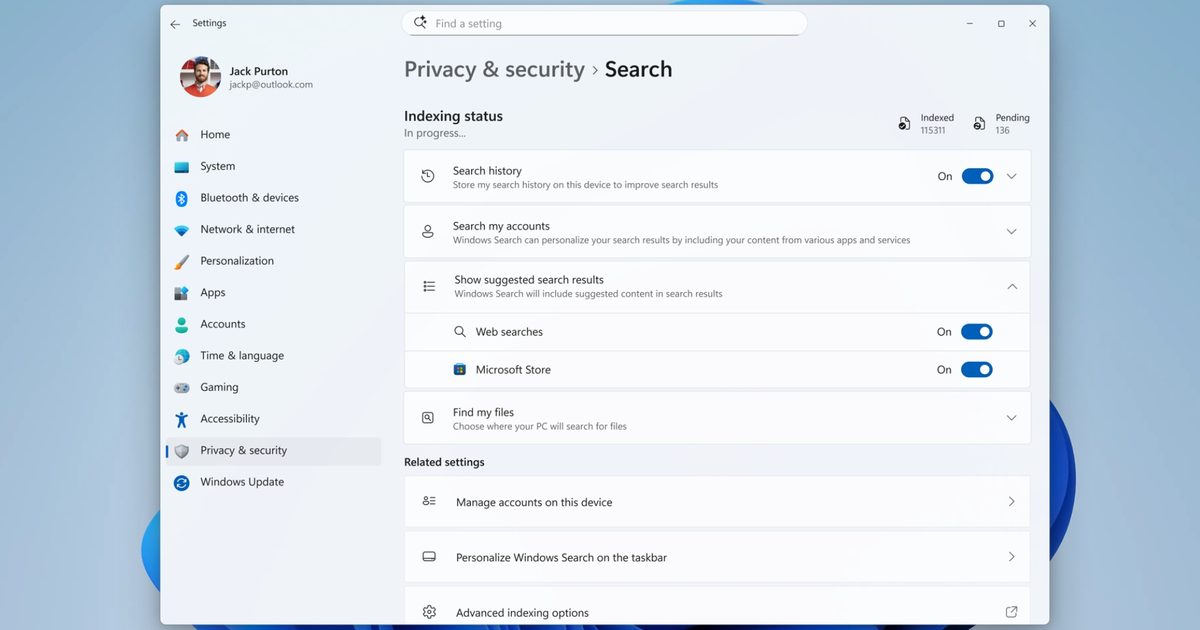
There are two solutions to this. A keycap’s width is measured in “u,” so the letters and numbers on your keyboard are all typically “1u.” Since the spacebar on the Creator Board is a 2u, I replaced the keycap with a 1u key, leaving 0.5u gaps on either side. This doesn’t fix anything, but it does make it easier for my thumb to know where to press, since there isn’t any dead space.

The second solution is a testament to this keyboard’s customizability, but could also be seen as a representation of its greatest flaw. If you want, you can desolder the singular spacebar switch and replace it with two regular keys, which can then function as a split spacebar. It’s a great solution, but it feels like it’s solving a problem of its own creation. For what it’s worth, Work Louder says it’s considering adding a stabilizer to the spacebar key, which would eliminate the issue. That would be fantastic, and I’d wait to buy one until this fix.

Terrifyingly Efficient

What matters is how effective this keyboard is for multimedia editing. And, quite frankly, it’s brilliant if you have the time to customize it. This keyboard comes preinstalled with a generic 40 percent layout to get you started, and it lets you change whatever you want right out of the box using VIA, one of the most powerful keyboard customization tools available today.

With VIA, you can change whatever you want. Need to add a second mode that transforms all of your keys into shortcuts? Need to scroll through brush sizes using a dial? Or how about setting one of your keys to automatically apply your favorite Adobe Lightroom preset? As long as the command can be quantified as a series of consistent mouse movements and key presses, you can do it.

Some of my favorite everyday uses for the dials include zooming in and out, swapping between windows, and adjusting system volume—all of which I can have mapped to different dials at the same time! Work Louder has hinted at other modules that can be added to the Creator Board, like a specialized module for audio production, but it hasn’t announced anything yet.

All of this doesn’t mean the Creator Board is going to be your single-keyboard solution to everything. As a purpose-built tool, it naturally falls short in other places. Number-heavy typing is an absolute slog due to the lack of a number row, and the limited design doesn’t exactly lend itself to gaming either, so you’ll likely want a second keyboard stowed away for when you need it.

But there’s a huge elephant in the room: the price. This keyboard has the design, charm, and niche functionality of a Teenage Engineering product, with a matching price too. The base Creator Board starts at $259. With both add-ons (what I was sent for review), it will run you $409. The XL version, which adds on a number pad with a larger footprint, brings the total to $559. That’s a lot.

If you’re the kind of person who wants a keyboard with these features, it’s one of the only options on the market. Sure, there are other modular keyboards, other ortholinear boards, and others that are deeply customizable, but this is the only keyboard that combines all of those into a single package. I think it’s fantastic for the specific use cases it’s intended for. If you look at this keyboard and think, “That’s exactly what I need,” then you’ll be very happy with it. This keyboard does exactly what it’s meant to, and I think that’s beautiful, even if it’s not for everyone.
Share. Facebook Twitter Pinterest LinkedIn Tumblr Email
Previous ArticleLenovo ThinkPad Z16 Gen 2 review: late to the game
Next Article In a gym 250 miles above Earth, astronauts sweat for science

Related Articles

Hostinger Promo Code: 79% Off for July 2026
News

Hostinger Promo Code: 79% Off for July 2026

14 July 2026
This website is a goldmine if you love Mac menu bar apps
News

This website is a goldmine if you love Mac menu bar apps

14 July 2026
OnePlus is ending its US operations pretty soon, says report
News

OnePlus is ending its US operations pretty soon, says report

14 July 2026
Microsoft is finally fixing the worst thing about Windows Search, but you can’t try it just yet
News

Microsoft is finally fixing the worst thing about Windows Search, but you can’t try it just yet

14 July 2026
How to install iOS 27 public beta on your iPhone?
News

How to install iOS 27 public beta on your iPhone?

14 July 2026
Google Home Speaker (2026) review: Smarter and punchier, with a subscription pinch
News

Google Home Speaker (2026) review: Smarter and punchier, with a subscription pinch

14 July 2026
Demo
Top Articles
5 laptops to buy instead of the M4 MacBook Pro

5 laptops to buy instead of the M4 MacBook Pro

17 November 2024133 Views
ChatGPT o1 vs. o1-mini vs. 4o: Which should you use?

ChatGPT o1 vs. o1-mini vs. 4o: Which should you use?

15 December 2024111 Views
Costco partners with Electric Era to bring back EV charging in the U.S.

Costco partners with Electric Era to bring back EV charging in the U.S.

28 October 2024100 Views

Subscribe to Updates

Get the latest tech news and updates directly to your inbox.

Latest News
Google Home Speaker (2026) review: Smarter and punchier, with a subscription pinch News

Google Home Speaker (2026) review: Smarter and punchier, with a subscription pinch

News Room14 July 2026
Siri AI Is Becoming Apple’s Everything Tool News

Siri AI Is Becoming Apple’s Everything Tool

News Room14 July 2026
How to install macOS 27 Golden Gate public beta on your Mac? News

How to install macOS 27 Golden Gate public beta on your Mac?

News Room14 July 2026
Most Popular
The Spectacular Burnout of a Solar Panel Salesman

The Spectacular Burnout of a Solar Panel Salesman

13 January 2025137 Views
5 laptops to buy instead of the M4 MacBook Pro

5 laptops to buy instead of the M4 MacBook Pro

17 November 2024133 Views
ChatGPT o1 vs. o1-mini vs. 4o: Which should you use?

ChatGPT o1 vs. o1-mini vs. 4o: Which should you use?

15 December 2024111 Views
Our Picks
Microsoft is finally fixing the worst thing about Windows Search, but you can’t try it just yet

Microsoft is finally fixing the worst thing about Windows Search, but you can’t try it just yet

14 July 2026
How to install iOS 27 public beta on your iPhone?

How to install iOS 27 public beta on your iPhone?

14 July 2026
Google Home Speaker (2026) review: Smarter and punchier, with a subscription pinch

Google Home Speaker (2026) review: Smarter and punchier, with a subscription pinch

14 July 2026

Subscribe to Updates

Get the latest tech news and updates directly to your inbox.

Facebook X (Twitter) Instagram Pinterest
  • Privacy Policy
  • Terms of use
  • Advertise
  • Contact Us
© 2026 Best in Technology. All Rights Reserved.

Type above and press Enter to search. Press Esc to cancel.