




Close Menu
Best in TechnologyBest in Technology
  • News
  • Phones
  • Laptops
  • Gadgets
  • Gaming
  • AI
  • Tips
  • More
    • Web Stories
    • Global
    • Press Release

Subscribe to Updates

Get the latest tech news and updates directly to your inbox.

What's On
Meta promised to stop creepy AI glasses videos, but they’re still all over Instagram

Meta promised to stop creepy AI glasses videos, but they’re still all over Instagram

17 August 2026
I found a better way to dictate on my Mac, and it doesn’t need the cloud

I found a better way to dictate on my Mac, and it doesn’t need the cloud

17 August 2026
Mac users now have an easier way to install apps from DMG files

Mac users now have an easier way to install apps from DMG files

17 August 2026
Facebook X (Twitter) Instagram
Just In
  • Meta promised to stop creepy AI glasses videos, but they’re still all over Instagram
  • I found a better way to dictate on my Mac, and it doesn’t need the cloud
  • Mac users now have an easier way to install apps from DMG files
  • I’m not buying the idea that killing PlayStation discs will make games cheaper
  • I tried a smart bracelet as my digital journal and mood calendar. It’s odd, but it works.
  • Sony still hasn’t fixed a launch date for the PS6, and that’s telling
  • ChatGPT’s Computer History has one big privacy problem
  • Intel may be cooking up a budget Panther Lake chip for gaming handhelds
Facebook X (Twitter) Instagram Pinterest Vimeo
Best in TechnologyBest in Technology
  • News
  • Phones
  • Laptops
  • Gadgets
  • Gaming
  • AI
  • Tips
  • More
    • Web Stories
    • Global
    • Press Release
Subscribe
Best in TechnologyBest in Technology
Home » PlayStation Portal tips: 5 settings to adjust right away
News

PlayStation Portal tips: 5 settings to adjust right away

News RoomBy News Room19 January 20253 Mins Read
Share Facebook Twitter Pinterest LinkedIn Tumblr Reddit Telegram Email
PlayStation Portal tips: 5 settings to adjust right away
Share
Facebook Twitter LinkedIn Pinterest Email

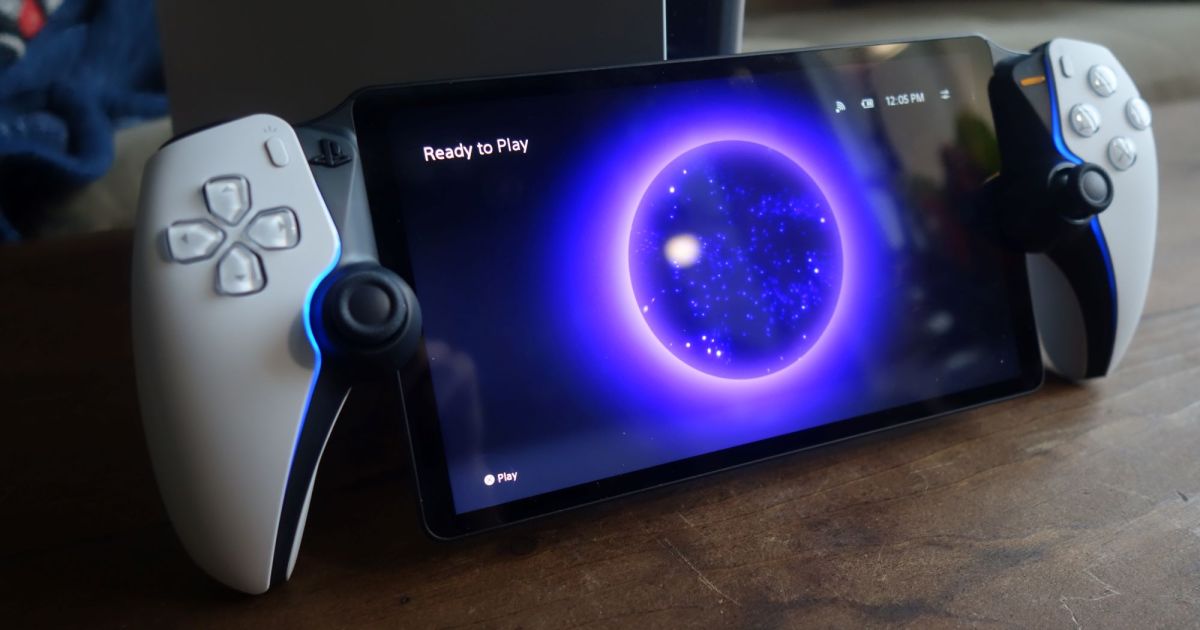
So, you’ve got a brand-new PlayStation Portal and are looking forward to the hours and hours of fun you’ll have using its Remote Play functionality to play your PlayStation 5 games. Well, yeah, you should be excited — it’s pretty rad, after all. But when you first dive in, you may want to take a look at some of the device’s settings to be sure things are set up exactly how you like them. Here are five settings we recommend adjusting on your PlayStation Portal.

Decide your preferred vibration intensity

Controller vibration can be a cool feature, but not everyone likes to feel it super strongly (or at all). Luckily, you can adjust the intensity of the vibration to meet your personal preferences.

Doing this requires you to go to Settings > Controller > Vibration Intensity. You can choose between Strong, Medium, or Weak — or you can just turn vibration off altogether.

Select the intensity of the trigger effect

Similarly to vibration, the trigger effects from the PS5’s DualSense controller are available on the PlayStation Portal’s triggers. This can add immersion in some games, but it can also be frustrating if you’re not the type of person who wants that extra layer of realism to your gaming.

To adjust this feature, go to Settings > Controller > Trigger Effect Intensity. As with vibration, you can select Strong, Medium, or Weak. You can also just turn it off completely (which is probably the best choice for a lot of players).

Decide how long it takes for Rest Mode to activate

If you’re the type to sit your Portal down for a bit and possibly forget that it’s on, you’ll want to ensure that it enters Rest Mode. This keeps it from consuming too much power (and therefore draining your battery faster) when you’re not using it.

You can do this by going to Settings > System > Battery > Set Time Until Entering Rest Mode and then choosing how long you’d like it to wait before entering Rest Mode. We’d recommended 1-2 minutes, but hey, it’s your battery!

Turn off the lightbars if they’re distracting you

The light bars that run along each side of the controller look pretty cool, but they can be distracting for some folks. If you’re finding them annoying (or want to save a little extra battery life), you can disable them altogther.

To do this, head to Settings > Display and Brightness > Brightness of Lightbar and select the only other setting, which is “Off.”

Choose to show the battery percentage

Speaking of battery life, the PlayStation Portal defaults to simply showing you a battery indicator in the top right corner consisting of 1-3 bars. It’s not a very clear indicator of just how much battery you have left, so we’d highly recommend turning on the battery percentage setting to get a more accurate reading of your battery life.

If you want this on, go to Settings > System > Battery > Show Battery Percentage and toggle the button next to the text.



Share. Facebook Twitter Pinterest LinkedIn Tumblr Email
Previous ArticleThe best OnePlus 13R cases for 2025
Next Article 7 most anticipated comedy movies of 2025, ranked

Related Articles

Meta promised to stop creepy AI glasses videos, but they’re still all over Instagram
News

Meta promised to stop creepy AI glasses videos, but they’re still all over Instagram

17 August 2026
I found a better way to dictate on my Mac, and it doesn’t need the cloud
News

I found a better way to dictate on my Mac, and it doesn’t need the cloud

17 August 2026
Mac users now have an easier way to install apps from DMG files
News

Mac users now have an easier way to install apps from DMG files

17 August 2026
I’m not buying the idea that killing PlayStation discs will make games cheaper
News

I’m not buying the idea that killing PlayStation discs will make games cheaper

17 August 2026
I tried a smart bracelet as my digital journal and mood calendar. It’s odd, but it works.
News

I tried a smart bracelet as my digital journal and mood calendar. It’s odd, but it works.

17 August 2026
Sony still hasn’t fixed a launch date for the PS6, and that’s telling
News

Sony still hasn’t fixed a launch date for the PS6, and that’s telling

17 August 2026
Demo
Top Articles
5 laptops to buy instead of the M4 MacBook Pro

5 laptops to buy instead of the M4 MacBook Pro

17 November 2024133 Views
ChatGPT o1 vs. o1-mini vs. 4o: Which should you use?

ChatGPT o1 vs. o1-mini vs. 4o: Which should you use?

15 December 2024112 Views
Costco partners with Electric Era to bring back EV charging in the U.S.

Costco partners with Electric Era to bring back EV charging in the U.S.

28 October 2024100 Views

Subscribe to Updates

Get the latest tech news and updates directly to your inbox.

Latest News
Sony still hasn’t fixed a launch date for the PS6, and that’s telling News

Sony still hasn’t fixed a launch date for the PS6, and that’s telling

News Room17 August 2026
ChatGPT’s Computer History has one big privacy problem News

ChatGPT’s Computer History has one big privacy problem

News Room16 August 2026
Intel may be cooking up a budget Panther Lake chip for gaming handhelds News

Intel may be cooking up a budget Panther Lake chip for gaming handhelds

News Room16 August 2026
Most Popular
The Spectacular Burnout of a Solar Panel Salesman

The Spectacular Burnout of a Solar Panel Salesman

13 January 2025137 Views
5 laptops to buy instead of the M4 MacBook Pro

5 laptops to buy instead of the M4 MacBook Pro

17 November 2024133 Views
ChatGPT o1 vs. o1-mini vs. 4o: Which should you use?

ChatGPT o1 vs. o1-mini vs. 4o: Which should you use?

15 December 2024112 Views
Our Picks
I’m not buying the idea that killing PlayStation discs will make games cheaper

I’m not buying the idea that killing PlayStation discs will make games cheaper

17 August 2026
I tried a smart bracelet as my digital journal and mood calendar. It’s odd, but it works.

I tried a smart bracelet as my digital journal and mood calendar. It’s odd, but it works.

17 August 2026
Sony still hasn’t fixed a launch date for the PS6, and that’s telling

Sony still hasn’t fixed a launch date for the PS6, and that’s telling

17 August 2026

Subscribe to Updates

Get the latest tech news and updates directly to your inbox.

Facebook X (Twitter) Instagram Pinterest
  • Privacy Policy
  • Terms of use
  • Advertise
  • Contact Us
© 2026 Best in Technology. All Rights Reserved.

Type above and press Enter to search. Press Esc to cancel.