




“Microsoft Defender is surprisingly effective for free antivirus software, and with a Microsoft 365 subscription, you get Defender apps for macOS, iOS, and Android.”
Pros
- Good free antivirus software
- Good protection record in recent years
- 24/7 support
- It’s already installed
- Microsoft 365 plans have great value
Cons
- VPN doesn’t help with geoblocking
- It’s only free for Windows
- Support was fast, but inaccurate
It’s clear that everyone needs antivirus protection, and Microsoft Defender is the first line of defense that comes with every Windows PC. I’ve reviewed the best third-party antivirus software available and that extra security usually isn’t cheap.
If you’re suffering from subscription fatigue, you might wonder how good Microsoft Defender is and whether it’s safe to trust your cybersecurity to a free app bundled with Windows. I researched and reviewed Microsoft Defender, checked its protection scores, and tested customer support to find out if it’s a good antivirus solution.
Tiers and pricing
Since Microsoft Defender is part of Windows 7 and later, it’s already installed on your PC. That’s a big advantage since it means you’re always protected, even when you get a new computer or do a clean install of Windows 11.
You get malware detection and scheduled virus scans and removal, along with ransomware and phishing protection. Microsoft also scans for identity leaks and includes $1 million in identity theft insurance.
To extend that protection to macOS, iOS, and Android devices, you’ll need to subscribe to Microsoft 365 Personal or Family. The Personal plan costs $70 per year or $7 monthly. At $100 annually or $10 per month, a Family subscription offers a discount price on six Personal accounts with shared data.
There are better deals on antivirus subscription plans. However, Microsoft 365 has Microsoft Defender antivirus and several premium features across five computers, phones, and tablets. It also includes all the best Office desktop, web, and mobile apps. You also get 1 TB of cloud storage per person.
It’s a great bargain if you need cross-platform protection and access to Word, Excel, OneDrive, and more.
Design
While most antivirus software subscriptions start with installation and setup, most of that work is already done if you use Microsoft Defender for Windows. It’s an antivirus solution that’s already installed and active.
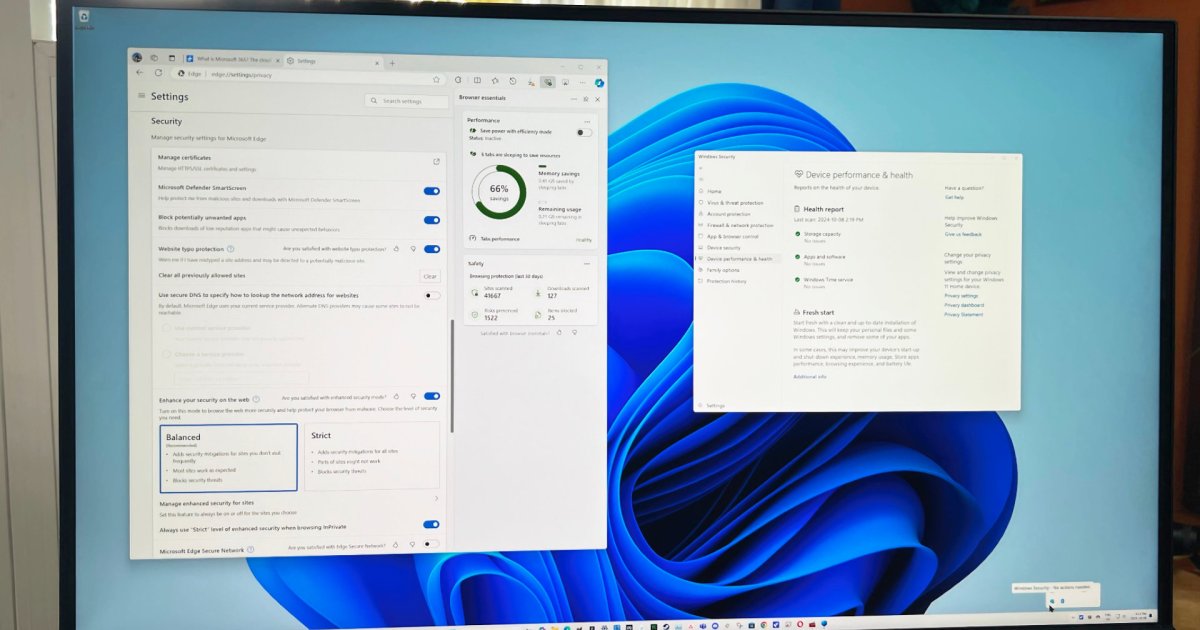
I can launch Microsoft Defender from the Privacy & Security tab in Windows Settings. The Windows Security section provides shortcuts to particular features. I can also open Defender from the start menu or select the blue shield icon in the system tray’s overflow menu.
The design is clean and simple. The main view shows at-a-glance assurance that my computer is secure, with green checkmarks for account safety, antivirus, network protection, and more.
Those sections also appear as tabs in the left sidebar. I can run quick scans for malware, full scans, and even offline scans for more troublesome viruses. I can add more folders to protect from ransomware and make sure my computer is running well.
In Microsoft’s Edge browser, I can check security settings to ensure malicious websites and downloads are blocked.
Features
After having a poor reputation in the past, Microsoft Defender has proven to be very effective antivirus software in the last several years.
Since December 2017, Defender has earned an average rating of 5.9 out of 6. On just 10 occasions, Microsoft’s antivirus lost half a point on AV-Test’s six-point protection scale.
In each case, the missed threat took the form of a zero-day vulnerability, which is the hardest to block since it arrives with no advance warning. Despite a few minor misses, the free antivirus software included with Windows has an impressive record over the last several years. Norton and Bitdefender have even better scores over longer periods of time.
I spot-checked Microsoft Defender’s browser protection by visiting Wicar’s malware test page. Defender blocked the virus download and interrupted browser exploits with a deep red warning page.
Microsoft Defender also includes a VPN focused on privacy and security. It isn’t useful to bypass geoblocking, however. Some competing antivirus solutions like Bitdefender include VPNs that let you access content from other countries like you wre a local.
Support
As a Microsoft 365 subscriber, you get 24/7 live chat with customer service agents. I tested the level of support by sending a message late one Monday evening.
The response was immediate and the agent stayed responsive throughout the conversation. With most cybersecurity live chats, a delay of several seconds or more is common.
While Microsoft support was consistently quick, some of the details seemed wrong. For example, I was told I could change server locations in Defender’s VPN, which isn’t true.
Microsoft 365 support answers questions about Office apps, account issues, email problems, and cybersecurity concerns. Perhaps Microsoft needs to do a better job of funneling customers to the right person for particular topics. Fast support is good, but accuracy is more important.
Norton antivirus support is completely focused on cybersecurity. While I had to wait 15 minutes for a Norton agent, the response was much more helpful.
Privacy and security
Microsoft takes privacy seriously and has good transparency on what data it collects and how it’s used.
Microsoft Defender collects minimal data to provide protection and uses strong encryption methods. Microsoft 365 subscribers receive promotional offers, but aren’t bombarded with spam.
Microsoft’s internal security is generally very good, but as the developer of the world’s most popular operating system, it’s a massive target for hackers. For example, a 2022 Microsoft data breach could have exposed over 2 TB of user data.
Microsoft claimed “no customer accounts or systems were compromised.” Still, it shows the ongoing need for vigilance at the corporate and consumer levels. It’s important to use two-factor authentication (2FA), passcodes, encryption, VPNs, and antivirus to keep your computer and your data safe.
Is Microsoft Defender enough protection for you?
Microsoft Defender is a good, free cybersecurity app that protects your Windows PC with minimal effort. It isn’t the only one, and you can combine it with a well-rated VPN solution, a full-featured password manager, and other powerful and free antivirus software to maximize your protection.
If you already subscribe to Microsoft 365, you can use Microsoft Defender on all your other devices, adding more value to your subscription. However, if you need the best cybersecurity protection and prevention, consider a complete package from Bitdefender or Norton to keep your computer secure from hackers and scammers.