

Close Menu
Best in TechnologyBest in Technology
  • News
  • Phones
  • Laptops
  • Gadgets
  • Gaming
  • AI
  • Tips
  • More
    • Web Stories
    • Global
    • Press Release

Subscribe to Updates

Get the latest tech news and updates directly to your inbox.

What's On
Tap or Swipe: How Mobile Wallets Affect the Payment Method Dichotomy

Tap or Swipe: How Mobile Wallets Affect the Payment Method Dichotomy

11 August 2026
Grok Bot wants to take work off your plate, not just answer your queries

Grok Bot wants to take work off your plate, not just answer your queries

11 August 2026
How and When to View the Perseid Meteor Shower (August 2026)

How and When to View the Perseid Meteor Shower (August 2026)

11 August 2026
Facebook X (Twitter) Instagram
Just In
  • Tap or Swipe: How Mobile Wallets Affect the Payment Method Dichotomy
  • Grok Bot wants to take work off your plate, not just answer your queries
  • How and When to View the Perseid Meteor Shower (August 2026)
  • What We Learned About Shizuka, The Mysterious – Aug 11, 2026
  • Bumble just changed who gets to make the first move
  • MelGeek MADE84 Ultra Review: Getting addicted to this magnetic keyboard was only a matter of time
  • Wolverine-Themed PlayStation 5 Consoles And – Aug 11, 2026
  • Spotify is finally calling out AI artists, and you’ll see it right away
Facebook X (Twitter) Instagram Pinterest Vimeo
Best in TechnologyBest in Technology
  • News
  • Phones
  • Laptops
  • Gadgets
  • Gaming
  • AI
  • Tips
  • More
    • Web Stories
    • Global
    • Press Release
Subscribe
Best in TechnologyBest in Technology
Home » How to use Visual Intelligence on your iPhone with iOS 18.2
News

How to use Visual Intelligence on your iPhone with iOS 18.2

News RoomBy News Room20 December 20244 Mins Read
Share Facebook Twitter Pinterest LinkedIn Tumblr Reddit Telegram Email
How to use Visual Intelligence on your iPhone with iOS 18.2
Share
Facebook Twitter LinkedIn Pinterest Email

Though the iPhone 16 series launched in September, it shipped with iOS 18 sans Apple Intelligence. Instead, Apple began rolling out Apple Intelligence features starting with iOS 18.1, and then more AI tools arrived in iOS 18.2, including Visual Intelligence for the iPhone 16.

But how do you use Visual Intelligence? It’s actually super easy, but you need to make sure you have an iPhone 16 device, as it requires the new Camera Control feature. Here’s how it works.

What is Visual Intelligence?

Before we get into how to use Visual Intelligence, let’s first break down what it is exactly? Think of it like Apple’s version of Google Lens for your iPhone 16.

Once Visual Intelligence is activated, just point the camera at something, and then you can ask ChatGPT to identify it or do a Google Search on what the camera is seeing. The results that you get will vary depending on what you’re pointing at and whether it’s trying to figure out what an object is or get more details about a location. It can even do various actions with text.

Again, Visual Intelligence requires iOS 18.2 and an iPhone 16 device. This means you must have an iPhone 16, iPhone 16 Plus, iPhone 16 Pro, or iPhone 16 Pro Max to use this feature, as it requires the new Camera Control button.

How to activate Visual Intelligence

Activating Visual Intelligence is pretty easy, but you do have to make sure Apple Intelligence is on first.

Step 1: Launch Settings on your iPhone 16 device.

Step 2: Select Apple Intelligence & Siri.
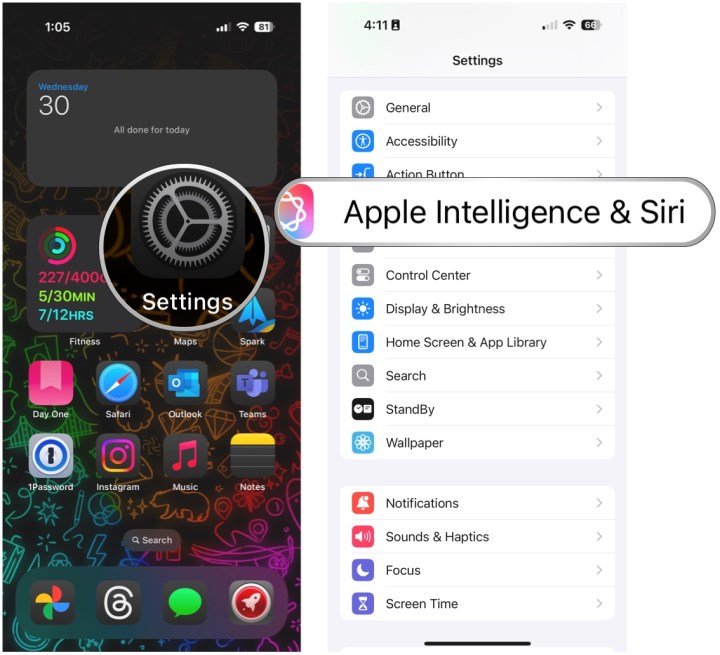
Open Settings, select Apple Intelligence & Siri.

Step 3: Make sure the Toggle for Apple Intelligence is On.

Step 4: If this is your first time turning on Apple Intelligence, you may need to join the waitlist first. Once you’re in, it may then need to download data in the background before you can start using it.

Open Settings, select Apple Intelligence & Siri, select Turn on Apple Intelligence

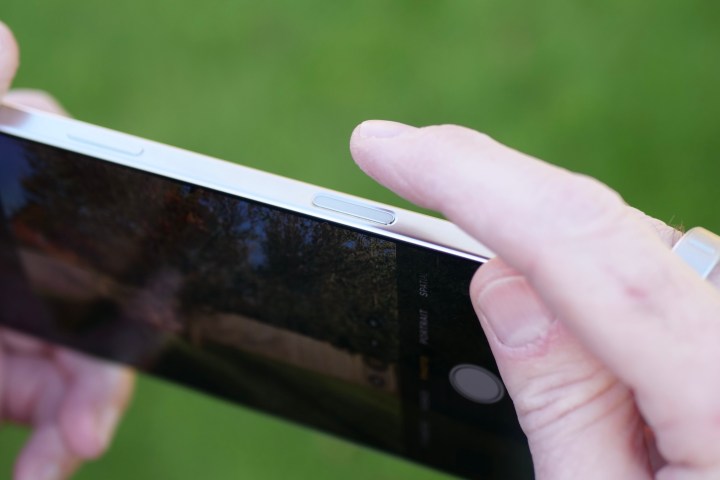
Step 5: Activate Visual Intelligence by pressing down and holding the Camera Control button.

Step 6: Point your camera at something you want to find out more about.

Step 7: Select the shutter button to do a quick snapshot (not saved to Camera Roll) and then select Ask or Search.

Step 8: Another method is to just point the camera at something and then select Ask or Search directly.

Step 9: By default, the Ask option will ask ChatGPT “What is this?” However, if you want something more specific, just type in a question about what you’re looking at.

Step 10: For Search, it basically gives you Google search results.

Visual Intelligence on iPhone.

A person using the Apple iPhone 16 Pro Max's Camera Control.

What can you use Visual Intelligence for?

Visual Intelligence is a simple feature that can open up a world of possibilities.

The basic use case is just looking up what something is. This is great for identifying plants, flowers, animals, food, or anything else. It’s also useful for looking up where you can purchase an item that catches your eye with the Google search results.

Visual Intelligence is also very useful for getting information about a place that you’re passing. For businesses, you can get information on things like hours, available services or menu, contact information, reviews and ratings, and reservations. You can even place an order for delivery. You can also call a phone number or go to the website, all just from pointing Visual Intelligence at a business.

Lastly, you can use Visual Intelligence on text for a variety of reasons. Visual Intelligence can help you summarize text, translate it, or even read it out loud. And if there’s contact information, Visual Intelligence can call the number, start an email, create calendar events, and more.

As you can see, there’s quite a lot that you can now do with Visual Intelligence through the Camera Control. Unfortunately, it doesn’t look like this feature will end up on the iPhone 15 Pro or iPhone 15 Pro Max due to the Camera Control requirement, which allows Apple to make it a selling point for the iPhone 16 series.


Share. Facebook Twitter Pinterest LinkedIn Tumblr Email
Previous ArticleWhy Can’t You Switch Seats in an Empty Airplane?
Next Article 3 underrated (HBO) Max movies you should watch this weekend (December 20-22)

Related Articles

Tap or Swipe: How Mobile Wallets Affect the Payment Method Dichotomy
News

Tap or Swipe: How Mobile Wallets Affect the Payment Method Dichotomy

11 August 2026
Grok Bot wants to take work off your plate, not just answer your queries
News

Grok Bot wants to take work off your plate, not just answer your queries

11 August 2026
How and When to View the Perseid Meteor Shower (August 2026)
News

How and When to View the Perseid Meteor Shower (August 2026)

11 August 2026
Bumble just changed who gets to make the first move
News

Bumble just changed who gets to make the first move

11 August 2026
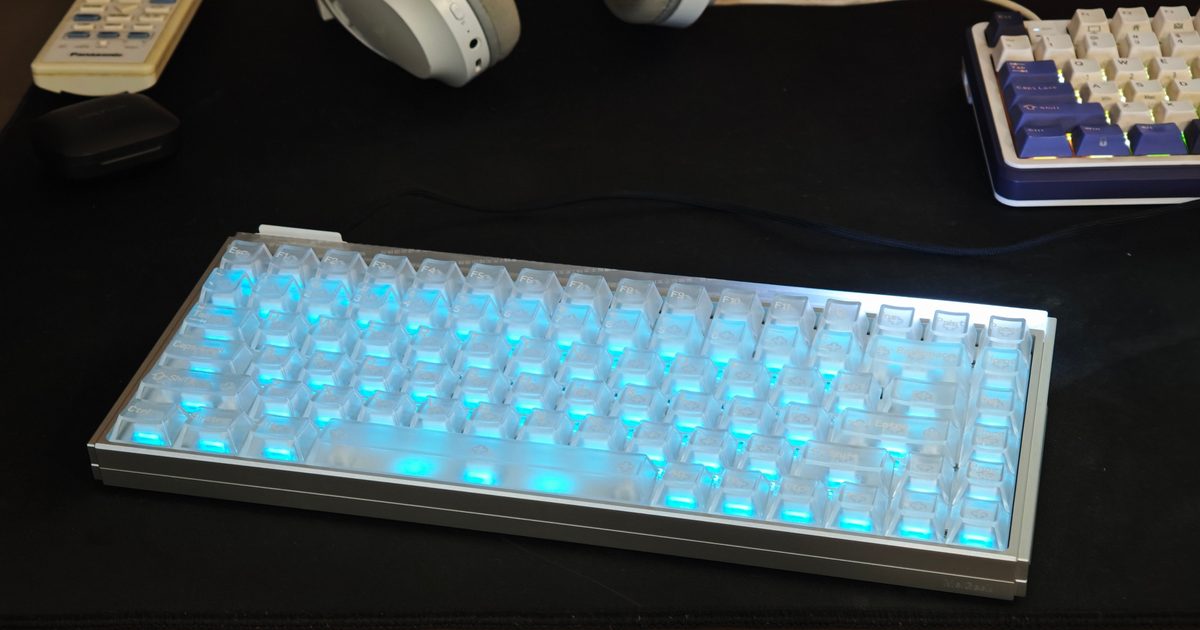
MelGeek MADE84 Ultra Review: Getting addicted to this magnetic keyboard was only a matter of time
News

MelGeek MADE84 Ultra Review: Getting addicted to this magnetic keyboard was only a matter of time

11 August 2026
Spotify is finally calling out AI artists, and you’ll see it right away
News

Spotify is finally calling out AI artists, and you’ll see it right away

11 August 2026
Demo
Top Articles
5 laptops to buy instead of the M4 MacBook Pro

5 laptops to buy instead of the M4 MacBook Pro

17 November 2024133 Views
ChatGPT o1 vs. o1-mini vs. 4o: Which should you use?

ChatGPT o1 vs. o1-mini vs. 4o: Which should you use?

15 December 2024112 Views
Costco partners with Electric Era to bring back EV charging in the U.S.

Costco partners with Electric Era to bring back EV charging in the U.S.

28 October 2024100 Views

Subscribe to Updates

Get the latest tech news and updates directly to your inbox.

Latest News
MelGeek MADE84 Ultra Review: Getting addicted to this magnetic keyboard was only a matter of time News

MelGeek MADE84 Ultra Review: Getting addicted to this magnetic keyboard was only a matter of time

News Room11 August 2026
Wolverine-Themed PlayStation 5 Consoles And – Aug 11, 2026 Gaming

Wolverine-Themed PlayStation 5 Consoles And – Aug 11, 2026

News Room11 August 2026
Spotify is finally calling out AI artists, and you’ll see it right away News

Spotify is finally calling out AI artists, and you’ll see it right away

News Room11 August 2026
Most Popular
The Spectacular Burnout of a Solar Panel Salesman

The Spectacular Burnout of a Solar Panel Salesman

13 January 2025137 Views
5 laptops to buy instead of the M4 MacBook Pro

5 laptops to buy instead of the M4 MacBook Pro

17 November 2024133 Views
ChatGPT o1 vs. o1-mini vs. 4o: Which should you use?

ChatGPT o1 vs. o1-mini vs. 4o: Which should you use?

15 December 2024112 Views
Our Picks
What We Learned About Shizuka, The Mysterious – Aug 11, 2026

What We Learned About Shizuka, The Mysterious – Aug 11, 2026

11 August 2026
Bumble just changed who gets to make the first move

Bumble just changed who gets to make the first move

11 August 2026
MelGeek MADE84 Ultra Review: Getting addicted to this magnetic keyboard was only a matter of time

MelGeek MADE84 Ultra Review: Getting addicted to this magnetic keyboard was only a matter of time

11 August 2026

Subscribe to Updates

Get the latest tech news and updates directly to your inbox.

Facebook X (Twitter) Instagram Pinterest
  • Privacy Policy
  • Terms of use
  • Advertise
  • Contact Us
© 2026 Best in Technology. All Rights Reserved.

Type above and press Enter to search. Press Esc to cancel.