



Close Menu
Best in TechnologyBest in Technology
  • News
  • Phones
  • Laptops
  • Gadgets
  • Gaming
  • AI
  • Tips
  • More
    • Web Stories
    • Global
    • Press Release

Subscribe to Updates

Get the latest tech news and updates directly to your inbox.

What's On
The ROG Gjallar packs Dolby Atmos in a compact form factor, but its US debut is still under wraps

The ROG Gjallar packs Dolby Atmos in a compact form factor, but its US debut is still under wraps

4 August 2026
Samsung is cracking down on TV apps that quietly shared users’ internet connections

Samsung is cracking down on TV apps that quietly shared users’ internet connections

4 August 2026
The next official Palworld mobile game comes from an unexpected studio

The next official Palworld mobile game comes from an unexpected studio

4 August 2026
Facebook X (Twitter) Instagram
Just In
  • The ROG Gjallar packs Dolby Atmos in a compact form factor, but its US debut is still under wraps
  • Samsung is cracking down on TV apps that quietly shared users’ internet connections
  • The next official Palworld mobile game comes from an unexpected studio
  • Beast of Reincarnation Review – Boring World, Beguiling Combat
  • Save big on DJI creator gear with these AliExpress August deals
  • Google Health just made Fitbit Air a better fit for Apple Health users
  • Did an AI Music App Just Snitch on the Song of the Summer?
  • Pwnage’s new gaming mouse lets users adjust click force and travel with a screwdriver
Facebook X (Twitter) Instagram Pinterest Vimeo
Best in TechnologyBest in Technology
  • News
  • Phones
  • Laptops
  • Gadgets
  • Gaming
  • AI
  • Tips
  • More
    • Web Stories
    • Global
    • Press Release
Subscribe
Best in TechnologyBest in Technology
Home » How to use the hidden Nintendo Switch browser
News

How to use the hidden Nintendo Switch browser

News RoomBy News Room16 March 20243 Mins Read
Share Facebook Twitter Pinterest LinkedIn Tumblr Reddit Telegram Email
How to use the hidden Nintendo Switch browser
Share
Facebook Twitter LinkedIn Pinterest Email

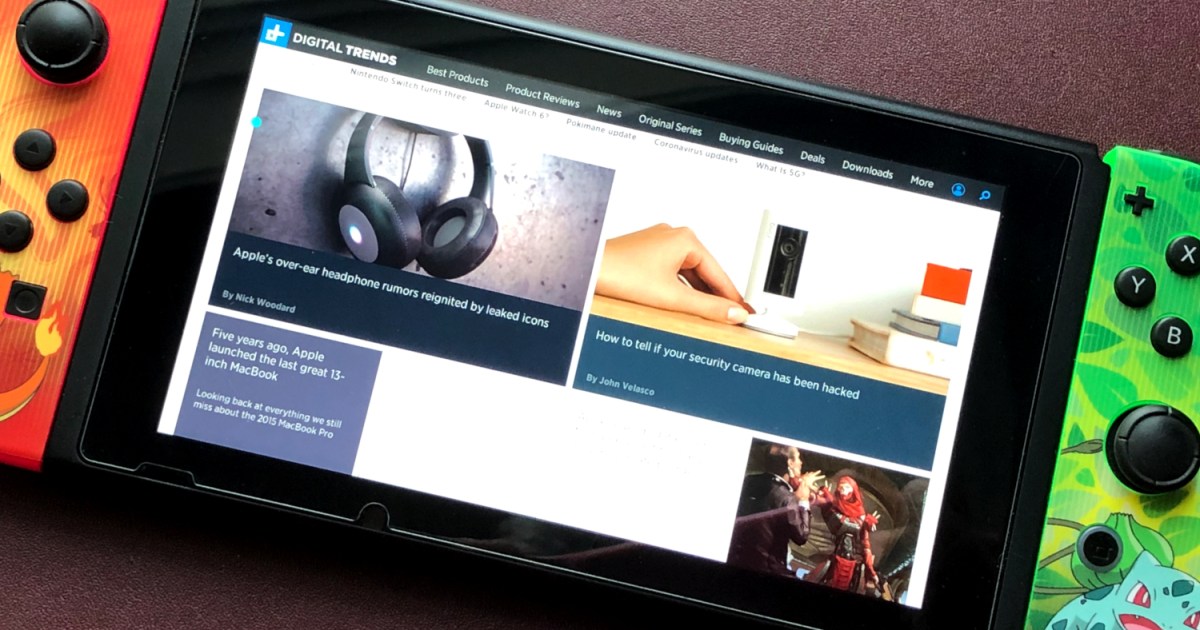
Nintendo is oddly strict about how it wants you to use its devices. Even features that were built into the Switch, like Bluetooth, wasn’t enabled until Nintendo felt like it. One thing Nintendo will likely never officially enable is a dedicated web browser, but that hasn’t stopped some clever users from figuring out a workaround by exploiting the hotspot feature.

To use the browser outside the typical hotspot method, you must trick the console by manually inserting a primary DNS address. Our instructions on how to use the hidden Nintendo Switch browser rely on SwitchBru, a free hosted DNS server that redirects your queries to Google’s public DNS servers. According to the service, your connection is encrypted.

Still, keep in mind that you’re connecting to a third-party service. SwitchBru claims it doesn’t collect information like your IP address and surfing habits, but it does offer a free service for storing your favorite links and preferences.

Use the web browser

Step 1: Select the System Settings gear icon located on the home screen.

Step 2: Scroll down and select the Internet option on the following screen.

Step 3: Select Internet Settings on the right.
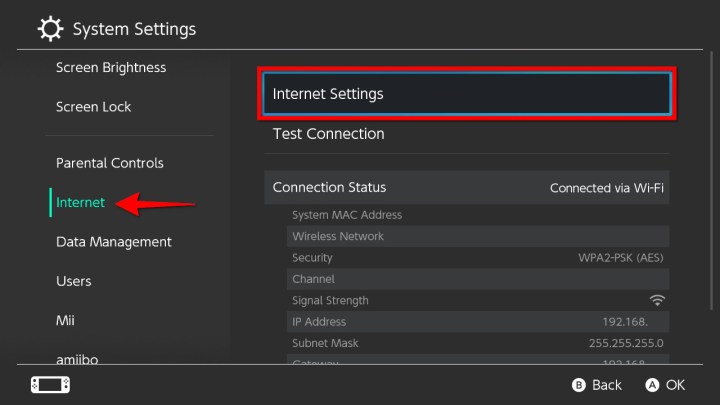

Step 4: Select an internet connection.

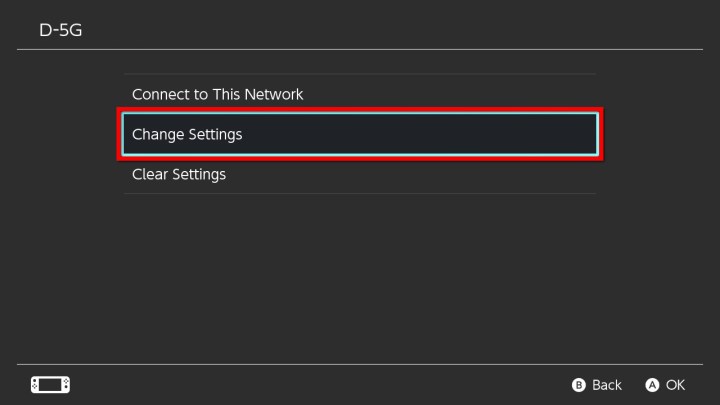
Step 5: On the following screen, select Change Settings.

Step 6: Scroll down and select DNS Settings.

Step 7: Choose Manual in the pop-up window at the bottom.

how to use hidden nintendo switch browser enter manual dns

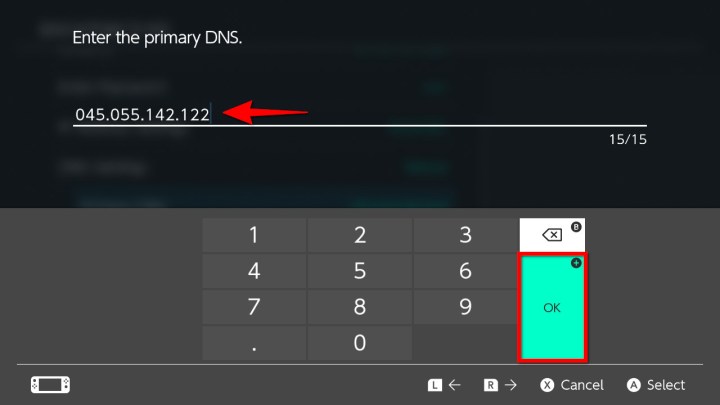
Step 8: Select Primary DNS, clear all the zeroes, and enter this address:

045.055.142.122

Select OK or tap the “plus” button to continue.

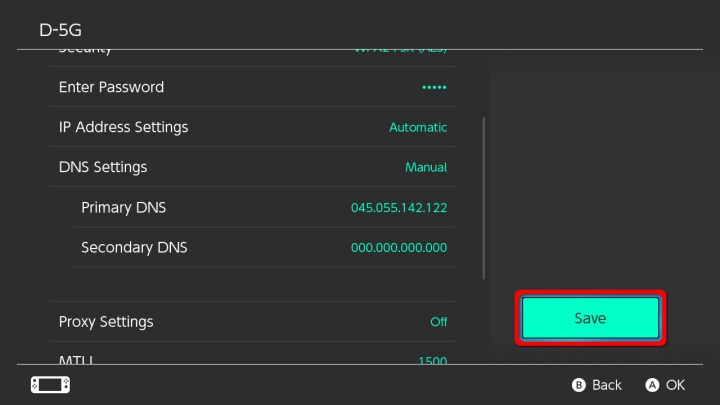
Step 9: Select the Save button.

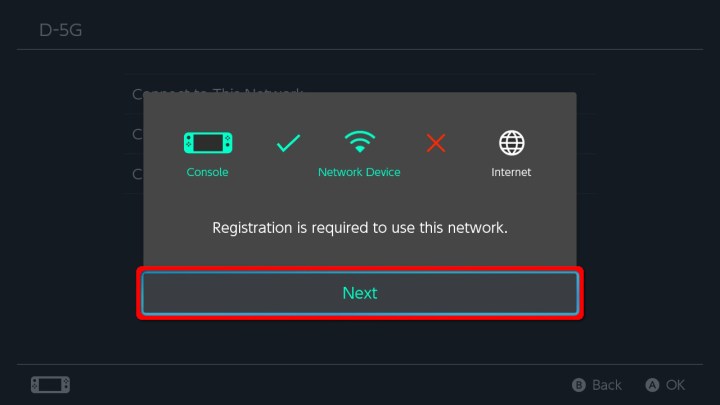
Step 10: Select Connect to This Network on the following screen.

Step 11: The connection appears to fail, requiring registration. Select Next.

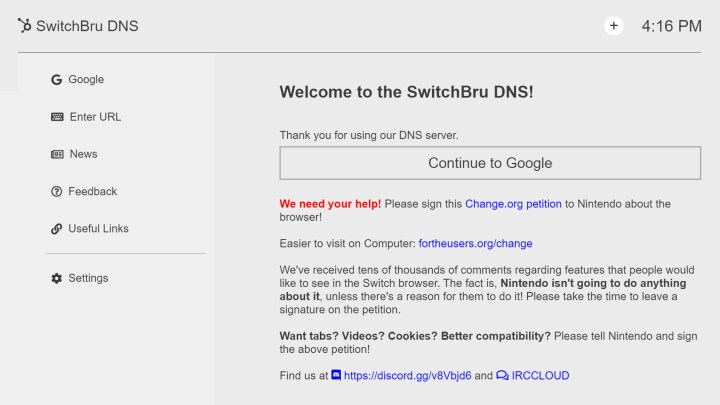
Step 12: The SwitchBru DNS homepage now appears on your screen. Here’s the actual address you can access on any device:

https://dns.switchbru.com

As shown below, you can select the Continue to Google button to load a basic Google search page. You’ll also see a column to the left with six categories:

  • Google: Search the internet.
  • Enter URL: Enter an address.
  • News: The latest news from SwitchBru.
  • Feedback: Take SwitchBru’s survey to provide feedback about the latest web browsing experience.
  • Useful Links: Add custom links and access general and Switch-related links.
  • Settings: Change the theme (white or black), manage notifications, disable ads, and more.
Disconnect the web browser

Now that your Primary DNS is finally rerouted to SwitchBru, you’ll switch to loading the welcome screen each time you utilize that internet connection. To return it back to the original settings and disable the web browser, look at the earlier directions from Step 1 to Step 5. Alternatively, after you arrive at the connection settings screen, follow these steps:

Step 1: Scroll down and then select the DNS Settings option. You’ll immediately see a pop-up page open at the bottom of the screen.

Step 2: Select Automatic.

Step 3: Press the Save button. After you do this, immediately select the OK button to finish the process.

We believe it’s worth mentioning that if you encounter connection problems using the Automatic setting, you can apply these directions to adjust the primary and secondary DNS numbers using a manual method. For example, here are Google’s DNS addresses:

8.8.8.8 (primary)

8.8.4.4 (secondary)

Editors’ Recommendations


Share. Facebook Twitter Pinterest LinkedIn Tumblr Email
Previous ArticleCyberpunk 2077 cheat codes: money, weapons, and more
Next Article Apple to Face Lawsuit Claiming AirTags Are Weapon of Stalkers, US Court Rules

Related Articles

The ROG Gjallar packs Dolby Atmos in a compact form factor, but its US debut is still under wraps
News

The ROG Gjallar packs Dolby Atmos in a compact form factor, but its US debut is still under wraps

4 August 2026
Samsung is cracking down on TV apps that quietly shared users’ internet connections
News

Samsung is cracking down on TV apps that quietly shared users’ internet connections

4 August 2026
The next official Palworld mobile game comes from an unexpected studio
News

The next official Palworld mobile game comes from an unexpected studio

4 August 2026
Save big on DJI creator gear with these AliExpress August deals
News

Save big on DJI creator gear with these AliExpress August deals

4 August 2026
Google Health just made Fitbit Air a better fit for Apple Health users
News

Google Health just made Fitbit Air a better fit for Apple Health users

4 August 2026
Did an AI Music App Just Snitch on the Song of the Summer?
News

Did an AI Music App Just Snitch on the Song of the Summer?

4 August 2026
Demo
Top Articles
5 laptops to buy instead of the M4 MacBook Pro

5 laptops to buy instead of the M4 MacBook Pro

17 November 2024133 Views
ChatGPT o1 vs. o1-mini vs. 4o: Which should you use?

ChatGPT o1 vs. o1-mini vs. 4o: Which should you use?

15 December 2024111 Views
Costco partners with Electric Era to bring back EV charging in the U.S.

Costco partners with Electric Era to bring back EV charging in the U.S.

28 October 2024100 Views

Subscribe to Updates

Get the latest tech news and updates directly to your inbox.

Latest News
Google Health just made Fitbit Air a better fit for Apple Health users News

Google Health just made Fitbit Air a better fit for Apple Health users

News Room4 August 2026
Did an AI Music App Just Snitch on the Song of the Summer? News

Did an AI Music App Just Snitch on the Song of the Summer?

News Room4 August 2026
Pwnage’s new gaming mouse lets users adjust click force and travel with a screwdriver News

Pwnage’s new gaming mouse lets users adjust click force and travel with a screwdriver

News Room4 August 2026
Most Popular
The Spectacular Burnout of a Solar Panel Salesman

The Spectacular Burnout of a Solar Panel Salesman

13 January 2025137 Views
5 laptops to buy instead of the M4 MacBook Pro

5 laptops to buy instead of the M4 MacBook Pro

17 November 2024133 Views
ChatGPT o1 vs. o1-mini vs. 4o: Which should you use?

ChatGPT o1 vs. o1-mini vs. 4o: Which should you use?

15 December 2024111 Views
Our Picks
Beast of Reincarnation Review – Boring World, Beguiling Combat

Beast of Reincarnation Review – Boring World, Beguiling Combat

4 August 2026
Save big on DJI creator gear with these AliExpress August deals

Save big on DJI creator gear with these AliExpress August deals

4 August 2026
Google Health just made Fitbit Air a better fit for Apple Health users

Google Health just made Fitbit Air a better fit for Apple Health users

4 August 2026

Subscribe to Updates

Get the latest tech news and updates directly to your inbox.

Facebook X (Twitter) Instagram Pinterest
  • Privacy Policy
  • Terms of use
  • Advertise
  • Contact Us
© 2026 Best in Technology. All Rights Reserved.

Type above and press Enter to search. Press Esc to cancel.