Close Menu
Best in TechnologyBest in Technology
  • News
  • Phones
  • Laptops
  • Gadgets
  • Gaming
  • AI
  • Tips
  • More
    • Web Stories
    • Global
    • Press Release

Subscribe to Updates

Get the latest tech news and updates directly to your inbox.

What's On
Here Are Three Reasons Why Dragon’s Dogma 2: Dark Arisen Has The Same Subtitle As Its Predecessor

Here Are Three Reasons Why Dragon’s Dogma 2: Dark Arisen Has The Same Subtitle As Its Predecessor

15 July 2026
OnePlus is leaving the US and a global market exit could follow by 2027, says report

OnePlus is leaving the US and a global market exit could follow by 2027, says report

15 July 2026
Thinking Machines Lab Drops Its First Model

Thinking Machines Lab Drops Its First Model

15 July 2026
Facebook X (Twitter) Instagram
Just In
  • Here Are Three Reasons Why Dragon’s Dogma 2: Dark Arisen Has The Same Subtitle As Its Predecessor
  • OnePlus is leaving the US and a global market exit could follow by 2027, says report
  • Thinking Machines Lab Drops Its First Model
  • PlayStation Shares New Details For Mobile Hero Shooter, Ratchet & Clank: Ranger Rumble
  • The UK just proposed a midnight social media curfew for teens that they can bypass in seconds
  • Lionel Messi’s Final World Cup—and the Death of Early Retirement
  • You Might Be Able To Play From Software’s The Duskbloods During A Network Test Next Month
  • How Can Small Businesses Reduce Late Payments and Improve Cash Flow?
Facebook X (Twitter) Instagram Pinterest Vimeo
Best in TechnologyBest in Technology
  • News
  • Phones
  • Laptops
  • Gadgets
  • Gaming
  • AI
  • Tips
  • More
    • Web Stories
    • Global
    • Press Release
Subscribe
Best in TechnologyBest in Technology
Home » How to upgrade the RAM on your laptop
News

How to upgrade the RAM on your laptop

News RoomBy News Room10 December 20234 Mins Read
Share Facebook Twitter Pinterest LinkedIn Tumblr Reddit Telegram Email
How to upgrade the RAM on your laptop
Share
Facebook Twitter LinkedIn Pinterest Email

Is your trusty laptop feeling a bit sluggish lately? Is it overwhelmed when too many tabs are open? Upgrading your RAM might just be the solution.

RAM, or Random Access Memory, plays a crucial role in your computer’s performance. When it runs out of physical memory, it starts swapping data to your hard drive, drastically slowing down processes. Here’s how to when it’s time to upgrade your laptop’s RAM and how to install it yourself.

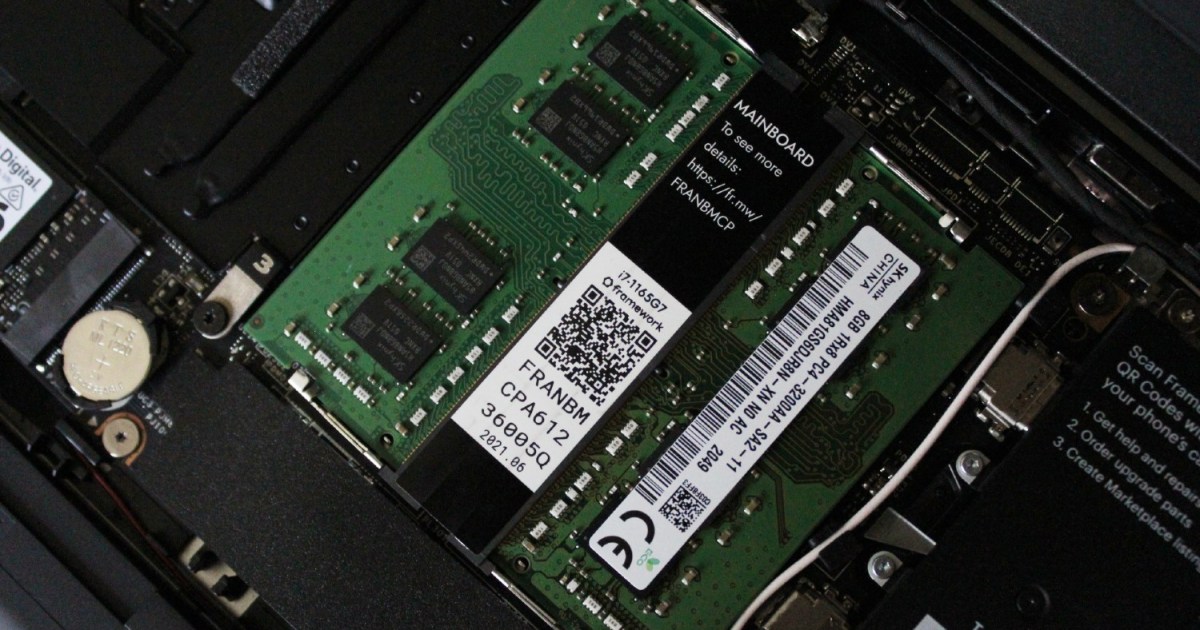
Install your new laptop RAM

As long as you follow the instructions carefully, you will be able to install new RAM on your laptop yourself without any advanced tech knowledge. Before you start, however, skip down to the bottom of this article for more information on how to check your RAM usage, how to know if your laptop can be upgraded, and how to select the right kind of RAM.

It should be noted that the internals of laptops are varied in terms of design. The following steps are general advice that should apply to most laptops, though the details will differ from laptop to laptop.

  1. Turn off your laptop and ensure it is unplugged from any power source.
  2. Turn your laptop over so you can identify and unscrew any screws that will allow you to take the base plate off.
  3. SODIMM memory sticks are often held in by clips. Locate these and remember to hold RAM by the edges rather than covering the gold connectors.
  4. Remove the old RAM from your laptop by releasing the clips holding the RAM in place. 
  5. Insert the new RAM by holding it by the sides at an angle; the pins should align with those in the slot.
  6. Press down firmly on the new RAM until it clicks in place under the clips.
  7. Replace the base plate and screw it back on.
  8. Turn your laptop on and navigate to Settings > System > About. Here ,you should see the full amount of RAM installed. If it is incorrect, you’ll need to repeat the above steps to reseat the RAM.

Check your current RAM usage

Those are the basic instructions, but there’s much more to know before you go out and buy some new sticks of RAM. Begin by checking your laptop’s memory usage. With your most demanding workload open and running, open up Windows Task Manager to check and see if need more. Here’s how to open it:

  • Right-click the taskbar.
  • Select Task Manager.
  • Click on the Performance tab.

Here, you can see how much memory is being used compared to the total amount of RAM available. If you’re nearing the limit, upgrading might significantly improve performance.

Find out if you can upgrade

Next, you need to know if upgrading the RAM on your laptop is even possible. Not all laptops allow RAM upgrades; some have sealed bottoms or soldered memory. If you’ve got a recent MacBook or another compact laptop, for example, you’re probably out of luck. 

You can use tools like Crucial’s Memory Advisor or refer to your laptop’s documentation to determine if an upgrade is possible. Identify the type and speed of RAM your laptop supports (DDR2, DDR3, DDR4, or DDR5) and the maximum capacity. If you can access your memory, you’re all good to go.

Purchase RAM that’s compatible with your laptop

Now that you know the type and speed of RAM your laptop can support, it’s time to purchase that RAM for your laptop. While it’s not necessary to purchase a matching pair of memory sticks, dual-channel RAM does offer increased performance. It also eliminates any potential compatibility conflicts.

You can purchase RAM to upgrade your laptop from the manufacturer’s website, or via online retail stores like Amazon or Best Buy.

Editors’ Recommendations



Share. Facebook Twitter Pinterest LinkedIn Tumblr Email
Previous ArticleYou Asked: Do perfect LCD panels exist?
Next Article 3 underrated shows on Max you need to watch in December

Related Articles

OnePlus is leaving the US and a global market exit could follow by 2027, says report
News

OnePlus is leaving the US and a global market exit could follow by 2027, says report

15 July 2026
Thinking Machines Lab Drops Its First Model
News

Thinking Machines Lab Drops Its First Model

15 July 2026
The UK just proposed a midnight social media curfew for teens that they can bypass in seconds
News

The UK just proposed a midnight social media curfew for teens that they can bypass in seconds

15 July 2026
Lionel Messi’s Final World Cup—and the Death of Early Retirement
News

Lionel Messi’s Final World Cup—and the Death of Early Retirement

15 July 2026
How Can Small Businesses Reduce Late Payments and Improve Cash Flow?
News

How Can Small Businesses Reduce Late Payments and Improve Cash Flow?

15 July 2026
Madden NFL 27 is coming to Apple Arcade next month, and it lets you run an NFL franchise from top to bottom
News

Madden NFL 27 is coming to Apple Arcade next month, and it lets you run an NFL franchise from top to bottom

15 July 2026
Demo
Top Articles
5 laptops to buy instead of the M4 MacBook Pro

5 laptops to buy instead of the M4 MacBook Pro

17 November 2024133 Views
ChatGPT o1 vs. o1-mini vs. 4o: Which should you use?

ChatGPT o1 vs. o1-mini vs. 4o: Which should you use?

15 December 2024111 Views
Costco partners with Electric Era to bring back EV charging in the U.S.

Costco partners with Electric Era to bring back EV charging in the U.S.

28 October 2024100 Views

Subscribe to Updates

Get the latest tech news and updates directly to your inbox.

Latest News
Lionel Messi’s Final World Cup—and the Death of Early Retirement News

Lionel Messi’s Final World Cup—and the Death of Early Retirement

News Room15 July 2026
You Might Be Able To Play From Software’s The Duskbloods During A Network Test Next Month Gaming

You Might Be Able To Play From Software’s The Duskbloods During A Network Test Next Month

News Room15 July 2026
How Can Small Businesses Reduce Late Payments and Improve Cash Flow? News

How Can Small Businesses Reduce Late Payments and Improve Cash Flow?

News Room15 July 2026
Most Popular
The Spectacular Burnout of a Solar Panel Salesman

The Spectacular Burnout of a Solar Panel Salesman

13 January 2025137 Views
5 laptops to buy instead of the M4 MacBook Pro

5 laptops to buy instead of the M4 MacBook Pro

17 November 2024133 Views
ChatGPT o1 vs. o1-mini vs. 4o: Which should you use?

ChatGPT o1 vs. o1-mini vs. 4o: Which should you use?

15 December 2024111 Views
Our Picks
PlayStation Shares New Details For Mobile Hero Shooter, Ratchet & Clank: Ranger Rumble

PlayStation Shares New Details For Mobile Hero Shooter, Ratchet & Clank: Ranger Rumble

15 July 2026
The UK just proposed a midnight social media curfew for teens that they can bypass in seconds

The UK just proposed a midnight social media curfew for teens that they can bypass in seconds

15 July 2026
Lionel Messi’s Final World Cup—and the Death of Early Retirement

Lionel Messi’s Final World Cup—and the Death of Early Retirement

15 July 2026

Subscribe to Updates

Get the latest tech news and updates directly to your inbox.

Facebook X (Twitter) Instagram Pinterest
  • Privacy Policy
  • Terms of use
  • Advertise
  • Contact Us
© 2026 Best in Technology. All Rights Reserved.

Type above and press Enter to search. Press Esc to cancel.