


Close Menu
Best in TechnologyBest in Technology
  • News
  • Phones
  • Laptops
  • Gadgets
  • Gaming
  • AI
  • Tips
  • More
    • Web Stories
    • Global
    • Press Release

Subscribe to Updates

Get the latest tech news and updates directly to your inbox.

What's On
I never cared about Mac desktop widgets until I found this app

I never cared about Mac desktop widgets until I found this app

24 August 2026
Samsung thinks Exynos 2700 can beat Qualcomm’s best next-gen chip

Samsung thinks Exynos 2700 can beat Qualcomm’s best next-gen chip

24 August 2026
Apple’s September 2026 event: Everything we know about the iPhone 18 Pro and iPhone Ultra launch event

Apple’s September 2026 event: Everything we know about the iPhone 18 Pro and iPhone Ultra launch event

24 August 2026
Facebook X (Twitter) Instagram
Just In
  • I never cared about Mac desktop widgets until I found this app
  • Samsung thinks Exynos 2700 can beat Qualcomm’s best next-gen chip
  • Apple’s September 2026 event: Everything we know about the iPhone 18 Pro and iPhone Ultra launch event
  • Samsung may be planning two Galaxy S27 Ultra sizes next year
  • In China, AI has reached dumpling shops where you also get to feed on compute tokens
  • ASUS’ less powerful Googlebook could still cost a small fortune
  • Pixel Watch 5 vs. Galaxy Watch 9 vs. Apple Watch Series 11: There’s more than one way to take your health seriously
  • A new iMac is coming before the end of 2026, but don’t expect much beyond M6
Facebook X (Twitter) Instagram Pinterest Vimeo
Best in TechnologyBest in Technology
  • News
  • Phones
  • Laptops
  • Gadgets
  • Gaming
  • AI
  • Tips
  • More
    • Web Stories
    • Global
    • Press Release
Subscribe
Best in TechnologyBest in Technology
Home » How to type an em dash on a Mac
News

How to type an em dash on a Mac

News RoomBy News Room22 April 20242 Mins Read
Share Facebook Twitter Pinterest LinkedIn Tumblr Reddit Telegram Email
How to type an em dash on a Mac
Share
Facebook Twitter LinkedIn Pinterest Email

The em dash (—) punctuation is a useful stylization in writing and editing that can replace a comma, colon, or parenthesis. Accessing this symbol on a computer can be challenging, depending on the operating system.

The Windows operating system has several built-in and program-associated methods for typing or pulling up the em dash into a word processor or text box. However, macOS is well known for having a system integrated methods of accessing the em dash — some you may know and some that might not be as obvious.

Keyboard

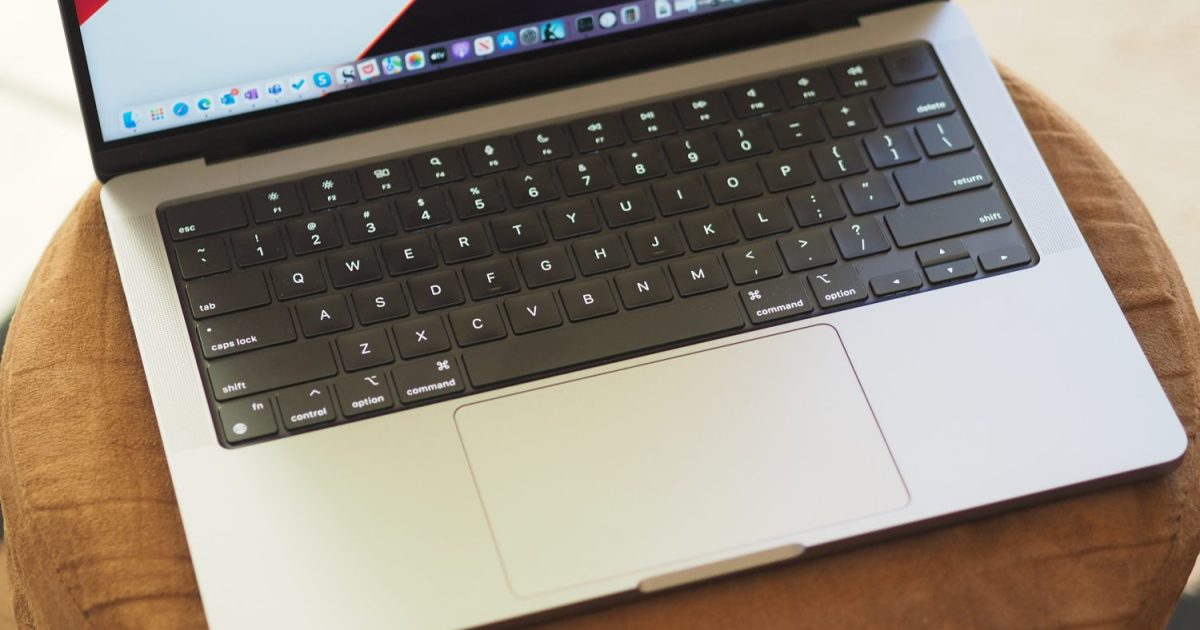
Apple has made inserting an em dash into your text very simple with a keyboard shortcut. Press the Shift (⇧) + Option (⌥) + Minus (-) keys on your keyboard, and the em dash will appear in your word processor or text box automatically.

This keyboard shortcut is program agnostic, so you can use it in a Windows environment, Google space, or any third-party text area, in addition to Mac applications.

Menu bar

An alternate option is to select the em dash accent from the macOS character viewer, which is located in the drop-down Menu bar at the top of your desktop screen. Select Edit > Emoji & Symbols.

If you’re only seeing emojis, click the small icon in the upper-right corner to expand the window to Character View. Select the Punctuation option in the side menu. Find the em dash, which will be detailed by name on the right once you’ve selected a character. Double-click it to insert it into your word processor or text box.

Search engine

After exploring the other em dash typing methods for macOS, this one might seem a bit pointless. Even so, you can search the term “em dash” in your search engine of choice, copy the symbol, and paste it into your word processor or text box.

Often, the primary search result will be a definition of “em dash,” which includes the proper symbol in parenthesis. This is the case in the Apple Safari browser. Typically, an em dash is not used often in a text, but if you need it again, you can copy and paste it from the original punctuation you pasted.

Editors’ Recommendations



Share. Facebook Twitter Pinterest LinkedIn Tumblr Email
Previous ArticleGreen Roofs Are Great. Blue-Green Roofs Are Even Better
Next Article Boomergasms Are Booming

Related Articles

I never cared about Mac desktop widgets until I found this app
News

I never cared about Mac desktop widgets until I found this app

24 August 2026
Samsung thinks Exynos 2700 can beat Qualcomm’s best next-gen chip
News

Samsung thinks Exynos 2700 can beat Qualcomm’s best next-gen chip

24 August 2026
Apple’s September 2026 event: Everything we know about the iPhone 18 Pro and iPhone Ultra launch event
News

Apple’s September 2026 event: Everything we know about the iPhone 18 Pro and iPhone Ultra launch event

24 August 2026
Samsung may be planning two Galaxy S27 Ultra sizes next year
News

Samsung may be planning two Galaxy S27 Ultra sizes next year

24 August 2026
In China, AI has reached dumpling shops where you also get to feed on compute tokens
News

In China, AI has reached dumpling shops where you also get to feed on compute tokens

23 August 2026
ASUS’ less powerful Googlebook could still cost a small fortune
News

ASUS’ less powerful Googlebook could still cost a small fortune

23 August 2026
Demo
Top Articles
5 laptops to buy instead of the M4 MacBook Pro

5 laptops to buy instead of the M4 MacBook Pro

17 November 2024133 Views
ChatGPT o1 vs. o1-mini vs. 4o: Which should you use?

ChatGPT o1 vs. o1-mini vs. 4o: Which should you use?

15 December 2024112 Views
Costco partners with Electric Era to bring back EV charging in the U.S.

Costco partners with Electric Era to bring back EV charging in the U.S.

28 October 2024100 Views

Subscribe to Updates

Get the latest tech news and updates directly to your inbox.

Latest News
ASUS’ less powerful Googlebook could still cost a small fortune News

ASUS’ less powerful Googlebook could still cost a small fortune

News Room23 August 2026
Pixel Watch 5 vs. Galaxy Watch 9 vs. Apple Watch Series 11: There’s more than one way to take your health seriously News

Pixel Watch 5 vs. Galaxy Watch 9 vs. Apple Watch Series 11: There’s more than one way to take your health seriously

News Room23 August 2026
A new iMac is coming before the end of 2026, but don’t expect much beyond M6 News

A new iMac is coming before the end of 2026, but don’t expect much beyond M6

News Room23 August 2026
Most Popular
The Spectacular Burnout of a Solar Panel Salesman

The Spectacular Burnout of a Solar Panel Salesman

13 January 2025137 Views
5 laptops to buy instead of the M4 MacBook Pro

5 laptops to buy instead of the M4 MacBook Pro

17 November 2024133 Views
ChatGPT o1 vs. o1-mini vs. 4o: Which should you use?

ChatGPT o1 vs. o1-mini vs. 4o: Which should you use?

15 December 2024112 Views
Our Picks
Samsung may be planning two Galaxy S27 Ultra sizes next year

Samsung may be planning two Galaxy S27 Ultra sizes next year

24 August 2026
In China, AI has reached dumpling shops where you also get to feed on compute tokens

In China, AI has reached dumpling shops where you also get to feed on compute tokens

23 August 2026
ASUS’ less powerful Googlebook could still cost a small fortune

ASUS’ less powerful Googlebook could still cost a small fortune

23 August 2026

Subscribe to Updates

Get the latest tech news and updates directly to your inbox.

Facebook X (Twitter) Instagram Pinterest
  • Privacy Policy
  • Terms of use
  • Advertise
  • Contact Us
© 2026 Best in Technology. All Rights Reserved.

Type above and press Enter to search. Press Esc to cancel.