




Close Menu
Best in TechnologyBest in Technology
  • News
  • Phones
  • Laptops
  • Gadgets
  • Gaming
  • AI
  • Tips
  • More
    • Web Stories
    • Global
    • Press Release

Subscribe to Updates

Get the latest tech news and updates directly to your inbox.

What's On
Your Google AI Studio apps can finally have polished, presentable web links

Your Google AI Studio apps can finally have polished, presentable web links

11 July 2026
A Majority of European Lawmakers Voted Against Letting Big Tech Read Our Messages. They’re Going to Anyway

A Majority of European Lawmakers Voted Against Letting Big Tech Read Our Messages. They’re Going to Anyway

11 July 2026
Xbox Parts Ways With Five Studios, Over 3,000 Layoffs Announced

Xbox Parts Ways With Five Studios, Over 3,000 Layoffs Announced

11 July 2026
Facebook X (Twitter) Instagram
Just In
  • Your Google AI Studio apps can finally have polished, presentable web links
  • A Majority of European Lawmakers Voted Against Letting Big Tech Read Our Messages. They’re Going to Anyway
  • Xbox Parts Ways With Five Studios, Over 3,000 Layoffs Announced
  • LG SIGNATURE DLEX9900S review: A massive, gorgeous dryer with one AI-sized asterisk
  • Exclusive: How Jay-Z Pulled Off a Surprise-Filled Show During New York’s Wildest Summer
  • Orbitals Preview – Anime nostalgia meets co-op puzzle action
  • Apple is suing OpenAI over theft of trade secrets in blockbuster lawsuit
  • The 1X Neo Robot Has Freaky Fast Fingers
Facebook X (Twitter) Instagram Pinterest Vimeo
Best in TechnologyBest in Technology
  • News
  • Phones
  • Laptops
  • Gadgets
  • Gaming
  • AI
  • Tips
  • More
    • Web Stories
    • Global
    • Press Release
Subscribe
Best in TechnologyBest in Technology
Home » How to Transfer WhatsApp Chat History on Android or iOS Using QR Code
Tips

How to Transfer WhatsApp Chat History on Android or iOS Using QR Code

News RoomBy News Room1 December 20233 Mins Read
Share Facebook Twitter Pinterest LinkedIn Tumblr Reddit Telegram Email
How to Transfer WhatsApp Chat History on Android or iOS Using QR Code
Share
Facebook Twitter LinkedIn Pinterest Email

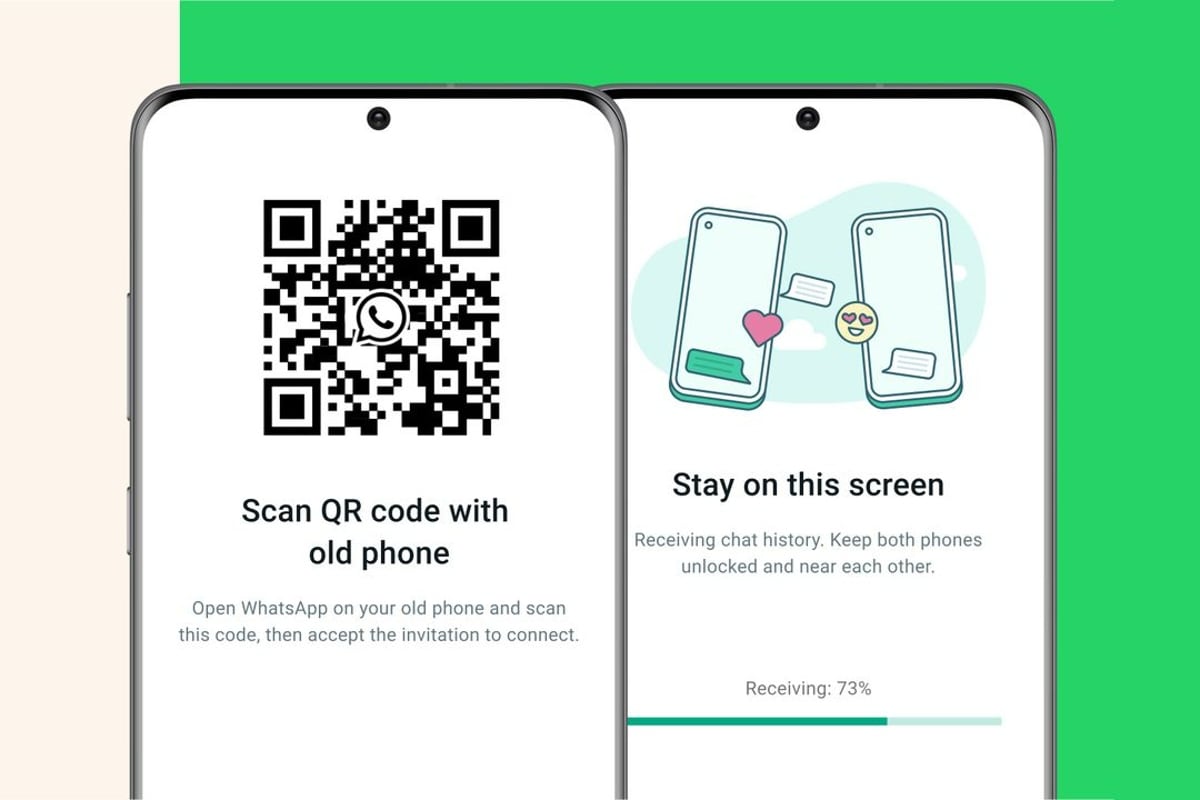
Meta, in a recent announcement, made it easier for WhatsApp users to transfer their chat history from an old phone to new phone without the use of any backup or cloud services. WhatsApp now allows Android as well as iOS users to transfer their chat history, along with media attachments, between phone running on the same OS. While the instant messaging service already had an option for transfer of chat history, it needed either backing up the chat history on storage or uploading it to the cloud.WhatsApp’s new chat transfer feature, using QR code, lets users transfer most chat information like messages, and media files including documents, links and videos. However, users will not be able to transfer details on peer-to-peer payment messages and call history.To transfer the WhatsApp Chat History via QR code, the user needs to assure that both their phones have Android OS Lollipop 5.1, or Android 6 or above installed on them. The new phone shouldn’t be registered on WhatsApp until the transfer process. Both handsets also need to have their WiFi enabled and on the same network.Similarly, for chat transfer on iOS, both old and new iPhone variants should have WhatsApp for iOS version 2.23.9.77 or above installed. Here’s how to transfer WhatsApp chat history on Android as well as iOS phones.Transfer WhatsApp Chat History on Android Phone Open WhatsApp on old phone. Go to More Options > Settings > Chats > Transfer chats > Start. On the new handset, install and register on WhatsApp using the same number. Select Start on Transfer chat history from old phone. Allow the permissions and a QR code will appear. Scan this code using your old device. Once the permission for connecting phone is granted, the process will begin. As the import is finished, tap Done. Transfer WhatsApp Chat History on iOS device Open WhatsApp on old iPhone and go to Settings > Chats > Transfer Chats to iPhone > Start. On the new phone, install WhatsApp and register using your phone number. Now select Continue on Transfer chat history to iPhone. Using the camera on your old phone, scan the QR code shown on your new device. Once the transfer completes, setup your profile on the new device.From the Nothing Phone 2 to the Motorola Razr 40 Ultra, several new smartphones are expected to make their debeut in July. We discuss all of the most exciting smartphones coming this month and more on the latest episode of Orbital, the Gadgets 360 podcast. Orbital is available on Spotify, Gaana, JioSaavn, Google Podcasts, Apple Podcasts, Amazon Music and wherever you get your podcasts.

Share. Facebook Twitter Pinterest LinkedIn Tumblr Email
Previous ArticleMicrosoft Copilot With Generative AI Features Coming to Windows 10: All You Need to Know
Next Article Things to Consider When Buying Your First Foldable Smartphone

Related Articles

How to Change Phone Number in Aadhaar Card: A Step-by-Step Guide
Tips

How to Change Phone Number in Aadhaar Card: A Step-by-Step Guide

22 July 2025
How to Upgrade to BSNL 4G/ 5G SIM Card Online: A Step-by-Step Guide
Tips

How to Upgrade to BSNL 4G/ 5G SIM Card Online: A Step-by-Step Guide

7 July 2025
How to Delete Emails in Bulk in Gmail Using Different Methods
Tips

How to Delete Emails in Bulk in Gmail Using Different Methods

26 June 2025
How to Add Music to Your WhatsApp Status
Tips

How to Add Music to Your WhatsApp Status

14 April 2025
Facebook Profile Lock: How to Lock Your FB Profile on Mobile, Desktop, Benefits, and More
Tips

Facebook Profile Lock: How to Lock Your FB Profile on Mobile, Desktop, Benefits, and More

26 February 2025
How to Activate New Airtel 5G SIM: A Step-by-Step Guide
Tips

How to Activate New Airtel 5G SIM: A Step-by-Step Guide

26 February 2025
Demo
Top Articles
5 laptops to buy instead of the M4 MacBook Pro

5 laptops to buy instead of the M4 MacBook Pro

17 November 2024133 Views
ChatGPT o1 vs. o1-mini vs. 4o: Which should you use?

ChatGPT o1 vs. o1-mini vs. 4o: Which should you use?

15 December 2024111 Views
Costco partners with Electric Era to bring back EV charging in the U.S.

Costco partners with Electric Era to bring back EV charging in the U.S.

28 October 2024100 Views

Subscribe to Updates

Get the latest tech news and updates directly to your inbox.

Latest News
Orbitals Preview – Anime nostalgia meets co-op puzzle action Gaming

Orbitals Preview – Anime nostalgia meets co-op puzzle action

News Room11 July 2026
Apple is suing OpenAI over theft of trade secrets in blockbuster lawsuit News

Apple is suing OpenAI over theft of trade secrets in blockbuster lawsuit

News Room11 July 2026
The 1X Neo Robot Has Freaky Fast Fingers News

The 1X Neo Robot Has Freaky Fast Fingers

News Room11 July 2026
Most Popular
The Spectacular Burnout of a Solar Panel Salesman

The Spectacular Burnout of a Solar Panel Salesman

13 January 2025137 Views
5 laptops to buy instead of the M4 MacBook Pro

5 laptops to buy instead of the M4 MacBook Pro

17 November 2024133 Views
ChatGPT o1 vs. o1-mini vs. 4o: Which should you use?

ChatGPT o1 vs. o1-mini vs. 4o: Which should you use?

15 December 2024111 Views
Our Picks
LG SIGNATURE DLEX9900S review: A massive, gorgeous dryer with one AI-sized asterisk

LG SIGNATURE DLEX9900S review: A massive, gorgeous dryer with one AI-sized asterisk

11 July 2026
Exclusive: How Jay-Z Pulled Off a Surprise-Filled Show During New York’s Wildest Summer

Exclusive: How Jay-Z Pulled Off a Surprise-Filled Show During New York’s Wildest Summer

11 July 2026
Orbitals Preview – Anime nostalgia meets co-op puzzle action

Orbitals Preview – Anime nostalgia meets co-op puzzle action

11 July 2026

Subscribe to Updates

Get the latest tech news and updates directly to your inbox.

Facebook X (Twitter) Instagram Pinterest
  • Privacy Policy
  • Terms of use
  • Advertise
  • Contact Us
© 2026 Best in Technology. All Rights Reserved.

Type above and press Enter to search. Press Esc to cancel.