


Close Menu
Best in TechnologyBest in Technology
  • News
  • Phones
  • Laptops
  • Gadgets
  • Gaming
  • AI
  • Tips
  • More
    • Web Stories
    • Global
    • Press Release

Subscribe to Updates

Get the latest tech news and updates directly to your inbox.

What's On
Android 17 is getting a feature iPhone users have had for years

Android 17 is getting a feature iPhone users have had for years

15 August 2026
6 Best Apple Watch Accessories to Upgrade Your Watch (2026)

6 Best Apple Watch Accessories to Upgrade Your Watch (2026)

15 August 2026
Apple has a plan to fix its memory chip problem, but the US government says no

Apple has a plan to fix its memory chip problem, but the US government says no

15 August 2026
Facebook X (Twitter) Instagram
Just In
  • Android 17 is getting a feature iPhone users have had for years
  • 6 Best Apple Watch Accessories to Upgrade Your Watch (2026)
  • Apple has a plan to fix its memory chip problem, but the US government says no
  • Instapaper, the Original Read-It-Later App, Just Got a Huge Upgrade
  • This Beautifully Weird Necklace Is Secretly a USB Drive
  • WhatsApp will finally let you react with the emoji you actually want, but there’s a catch
  • Review: Retrospec Joe Rev 2
  • Review: Auk Mini 2 Indoor Smart Garden
Facebook X (Twitter) Instagram Pinterest Vimeo
Best in TechnologyBest in Technology
  • News
  • Phones
  • Laptops
  • Gadgets
  • Gaming
  • AI
  • Tips
  • More
    • Web Stories
    • Global
    • Press Release
Subscribe
Best in TechnologyBest in Technology
Home » How to show hidden files in Windows
News

How to show hidden files in Windows

News RoomBy News Room6 August 20242 Mins Read
Share Facebook Twitter Pinterest LinkedIn Tumblr Reddit Telegram Email
How to show hidden files in Windows
Share
Facebook Twitter LinkedIn Pinterest Email

Hiding files is a great way to improve the security and privacy of your data, but it doesn’t lock them away with a password or encryption. You can show hidden files in Windows on your account so that you can still readily access them if you know where they are. They still won’t show up in search results, but will have a translucent look to them, making them easier to open, edit, or otherwise.

Here’s how to show hidden files in Windows.
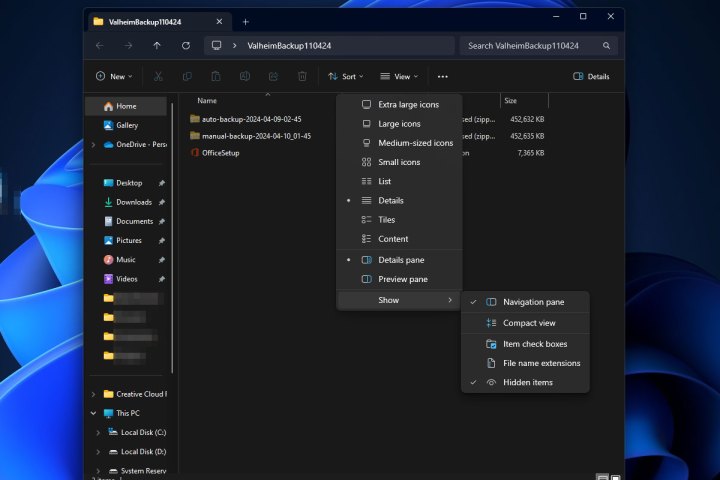
Hidden items in Windows 11.

How to show hidden files in Windows 11

Step 1: Open any folder or the Windows File Explorer.

Step 2: Select View from the top-bar menu.

Step 3: Select Show from the drop-down menu that appears.

Step 4: Select Hidden items.

Hidden files and folders will now be partially visible.

Step 5: If you ever want to hide those files again, you can repeat the above steps and select Hidden items again, so that it is unticked.

show hidden files in Windows

How to show hidden files in Windows 10

Showing hidden files in Windows 10 is much the same as Windows 11, though not exactly. Here’s how to do it.

Step 1: Open any folder or the Windows File Explorer.

Step 2: Select the View tab in the quick-access toolbar.

Step 3: On the right-hand side, select the checkbox next to Hidden items. Hidden files and folders will now be visible.

If you can’t see the option, select the Show/hide button to open the options up.

Step 4: If you ever want to hide files and folders again, simple repeat these steps and uncheck the box.

Want to hide some more files and folders? Here’s our guide on how to hide folders in Windows.


Share. Facebook Twitter Pinterest LinkedIn Tumblr Email
Previous ArticleGalaxy AI Features to Reportedly Arrive on Samsung Galaxy A35, Galaxy A55 Models
Next Article How to Go to Burning Man in an Extreme Climate and Feel Good About It

Related Articles

Android 17 is getting a feature iPhone users have had for years
News

Android 17 is getting a feature iPhone users have had for years

15 August 2026
6 Best Apple Watch Accessories to Upgrade Your Watch (2026)
News

6 Best Apple Watch Accessories to Upgrade Your Watch (2026)

15 August 2026
Apple has a plan to fix its memory chip problem, but the US government says no
News

Apple has a plan to fix its memory chip problem, but the US government says no

15 August 2026
Instapaper, the Original Read-It-Later App, Just Got a Huge Upgrade
News

Instapaper, the Original Read-It-Later App, Just Got a Huge Upgrade

15 August 2026
This Beautifully Weird Necklace Is Secretly a USB Drive
News

This Beautifully Weird Necklace Is Secretly a USB Drive

15 August 2026
WhatsApp will finally let you react with the emoji you actually want, but there’s a catch
News

WhatsApp will finally let you react with the emoji you actually want, but there’s a catch

15 August 2026
Demo
Top Articles
5 laptops to buy instead of the M4 MacBook Pro

5 laptops to buy instead of the M4 MacBook Pro

17 November 2024133 Views
ChatGPT o1 vs. o1-mini vs. 4o: Which should you use?

ChatGPT o1 vs. o1-mini vs. 4o: Which should you use?

15 December 2024112 Views
Costco partners with Electric Era to bring back EV charging in the U.S.

Costco partners with Electric Era to bring back EV charging in the U.S.

28 October 2024100 Views

Subscribe to Updates

Get the latest tech news and updates directly to your inbox.

Latest News
WhatsApp will finally let you react with the emoji you actually want, but there’s a catch News

WhatsApp will finally let you react with the emoji you actually want, but there’s a catch

News Room15 August 2026
Review: Retrospec Joe Rev 2 News

Review: Retrospec Joe Rev 2

News Room15 August 2026
Review: Auk Mini 2 Indoor Smart Garden News

Review: Auk Mini 2 Indoor Smart Garden

News Room15 August 2026
Most Popular
The Spectacular Burnout of a Solar Panel Salesman

The Spectacular Burnout of a Solar Panel Salesman

13 January 2025137 Views
5 laptops to buy instead of the M4 MacBook Pro

5 laptops to buy instead of the M4 MacBook Pro

17 November 2024133 Views
ChatGPT o1 vs. o1-mini vs. 4o: Which should you use?

ChatGPT o1 vs. o1-mini vs. 4o: Which should you use?

15 December 2024112 Views
Our Picks
Instapaper, the Original Read-It-Later App, Just Got a Huge Upgrade

Instapaper, the Original Read-It-Later App, Just Got a Huge Upgrade

15 August 2026
This Beautifully Weird Necklace Is Secretly a USB Drive

This Beautifully Weird Necklace Is Secretly a USB Drive

15 August 2026
WhatsApp will finally let you react with the emoji you actually want, but there’s a catch

WhatsApp will finally let you react with the emoji you actually want, but there’s a catch

15 August 2026

Subscribe to Updates

Get the latest tech news and updates directly to your inbox.

Facebook X (Twitter) Instagram Pinterest
  • Privacy Policy
  • Terms of use
  • Advertise
  • Contact Us
© 2026 Best in Technology. All Rights Reserved.

Type above and press Enter to search. Press Esc to cancel.