Close Menu
Best in TechnologyBest in Technology
  • News
  • Phones
  • Laptops
  • Gadgets
  • Gaming
  • AI
  • Tips
  • More
    • Web Stories
    • Global
    • Press Release

Subscribe to Updates

Get the latest tech news and updates directly to your inbox.

What's On
Skyrover S1: The lightweight cinematic drone leading the next wave of accessible aerial creativity

Skyrover S1: The lightweight cinematic drone leading the next wave of accessible aerial creativity

4 March 2026
What It’s Like to Have a Brain Implant for 5 Years

What It’s Like to Have a Brain Implant for 5 Years

4 March 2026
One of 2025’s most powerful camera phones is getting a successor, and it’s going global

One of 2025’s most powerful camera phones is getting a successor, and it’s going global

4 March 2026
Facebook X (Twitter) Instagram
Just In
  • Skyrover S1: The lightweight cinematic drone leading the next wave of accessible aerial creativity
  • What It’s Like to Have a Brain Implant for 5 Years
  • One of 2025’s most powerful camera phones is getting a successor, and it’s going global
  • Call of Duty’s new ‘Black Ops Royale’ mode brings back classic battle royale
  • These Official ChromeOS Flex USB Sticks Can Give Your Old Mac or Windows PC a Second Life
  • An 8-bit quality surprise on Samsung’s Galaxy S26 Ultra has stumped me
  • Apple gives Studio Display a big Thunderbolt 5 upgrade and VESA adapter
  • Barkbox Promo Codes and Discounts: Up to 50% Off
Facebook X (Twitter) Instagram Pinterest Vimeo
Best in TechnologyBest in Technology
  • News
  • Phones
  • Laptops
  • Gadgets
  • Gaming
  • AI
  • Tips
  • More
    • Web Stories
    • Global
    • Press Release
Subscribe
Best in TechnologyBest in Technology
Home » How to restore deleted or missing contacts on your iPhone
News

How to restore deleted or missing contacts on your iPhone

News RoomBy News Room30 January 20243 Mins Read
Share Facebook Twitter Pinterest LinkedIn Tumblr Reddit Telegram Email
How to restore deleted or missing contacts on your iPhone
Share
Facebook Twitter LinkedIn Pinterest Email

The iPhone contacts feature is so great it is practically a crutch at times. Can you even remember your closest family member’s phone number at this point? If not, you could be in big trouble if your contacts go missing or get deleted. Luckily, there are several methods to recover your old contacts via your iPhone and other devices. We’ll guide you through each technique so you can get back to functioning as normal quickly.

iCloud makes it easy to restore your contacts on the best iPhones. Here’s how to restore contacts on an iPhone from iCloud using iOS.

To avoid losing your data and contacts, check out our guide on how to backup an iPhone and how to use iCloud.

Recover contacts using iCloud on your iPhone

If you’ve lost or deleted a contact by mistake, don’t panic. Contacts are set to sync with iCloud by default. You can go to Settings and turn them off and on to sync to your iPhone again.

Step 1: Go to Settings > [your name] > iCloud.
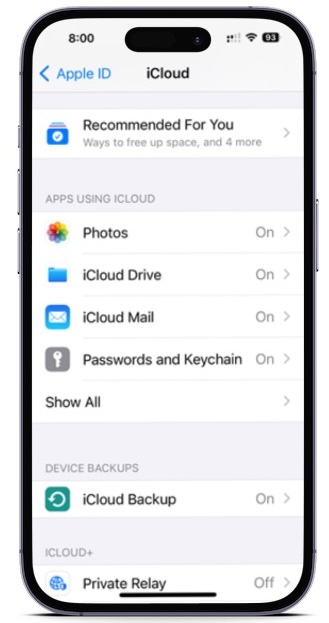
iCloud settings on an iPhone.

Step 2: Turn Contacts off and select Keep on My iPhone.
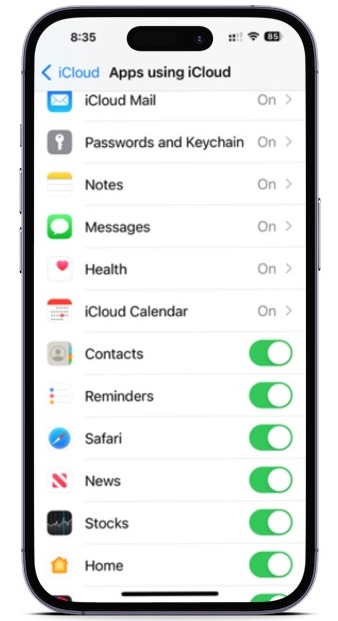
Contacts settings for iCloud on an iPhone.

Step 3: Turn Contacts on and select Merge. Wait a little while, and you should see the deleted contacts back on your iPhone.
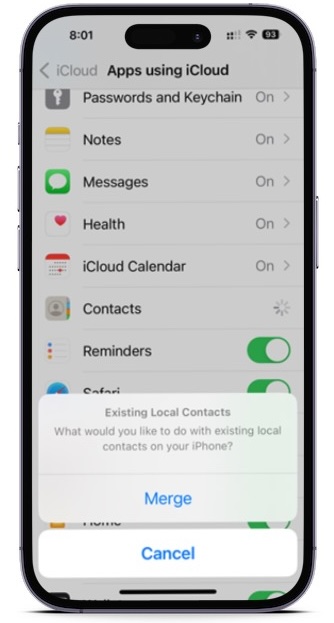
Contacts iCloud settings on an iPhone.

Recover contacts using iCloud.com

This is another trusted method for retrieving lost contact information — as well as other things like Reminders and Calendar events — and it comes directly from Apple. All you need is a computer, your Apple ID and password, and a bit of time.

Step 1: Pull up iCloud.com and use your Apple ID and password to log in.

Step 2: When you’ve signed in, go down and select the Data Recovery button.

Step 3: Go down to the Restore Contacts.
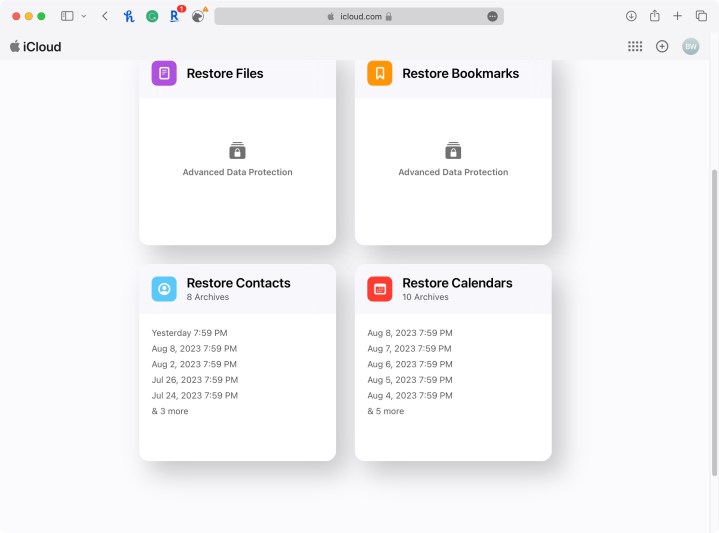
Selecting Data Recovery through iCloud.com.

Step 4: You’ll find a list of archives you’ve created in the past. Using their dates, locate an archive that should contain your full contacts list and hit Restore.
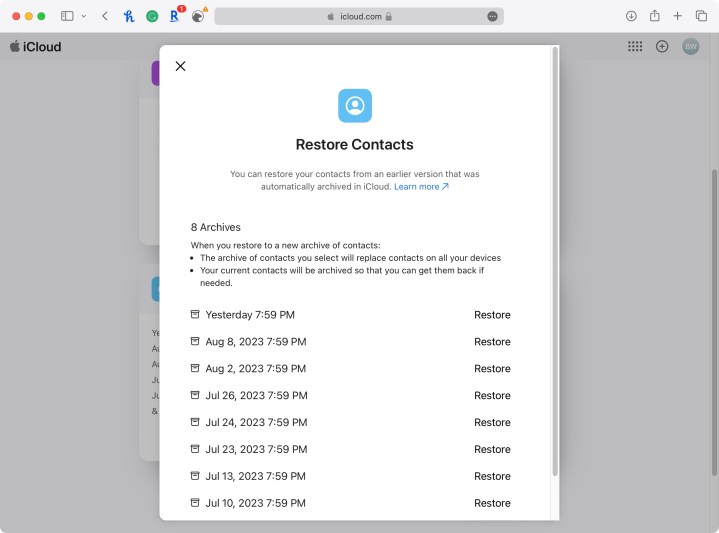
Selecting contact backup you wish to restore.

Step 5: Hit Restore once more to confirm and start the restoration. Afterward, you’ll get an email at the address linked to your Apple ID.

More techniques for restoring iPhone contacts

Here are some more things you can try:

  • If the above techniques don’t work, you can also try to restore your phone from an iTunes backup, which will also have contact data.
  • If you still have your old iPhone and haven’t changed many contacts since then, you can port them over or add important ones.
  • Consider reaching out on Facebook or to another mutual friend to get contact info again. Not remembering a friend or contact’s info is not as embarrassing as it might seem.

What about new contacts?

Most of the above techniques will update and replace all of your contacts on any iPhone, rather than merely adding any that are missing. So, assuming you’ve added new contacts since the last backup, you will lose those new contacts. The good news is that your iPhone will automatically backup your new contacts before it completes this restore, so you will be able to retrieve them later.

You can retrieve your new contacts by following the first three steps above. When you do, make sure you select the archive made on the same day you restored your phone. Of course, if you accidentally restore with the wrong archive, no worries. You can use the same process if you accidentally select an incorrect archive to restore your contacts.

Editors’ Recommendations


Share. Facebook Twitter Pinterest LinkedIn Tumblr Email
Previous ArticleSony Xperia 1 VI Tipped to Launch in February at MCW 2024; Camera Details Leaked
Next Article Acer Swift Go 14 With Up to Intel Core Ultra 7 CPUs Launched in India: Price, Specifications

Related Articles

Skyrover S1: The lightweight cinematic drone leading the next wave of accessible aerial creativity
News

Skyrover S1: The lightweight cinematic drone leading the next wave of accessible aerial creativity

4 March 2026
What It’s Like to Have a Brain Implant for 5 Years
News

What It’s Like to Have a Brain Implant for 5 Years

4 March 2026
One of 2025’s most powerful camera phones is getting a successor, and it’s going global
News

One of 2025’s most powerful camera phones is getting a successor, and it’s going global

4 March 2026
Call of Duty’s new ‘Black Ops Royale’ mode brings back classic battle royale
News

Call of Duty’s new ‘Black Ops Royale’ mode brings back classic battle royale

4 March 2026
These Official ChromeOS Flex USB Sticks Can Give Your Old Mac or Windows PC a Second Life
News

These Official ChromeOS Flex USB Sticks Can Give Your Old Mac or Windows PC a Second Life

4 March 2026
An 8-bit quality surprise on Samsung’s Galaxy S26 Ultra has stumped me
News

An 8-bit quality surprise on Samsung’s Galaxy S26 Ultra has stumped me

4 March 2026
Demo
Top Articles
5 laptops to buy instead of the M4 MacBook Pro

5 laptops to buy instead of the M4 MacBook Pro

17 November 2024126 Views
ChatGPT o1 vs. o1-mini vs. 4o: Which should you use?

ChatGPT o1 vs. o1-mini vs. 4o: Which should you use?

15 December 2024111 Views
Costco partners with Electric Era to bring back EV charging in the U.S.

Costco partners with Electric Era to bring back EV charging in the U.S.

28 October 202499 Views

Subscribe to Updates

Get the latest tech news and updates directly to your inbox.

Latest News
An 8-bit quality surprise on Samsung’s Galaxy S26 Ultra has stumped me News

An 8-bit quality surprise on Samsung’s Galaxy S26 Ultra has stumped me

News Room4 March 2026
Apple gives Studio Display a big Thunderbolt 5 upgrade and VESA adapter News

Apple gives Studio Display a big Thunderbolt 5 upgrade and VESA adapter

News Room4 March 2026
Barkbox Promo Codes and Discounts: Up to 50% Off News

Barkbox Promo Codes and Discounts: Up to 50% Off

News Room4 March 2026
Most Popular
The Spectacular Burnout of a Solar Panel Salesman

The Spectacular Burnout of a Solar Panel Salesman

13 January 2025137 Views
5 laptops to buy instead of the M4 MacBook Pro

5 laptops to buy instead of the M4 MacBook Pro

17 November 2024126 Views
ChatGPT o1 vs. o1-mini vs. 4o: Which should you use?

ChatGPT o1 vs. o1-mini vs. 4o: Which should you use?

15 December 2024111 Views
Our Picks
Call of Duty’s new ‘Black Ops Royale’ mode brings back classic battle royale

Call of Duty’s new ‘Black Ops Royale’ mode brings back classic battle royale

4 March 2026
These Official ChromeOS Flex USB Sticks Can Give Your Old Mac or Windows PC a Second Life

These Official ChromeOS Flex USB Sticks Can Give Your Old Mac or Windows PC a Second Life

4 March 2026
An 8-bit quality surprise on Samsung’s Galaxy S26 Ultra has stumped me

An 8-bit quality surprise on Samsung’s Galaxy S26 Ultra has stumped me

4 March 2026

Subscribe to Updates

Get the latest tech news and updates directly to your inbox.

Facebook X (Twitter) Instagram Pinterest
  • Privacy Policy
  • Terms of use
  • Advertise
  • Contact Us
© 2026 Best in Technology. All Rights Reserved.

Type above and press Enter to search. Press Esc to cancel.