


Close Menu
Best in TechnologyBest in Technology
  • News
  • Phones
  • Laptops
  • Gadgets
  • Gaming
  • AI
  • Tips
  • More
    • Web Stories
    • Global
    • Press Release

Subscribe to Updates

Get the latest tech news and updates directly to your inbox.

What's On
The flagship phone chip race just got another monster

The flagship phone chip race just got another monster

24 August 2026
The Best Home Theater Projectors in 2026: XGIMI, Hisense, Leica, and More

The Best Home Theater Projectors in 2026: XGIMI, Hisense, Leica, and More

24 August 2026
Google’s 9 Pixel 11 can’t properly play Genshin Impact, and we’ve been here before

Google’s $899 Pixel 11 can’t properly play Genshin Impact, and we’ve been here before

24 August 2026
Facebook X (Twitter) Instagram
Just In
  • The flagship phone chip race just got another monster
  • The Best Home Theater Projectors in 2026: XGIMI, Hisense, Leica, and More
  • Google’s $899 Pixel 11 can’t properly play Genshin Impact, and we’ve been here before
  • The Best Multiuse Air Purifier for Home in 2026: BlueAir, Rabbit Air, Dreame
  • NASA’s New Space Telescope Is Poised to Discover Hidden Facets of the Universe
  • I never cared about Mac desktop widgets until I found this app
  • Samsung thinks Exynos 2700 can beat Qualcomm’s best next-gen chip
  • Apple’s September 2026 event: Everything we know about the iPhone 18 Pro and iPhone Ultra launch event
Facebook X (Twitter) Instagram Pinterest Vimeo
Best in TechnologyBest in Technology
  • News
  • Phones
  • Laptops
  • Gadgets
  • Gaming
  • AI
  • Tips
  • More
    • Web Stories
    • Global
    • Press Release
Subscribe
Best in TechnologyBest in Technology
Home » How to generate AI art right in Google Search
News

How to generate AI art right in Google Search

News RoomBy News Room28 December 20232 Mins Read
Share Facebook Twitter Pinterest LinkedIn Tumblr Reddit Telegram Email
How to generate AI art right in Google Search
Share
Facebook Twitter LinkedIn Pinterest Email

After a year of different iterations and programs promising the best in AI-generated art, the easiest way to access your next text-to-image masterpiece might now be to Google it.

The brand’s Labs AI experimental hub has been available since the spring, and one of its most recent features allows you to input a query to generate an AI image directly into Google Search and have that image populate into results.

Enabling Google’s Search Generative Experience (SGE) allows you to accept AI-generated results in your search and in pages while browsing. Setting the feature up is simple and can be done on a Google Chrome browser on desktop or the Google app on mobile. Follow these easy steps to start creating AI-generated art directly from Google Search.

  • Visit the Labs website at labs.google.
  • Scroll down to the Google Search section and click Get Started.
  • Select the SGE, generative AI in Search toggle.

This option will likely be enabled by default if you need to install the Google Chrome browser or the Google app. However, you always have the option to turn the feature off when you’re not interested in participating in the AI experiment.

To use the generative AI feature, you only need to type your query into the search box at Google.com or the search box at the top of the browser. Using the default example prompt, “draw a picture of a capybara wearing a chef’s hat and cooking breakfast,” generated several unique images of the animals preparing breakfast foods.

In one generation, I got a more realistic image of a capybara in a chef’s hat and the animal making pancakes and waffles. Then, in a second generation, I got an image of a portrait of a capybara making eggs and another image of the animal making a smoothie.
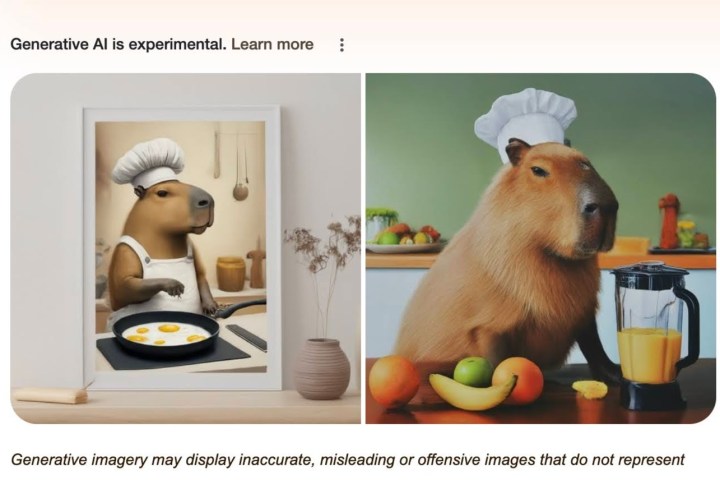
Capybara in a chef's hat prompt.

Clicking each image gives a description of the art and also notes that they are AI-generated. The main image results also note that generative AI is experimental and includes a warning of potential “inaccurate, misleading or offensive images.” You can then use the text box below to put follow-up questions and inquiries, similar to Microsoft Bing Chat.

To scroll beyond the AI image search, you get the standard Google Search results, including links referencing Google’s SGE and other AI image generation topics. You can imagine that the text and link search results you get will match the image query you inputted.

Editors’ Recommendations


Share. Facebook Twitter Pinterest LinkedIn Tumblr Email
Previous ArticleNvidia’s CEO Was the Man of This Year, Next Year, and the One After That
Next Article Starfield, Baldur’s gate 3, and Hogwarts Legacy Lead Steam’s End Of Year Stats

Related Articles

The flagship phone chip race just got another monster
News

The flagship phone chip race just got another monster

24 August 2026
The Best Home Theater Projectors in 2026: XGIMI, Hisense, Leica, and More
News

The Best Home Theater Projectors in 2026: XGIMI, Hisense, Leica, and More

24 August 2026
Google’s 9 Pixel 11 can’t properly play Genshin Impact, and we’ve been here before
News

Google’s $899 Pixel 11 can’t properly play Genshin Impact, and we’ve been here before

24 August 2026
The Best Multiuse Air Purifier for Home in 2026: BlueAir, Rabbit Air, Dreame
News

The Best Multiuse Air Purifier for Home in 2026: BlueAir, Rabbit Air, Dreame

24 August 2026
NASA’s New Space Telescope Is Poised to Discover Hidden Facets of the Universe
News

NASA’s New Space Telescope Is Poised to Discover Hidden Facets of the Universe

24 August 2026
I never cared about Mac desktop widgets until I found this app
News

I never cared about Mac desktop widgets until I found this app

24 August 2026
Demo
Top Articles
5 laptops to buy instead of the M4 MacBook Pro

5 laptops to buy instead of the M4 MacBook Pro

17 November 2024133 Views
ChatGPT o1 vs. o1-mini vs. 4o: Which should you use?

ChatGPT o1 vs. o1-mini vs. 4o: Which should you use?

15 December 2024112 Views
Costco partners with Electric Era to bring back EV charging in the U.S.

Costco partners with Electric Era to bring back EV charging in the U.S.

28 October 2024100 Views

Subscribe to Updates

Get the latest tech news and updates directly to your inbox.

Latest News
I never cared about Mac desktop widgets until I found this app News

I never cared about Mac desktop widgets until I found this app

News Room24 August 2026
Samsung thinks Exynos 2700 can beat Qualcomm’s best next-gen chip News

Samsung thinks Exynos 2700 can beat Qualcomm’s best next-gen chip

News Room24 August 2026
Apple’s September 2026 event: Everything we know about the iPhone 18 Pro and iPhone Ultra launch event News

Apple’s September 2026 event: Everything we know about the iPhone 18 Pro and iPhone Ultra launch event

News Room24 August 2026
Most Popular
The Spectacular Burnout of a Solar Panel Salesman

The Spectacular Burnout of a Solar Panel Salesman

13 January 2025137 Views
5 laptops to buy instead of the M4 MacBook Pro

5 laptops to buy instead of the M4 MacBook Pro

17 November 2024133 Views
ChatGPT o1 vs. o1-mini vs. 4o: Which should you use?

ChatGPT o1 vs. o1-mini vs. 4o: Which should you use?

15 December 2024112 Views
Our Picks
The Best Multiuse Air Purifier for Home in 2026: BlueAir, Rabbit Air, Dreame

The Best Multiuse Air Purifier for Home in 2026: BlueAir, Rabbit Air, Dreame

24 August 2026
NASA’s New Space Telescope Is Poised to Discover Hidden Facets of the Universe

NASA’s New Space Telescope Is Poised to Discover Hidden Facets of the Universe

24 August 2026
I never cared about Mac desktop widgets until I found this app

I never cared about Mac desktop widgets until I found this app

24 August 2026

Subscribe to Updates

Get the latest tech news and updates directly to your inbox.

Facebook X (Twitter) Instagram Pinterest
  • Privacy Policy
  • Terms of use
  • Advertise
  • Contact Us
© 2026 Best in Technology. All Rights Reserved.

Type above and press Enter to search. Press Esc to cancel.