Close Menu
Best in TechnologyBest in Technology
  • News
  • Phones
  • Laptops
  • Gadgets
  • Gaming
  • AI
  • Tips
  • More
    • Web Stories
    • Global
    • Press Release

Subscribe to Updates

Get the latest tech news and updates directly to your inbox.

What's On
Google is prepping a dedicated app to identify songs playing around you

Google is prepping a dedicated app to identify songs playing around you

16 February 2026
Apple sets the date for March 4 event and it could be a big one for Macs

Apple sets the date for March 4 event and it could be a big one for Macs

16 February 2026
Review: Sony LinkBuds Clip

Review: Sony LinkBuds Clip

16 February 2026
Facebook X (Twitter) Instagram
Just In
  • Google is prepping a dedicated app to identify songs playing around you
  • Apple sets the date for March 4 event and it could be a big one for Macs
  • Review: Sony LinkBuds Clip
  • After hidden doors, yoke-style half-steering wheels could go out of vogue soon
  • The El Paso No-Fly Debacle Is Just the Beginning of a Drone Defense Mess
  • This new aluminum-based EV battery could solve cold-weather range and charging issues
  • Amazon Props Up Misleading, Junky Laptops No One Should Buy
  • Gemini can now create audio summaries of your Google Docs
Facebook X (Twitter) Instagram Pinterest Vimeo
Best in TechnologyBest in Technology
  • News
  • Phones
  • Laptops
  • Gadgets
  • Gaming
  • AI
  • Tips
  • More
    • Web Stories
    • Global
    • Press Release
Subscribe
Best in TechnologyBest in Technology
Home » How to fix a Shark robot vacuum that’s not charging
News

How to fix a Shark robot vacuum that’s not charging

News RoomBy News Room1 March 20244 Mins Read
Share Facebook Twitter Pinterest LinkedIn Tumblr Reddit Telegram Email
How to fix a Shark robot vacuum that’s not charging
Share
Facebook Twitter LinkedIn Pinterest Email

Shark has a number of handy cordless vacuums designed with rechargeable batteries, including slim stick vacuums and the Ion line of robot vacuums. Many robot vacs have the ability to go back to their charging stations automatically when necessary.

While you can expect rechargeable batteries to lose a little juice over time, if your Shark robovac or similar vacuum is relatively new but just not charging, then there’s certainly something wrong. While you could always buy a replacement, or get a bargain via a robot vacuum deal, its always best to try to resolve the problem on your own. Going over these steps can help you find the problem and fix it fast.

Why is my Shark vacuum not charging?

Charging problems, especially with a newer Shark vacuum, are usually caused by positioning or power issues. Thankfully these are not permanent issues. There are often simple fixes to try if you know what to look for — and that’s where we’re going to help out!

What do you do if your Shark robot vacuum won’t charge?

Step 1: Look at your on/off switch.

Shark robot vacuums have a manual on/off switch located on the robovac itself. Switching the bot off can help you save on power if you don’t want to use the battery or don’t plan on scheduling a vacuum session for a few days. However, sometimes this switch gets flipped to the off position when the robot bumps into furniture. Users find the robot unresponsive and try putting the bot in its charger to give the battery a boost, but when the robot vacuum is off, it won’t always charge.

Check the manual switch, and make sure it’s in the on position. Sometimes, this easy fix is all you need.
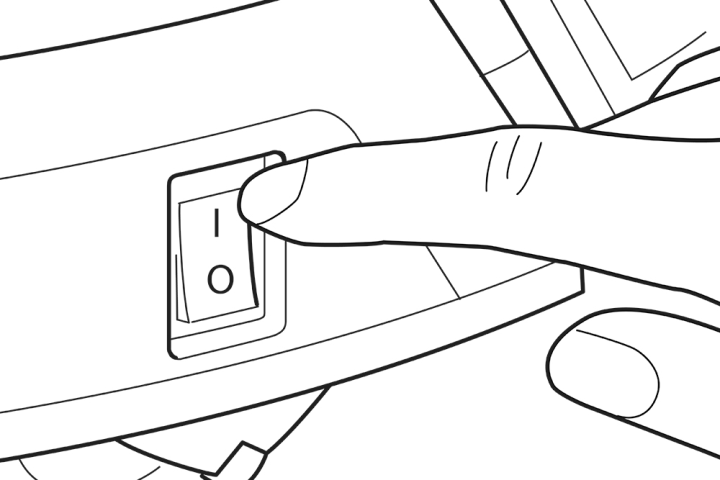
Power button on Shark Ion.

Step 2: Check if you need to manually place the vac.

Your Shark robot vac should have blue LED indicator lights on the top of the unit to show battery strength. As long as at least one of these indicator lights is on, then your bot probably has enough remaining battery life to go back to its charger automatically. There are other Shark vacuum indicator light colors that signify other problems.

If all the lights on the vacuum are off, then the battery is probably too empty to fuel a trip back to the dock. In these cases, your vacuum needs a little help: Carry it back to the dock and put it in place so that it starts charging.

This is also good advice for using your robot vacuum for the first time: It usually needs to be charged in the dock before it’s ready for action.

Step 3: Clean all charging contacts.

The Shark vacuum should have two metal contact points designed to fit against two metal plates on the charging dock. When these two pieces make proper contact, the battery can charge. However, sometimes the contacts can’t connect. Clean the contacts on both the bot and the charging dock to see if this fixes the problem. The battery indicator lights on your vacuum will start blinking when the robot is charging, which is an easy way to see if it’s working.
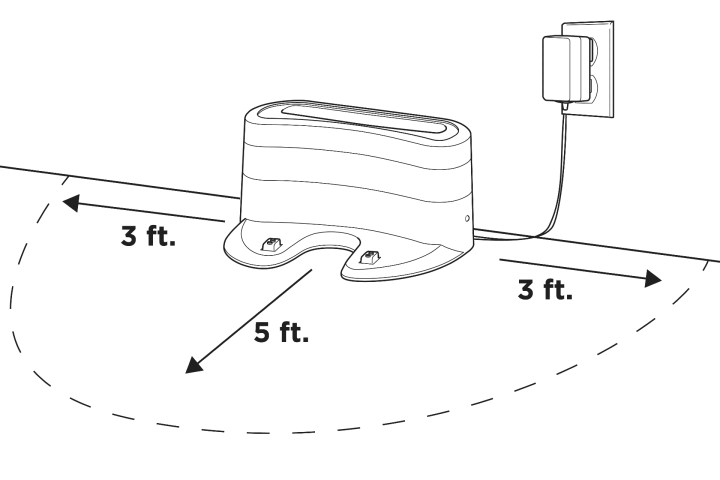
Shark Dock Placement.

Step 4: Check the dock for power and proper operation.

While not as common, something might have happened to the charging dock to prevent it from working properly. When the dock is turned on and ready to charge, it should have a green light illuminated on the side. If your dock doesn’t, make sure it’s plugged in, and try another outlet to see if it can get power elsewhere.

You should always place the dock in an area that’s free of obstructions. It should have three feet of space on either side and five feet of space in front of it. If there isn’t enough room, the robovac may not be able to make it back properly.

Step 5: Inspect and replace the battery.

If nothing else works, it’s time to open up the battery case and take a look. Sometimes the battery may have gotten dirty or slipped away from its contacts inside the Shark robot vacuum. Cleaning and repositioning it may fix your problem. But if it’s an old battery or there are clear signs of damage, you should order a replacement battery that matches your model.

If none of these troubleshooting tips work, it might be time for a new model. Check out our list of the best Shark vacuums to see which model might be right for you.

Editors’ Recommendations


Share. Facebook Twitter Pinterest LinkedIn Tumblr Email
Previous ArticleGood Climate Solutions Need Good Policy—and AI Can Help With That
Next Article Meizu 21 Pro With Snapdragon 8 Gen 3 SoC, 50-Megapixel Camera Launched: Price, Specifications

Related Articles

Google is prepping a dedicated app to identify songs playing around you
News

Google is prepping a dedicated app to identify songs playing around you

16 February 2026
Apple sets the date for March 4 event and it could be a big one for Macs
News

Apple sets the date for March 4 event and it could be a big one for Macs

16 February 2026
Review: Sony LinkBuds Clip
News

Review: Sony LinkBuds Clip

16 February 2026
After hidden doors, yoke-style half-steering wheels could go out of vogue soon
News

After hidden doors, yoke-style half-steering wheels could go out of vogue soon

16 February 2026
The El Paso No-Fly Debacle Is Just the Beginning of a Drone Defense Mess
News

The El Paso No-Fly Debacle Is Just the Beginning of a Drone Defense Mess

16 February 2026
This new aluminum-based EV battery could solve cold-weather range and charging issues
News

This new aluminum-based EV battery could solve cold-weather range and charging issues

16 February 2026
Demo
Top Articles
5 laptops to buy instead of the M4 MacBook Pro

5 laptops to buy instead of the M4 MacBook Pro

17 November 2024126 Views
ChatGPT o1 vs. o1-mini vs. 4o: Which should you use?

ChatGPT o1 vs. o1-mini vs. 4o: Which should you use?

15 December 2024110 Views
Costco partners with Electric Era to bring back EV charging in the U.S.

Costco partners with Electric Era to bring back EV charging in the U.S.

28 October 202498 Views

Subscribe to Updates

Get the latest tech news and updates directly to your inbox.

Latest News
This new aluminum-based EV battery could solve cold-weather range and charging issues News

This new aluminum-based EV battery could solve cold-weather range and charging issues

News Room16 February 2026
Amazon Props Up Misleading, Junky Laptops No One Should Buy News

Amazon Props Up Misleading, Junky Laptops No One Should Buy

News Room16 February 2026
Gemini can now create audio summaries of your Google Docs News

Gemini can now create audio summaries of your Google Docs

News Room16 February 2026
Most Popular
The Spectacular Burnout of a Solar Panel Salesman

The Spectacular Burnout of a Solar Panel Salesman

13 January 2025137 Views
5 laptops to buy instead of the M4 MacBook Pro

5 laptops to buy instead of the M4 MacBook Pro

17 November 2024126 Views
ChatGPT o1 vs. o1-mini vs. 4o: Which should you use?

ChatGPT o1 vs. o1-mini vs. 4o: Which should you use?

15 December 2024110 Views
Our Picks
After hidden doors, yoke-style half-steering wheels could go out of vogue soon

After hidden doors, yoke-style half-steering wheels could go out of vogue soon

16 February 2026
The El Paso No-Fly Debacle Is Just the Beginning of a Drone Defense Mess

The El Paso No-Fly Debacle Is Just the Beginning of a Drone Defense Mess

16 February 2026
This new aluminum-based EV battery could solve cold-weather range and charging issues

This new aluminum-based EV battery could solve cold-weather range and charging issues

16 February 2026

Subscribe to Updates

Get the latest tech news and updates directly to your inbox.

Facebook X (Twitter) Instagram Pinterest
  • Privacy Policy
  • Terms of use
  • Advertise
  • Contact Us
© 2026 Best in Technology. All Rights Reserved.

Type above and press Enter to search. Press Esc to cancel.