


Close Menu
Best in TechnologyBest in Technology
  • News
  • Phones
  • Laptops
  • Gadgets
  • Gaming
  • AI
  • Tips
  • More
    • Web Stories
    • Global
    • Press Release

Subscribe to Updates

Get the latest tech news and updates directly to your inbox.

What's On
A tight squeeze could fix the biggest hurdle for solid-state car and gadget batteries

A tight squeeze could fix the biggest hurdle for solid-state car and gadget batteries

29 August 2026
3 hidden gems on HBO Max you should watch this weekend (August 28-30)

3 hidden gems on HBO Max you should watch this weekend (August 28-30)

29 August 2026
Smart rings focus on the heart. I saw the future, and it’s a sweat-sensing lab on your finger.

Smart rings focus on the heart. I saw the future, and it’s a sweat-sensing lab on your finger.

29 August 2026
Facebook X (Twitter) Instagram
Just In
  • A tight squeeze could fix the biggest hurdle for solid-state car and gadget batteries
  • 3 hidden gems on HBO Max you should watch this weekend (August 28-30)
  • Smart rings focus on the heart. I saw the future, and it’s a sweat-sensing lab on your finger.
  • Meta smart glasses ban trend is catching steam in the US, and an NY nightclub just set the ball rolling
  • The resistance against Flock surveillance cameras has birthed a vigilante movement in the US
  • iPhone Fold: Everything we know about Apple’s Ultra foldable
  • Nvidia CEO Jensen Huang Took a Call From Donald Trump in the Middle of an All-Hands
  • iPhone 18 series: Everything we know so far
Facebook X (Twitter) Instagram Pinterest Vimeo
Best in TechnologyBest in Technology
  • News
  • Phones
  • Laptops
  • Gadgets
  • Gaming
  • AI
  • Tips
  • More
    • Web Stories
    • Global
    • Press Release
Subscribe
Best in TechnologyBest in Technology
Home » How to factory reset an HP laptop to start fresh or for resale
News

How to factory reset an HP laptop to start fresh or for resale

News RoomBy News Room29 February 20244 Mins Read
Share Facebook Twitter Pinterest LinkedIn Tumblr Reddit Telegram Email
How to factory reset an HP laptop to start fresh or for resale
Share
Facebook Twitter LinkedIn Pinterest Email

When it’s time to factory reset a computer, you’ve probably exhausted all your other reboot and repair options. After all, performing on a full-on factory reset isn’t exactly fun, but sometimes it’s the only thing that will get a laptop or desktop back in working order.

If you’re the proud owner of an HP laptop that that requires a factory reset, you’ll be pleased to learn that the restart process isn’t too complicated. Still though, there are some important parts of the process you won’t want to miss, so we’ve assembled this step-by-step guide to help you along the way.

How to factory reset an HP laptop on Windows 11 or 10

Step 1: Open the Settings window on your Windows 11 or 10 laptop by pressing Windows Key + I.

Step 2: Select the Update and security option, and then select Recovery.

Step 3: For a clean reset of the HP laptop where it goes back to its factory settings, select Get started situated below the Reset this PC section.

The Reset This PC and Get Started buttons in Windows 10.

Step 4: The next step involves choosing whether you want the files contained within your system to remain on the device after the reset is performed. Select Keep my files to go ahead with this particular option. You can also choose Change settings after clicking this option to not restore apps and settings that came with the PC.

Alternatively, you can also select the Remove everything option, which will completely return the system to its factory setting, meaning it will more or less be a new, fresh HP laptop with no files, programs you’ve downloaded, etc., remaining on your machine.

The Remove files and clean the drive option will make the device like new, while the Just remove my files setting won’t perform a clean sweep of the hard drive.

Either way, when clicking the Next button for whichever method you’ve chosen, you’ll be instructed to plug your PC into a power outlet to proceed. Once the factory reset is completed, the screen will display a window to set up the HP laptop once again.

The different reset options in Windows 10.

How to factory reset an HP laptop without a password

Step 1: Reboot the HP laptop by making sure it’s completely shut down and then turn it on again.

Step 2: Select the F11 button immediately after the system has booted to access Troubleshooting. Please note that you may need to use other F keys such as F9 or F10 if F11 doesn’t work for you.
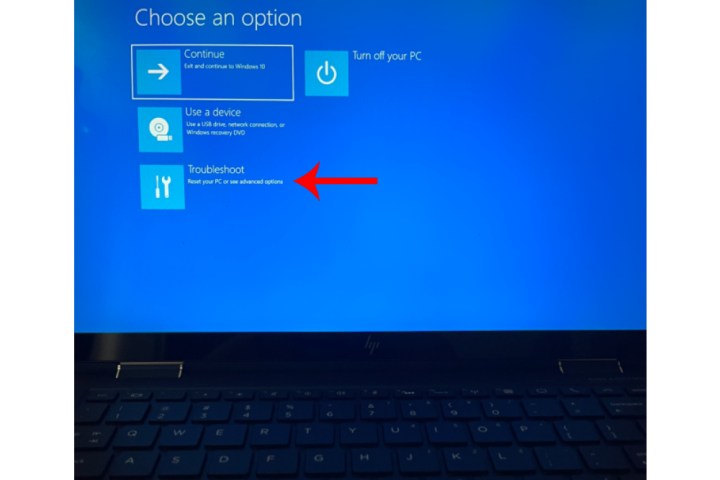
The F11 options menu for a Windows 10 laptop.

Step 3: Select Troubleshoot and then choose the Reset this PC option. Simply follow the steps outlined from the previous section to complete the factory reset process.
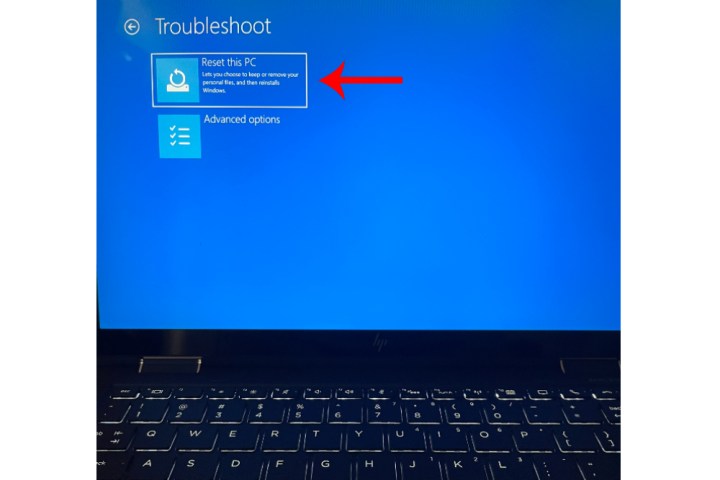
The Reset This PC option within Troubleshooting for a Windows 10 laptop.

Can you factory reset an HP laptop running Windows 7 or 8?

If your HP laptop is running Windows 7 or 8, you’ll still be able to perform a factory reset of the machine. For Windows 7, the steps to do so are slightly different than modern Windows OS types.

For Dell laptops running Windows 8, your factory reset options are identical to the steps you’d follow for a Windows 11 or 10 reset.

Factory resetting your Windows 7 Dell laptop (when it boots correctly)

Step 1: Start up the laptop, then head to the Control Panel.

Step 2: Click System Security > System > System protection > System restore.

Step 3: You’ll have the choice of resetting to your most recent restore point (Recommended Restore), or a restore point of your choosing (Choose a different restore point).

Step 4: Click Next > Finish. Then, click Yes to begin the restoration.

Factory resetting your Windows 7 Dell laptop (when it doesn’t boot)

Step 1: Begin by restarting your computer. During the actual restart, press the F8 key once per second until your Dell displays the Advanced Boot Options screen.

Step 2: Using your keyboard’s arrow keys, highlight Repair Your Computer and click Enter.

Step 3: Choose your language settings, then click Next.

Step 4: Log in as the administrator, then click OK. Then, click System Restore > Next.

Step 5: Choose whether or not you’d like to restore from the most recent restore point (the default), or click the Show more restore points box and search for a different point.

Step 6: Click Yes to begin the restoration. When the restore is finished, click Restart.

For a comprehensive guide on how to factory reset the different versions of Windows regardless of your system manufacturer, be sure to visit our detailed guide.

Editors’ Recommendations



Share. Facebook Twitter Pinterest LinkedIn Tumblr Email
Previous ArticleItel P55T With 6,000mAh Battery, Dual Rear Cameras Launched in India: Price, Specifications
Next Article Tecno Pova 6 Pro 5G – Price in India, Specifications (29th February 2024)

Related Articles

A tight squeeze could fix the biggest hurdle for solid-state car and gadget batteries
News

A tight squeeze could fix the biggest hurdle for solid-state car and gadget batteries

29 August 2026
3 hidden gems on HBO Max you should watch this weekend (August 28-30)
News

3 hidden gems on HBO Max you should watch this weekend (August 28-30)

29 August 2026
Smart rings focus on the heart. I saw the future, and it’s a sweat-sensing lab on your finger.
News

Smart rings focus on the heart. I saw the future, and it’s a sweat-sensing lab on your finger.

29 August 2026
Meta smart glasses ban trend is catching steam in the US, and an NY nightclub just set the ball rolling
News

Meta smart glasses ban trend is catching steam in the US, and an NY nightclub just set the ball rolling

29 August 2026
The resistance against Flock surveillance cameras has birthed a vigilante movement in the US
News

The resistance against Flock surveillance cameras has birthed a vigilante movement in the US

29 August 2026
iPhone Fold: Everything we know about Apple’s Ultra foldable
News

iPhone Fold: Everything we know about Apple’s Ultra foldable

29 August 2026
Demo
Top Articles
5 laptops to buy instead of the M4 MacBook Pro

5 laptops to buy instead of the M4 MacBook Pro

17 November 2024133 Views
ChatGPT o1 vs. o1-mini vs. 4o: Which should you use?

ChatGPT o1 vs. o1-mini vs. 4o: Which should you use?

15 December 2024112 Views
Costco partners with Electric Era to bring back EV charging in the U.S.

Costco partners with Electric Era to bring back EV charging in the U.S.

28 October 2024101 Views

Subscribe to Updates

Get the latest tech news and updates directly to your inbox.

Latest News
iPhone Fold: Everything we know about Apple’s Ultra foldable News

iPhone Fold: Everything we know about Apple’s Ultra foldable

News Room29 August 2026
Nvidia CEO Jensen Huang Took a Call From Donald Trump in the Middle of an All-Hands News

Nvidia CEO Jensen Huang Took a Call From Donald Trump in the Middle of an All-Hands

News Room29 August 2026
iPhone 18 series: Everything we know so far News

iPhone 18 series: Everything we know so far

News Room29 August 2026
Most Popular
The Spectacular Burnout of a Solar Panel Salesman

The Spectacular Burnout of a Solar Panel Salesman

13 January 2025137 Views
5 laptops to buy instead of the M4 MacBook Pro

5 laptops to buy instead of the M4 MacBook Pro

17 November 2024133 Views
ChatGPT o1 vs. o1-mini vs. 4o: Which should you use?

ChatGPT o1 vs. o1-mini vs. 4o: Which should you use?

15 December 2024112 Views
Our Picks
Meta smart glasses ban trend is catching steam in the US, and an NY nightclub just set the ball rolling

Meta smart glasses ban trend is catching steam in the US, and an NY nightclub just set the ball rolling

29 August 2026
The resistance against Flock surveillance cameras has birthed a vigilante movement in the US

The resistance against Flock surveillance cameras has birthed a vigilante movement in the US

29 August 2026
iPhone Fold: Everything we know about Apple’s Ultra foldable

iPhone Fold: Everything we know about Apple’s Ultra foldable

29 August 2026

Subscribe to Updates

Get the latest tech news and updates directly to your inbox.

Facebook X (Twitter) Instagram Pinterest
  • Privacy Policy
  • Terms of use
  • Advertise
  • Contact Us
© 2026 Best in Technology. All Rights Reserved.

Type above and press Enter to search. Press Esc to cancel.