


Close Menu
Best in TechnologyBest in Technology
  • News
  • Phones
  • Laptops
  • Gadgets
  • Gaming
  • AI
  • Tips
  • More
    • Web Stories
    • Global
    • Press Release

Subscribe to Updates

Get the latest tech news and updates directly to your inbox.

What's On
Samsung is cracking down on TV apps that quietly shared users’ internet connections

Samsung is cracking down on TV apps that quietly shared users’ internet connections

4 August 2026
The next official Palworld mobile game comes from an unexpected studio

The next official Palworld mobile game comes from an unexpected studio

4 August 2026
Beast of Reincarnation Review – Boring World, Beguiling Combat

Beast of Reincarnation Review – Boring World, Beguiling Combat

4 August 2026
Facebook X (Twitter) Instagram
Just In
  • Samsung is cracking down on TV apps that quietly shared users’ internet connections
  • The next official Palworld mobile game comes from an unexpected studio
  • Beast of Reincarnation Review – Boring World, Beguiling Combat
  • Save big on DJI creator gear with these AliExpress August deals
  • Google Health just made Fitbit Air a better fit for Apple Health users
  • Did an AI Music App Just Snitch on the Song of the Summer?
  • Pwnage’s new gaming mouse lets users adjust click force and travel with a screwdriver
  • Dave Bautista Reportedly In Talks To Replace Injured Ryan Hurst
Facebook X (Twitter) Instagram Pinterest Vimeo
Best in TechnologyBest in Technology
  • News
  • Phones
  • Laptops
  • Gadgets
  • Gaming
  • AI
  • Tips
  • More
    • Web Stories
    • Global
    • Press Release
Subscribe
Best in TechnologyBest in Technology
Home » How to download iPadOS 18 on your iPad right now
News

How to download iPadOS 18 on your iPad right now

News RoomBy News Room15 June 20244 Mins Read
Share Facebook Twitter Pinterest LinkedIn Tumblr Reddit Telegram Email
How to download iPadOS 18 on your iPad right now
Share
Facebook Twitter LinkedIn Pinterest Email

The taste-testing season for Apple’s wave of next-gen software has already begun. Where iOS 18 went heavy on AI and generously lifted off from Android’s feature set, iPadOS 18 didn’t quite get the same kind of attention from Apple. Making the beastly M4-powered iPad Pro run more macOS-like workflows? Well, that didn’t happen. But the future still looks a tad brighter, thanks to Apple Intelligence.

If you are itching to try iPadOS 18 on your Apple tablet, it has never been easier to get an early build running on a compatible iPad. But here’s the standard disclaimer.

We’re talking about a developer beta here, which means you might run into some weird and unexpected bugs — battery drain being one of them. Needless to say, don’t install it on a machine that serves as your work companion. But if you’ve already made up your mind, follow these steps and dive straight into iPadOS.

iPads that can run the iPadOS 18 beta

The situation is a bit tricky this time around. All the below iPads will technically be able to run iPadOS 18, but not all of them will get the full experience. For example, the whole suite of Apple Intelligence features will require an iPad with at least an M-series processor, which means every mainline iPad, alongside those in the mini and Air series, which pack A-series silicon, are out of luck.

Below is the full list of machines that can boot iPadOS 18:

  • iPad Pro (M4)
  • iPad Pro 12.9-inch (3rd generation and later)
  • iPad Pro 11-inch (1st generation and later)
  • iPad Air (M2)
  • iPad Air (3rd generation and later)
  • iPad (7th generation and later)
  • iPad mini (5th generation and later)
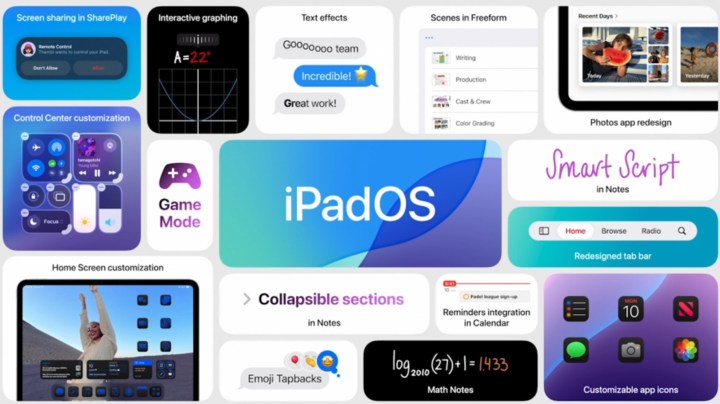
iPadOS 18 features.

How to register for the iPadOS 18 Developer Beta?

As mentioned above, the test build Apple has released is only for developers, but you can still get it via a simple registration process that requires your Apple ID. If you are already registered with Apple’s beta-testing program, you don’t need to go through the registration process.

For folks who are installing a developer build for the first time, simply use the following steps to get your account ready for receiving the over-the-air (OTA) update:

Step 1: On your iPad, open the web browser of your choice and go to the Apple developer website (developer.apple.com).

Step 2: In the top-right corner of the page, select Account.

Step 3: Next, enter your Apple ID credentials to go through the Sign in to Apple Developer protocol and agree to the terms.
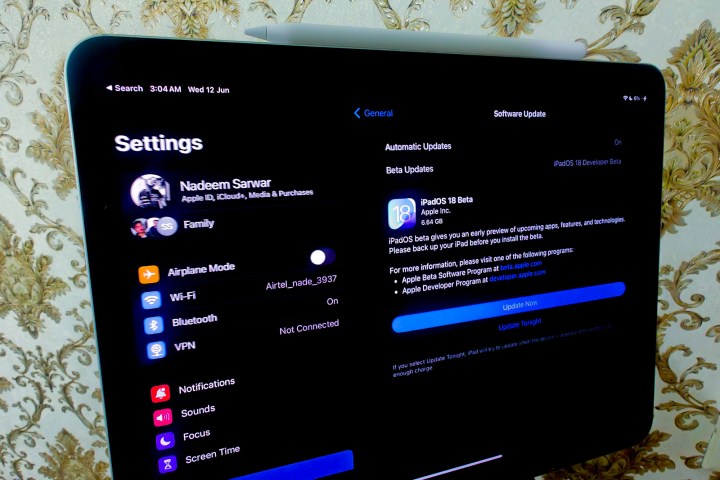
Settings app on iPad Pro M1.

How to install iPadOS 18

Once you’ve registered your Apple ID for beta software testing, you now have to download it like any other software update. Follow these steps to proceed:

Step 1: Open the Settings app on your compatible iPad.

Step 2: Scroll down and select General.

Step 3: On the General page, select Software update.

Step 4: On the next page, you will see Beta Updates.

Step 5: Select it, and then select iPadOS 18 Developer Beta.
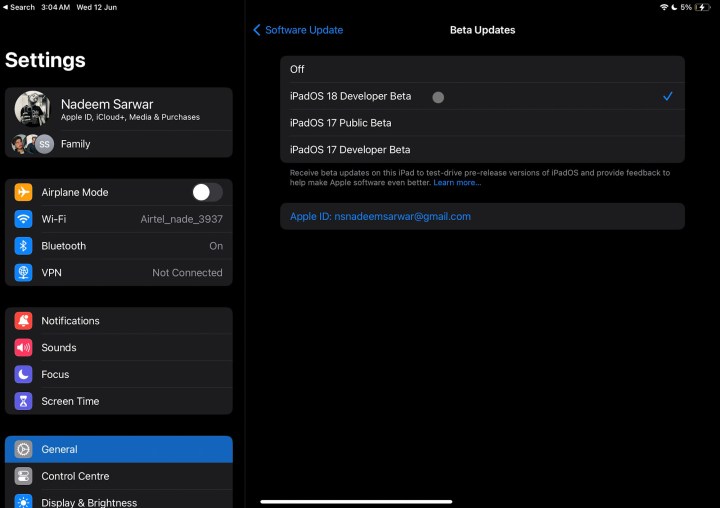
Selecting update channel on iPadOS.

Step 6: Go back to the General page. You will soon see an update window appear.
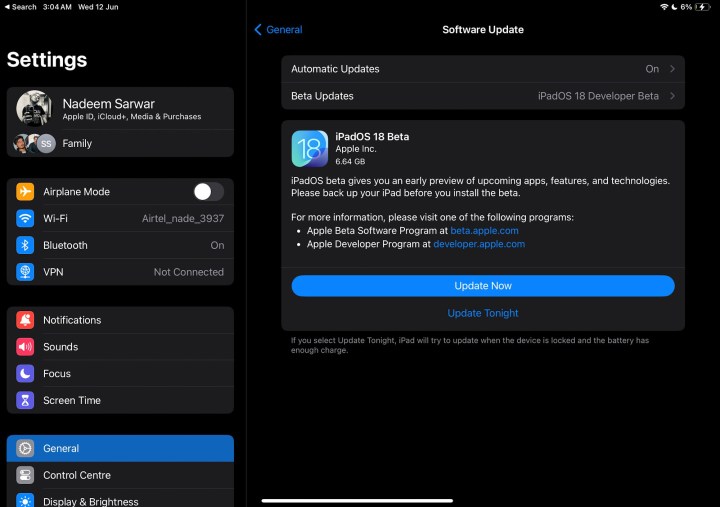
iPadOS 18 update alert.

Step 7: Select the blue Update Now button, enter the device passcode, and iPadOS 18 Developer Beta will be installed on your tablet.

It looks like iPadOS 18 is shaping up to be a meaningful refresh of the tablet experience, one that puts more focus on functional benefits than a visual overhaul. It finally brings a calculator to Apple’s tablet portfolio. For the first time, third-party apps will integrate with Control Center. You can also now customize the lock screen shortcuts, such as the Flashlight and Camera, with your preferred default apps.

Additionally, a new floating tab bar is being introduced in some apps to enhance navigation. SharePlay is adding a screen-sharing feature that lets you tap and draw on another person’s screen and remotely control their iPad for tech support. One of the most innovative new features is Smart Script, which comes to life courtesy of machine learning wizardry.

As impressive as some of these features are, remember — iPadOS 18 is still in very early stages right now. If you want to throw caution to the wind and use it this instant, these are the steps to follow. But if you aren’t one for bugs, we’d recommend waiting for the public beta later this summer or the final release coming in the fall.

Editors’ Recommendations



Share. Facebook Twitter Pinterest LinkedIn Tumblr Email
Previous ArticlePanerai’s Submersible Elux Lab-ID Dive Watch Generates Its Own Light Show
Next Article How to upload images to ChatGPT

Related Articles

Samsung is cracking down on TV apps that quietly shared users’ internet connections
News

Samsung is cracking down on TV apps that quietly shared users’ internet connections

4 August 2026
The next official Palworld mobile game comes from an unexpected studio
News

The next official Palworld mobile game comes from an unexpected studio

4 August 2026
Save big on DJI creator gear with these AliExpress August deals
News

Save big on DJI creator gear with these AliExpress August deals

4 August 2026
Google Health just made Fitbit Air a better fit for Apple Health users
News

Google Health just made Fitbit Air a better fit for Apple Health users

4 August 2026
Did an AI Music App Just Snitch on the Song of the Summer?
News

Did an AI Music App Just Snitch on the Song of the Summer?

4 August 2026
Pwnage’s new gaming mouse lets users adjust click force and travel with a screwdriver
News

Pwnage’s new gaming mouse lets users adjust click force and travel with a screwdriver

4 August 2026
Demo
Top Articles
5 laptops to buy instead of the M4 MacBook Pro

5 laptops to buy instead of the M4 MacBook Pro

17 November 2024133 Views
ChatGPT o1 vs. o1-mini vs. 4o: Which should you use?

ChatGPT o1 vs. o1-mini vs. 4o: Which should you use?

15 December 2024111 Views
Costco partners with Electric Era to bring back EV charging in the U.S.

Costco partners with Electric Era to bring back EV charging in the U.S.

28 October 2024100 Views

Subscribe to Updates

Get the latest tech news and updates directly to your inbox.

Latest News
Did an AI Music App Just Snitch on the Song of the Summer? News

Did an AI Music App Just Snitch on the Song of the Summer?

News Room4 August 2026
Pwnage’s new gaming mouse lets users adjust click force and travel with a screwdriver News

Pwnage’s new gaming mouse lets users adjust click force and travel with a screwdriver

News Room4 August 2026
Dave Bautista Reportedly In Talks To Replace Injured Ryan Hurst Gaming

Dave Bautista Reportedly In Talks To Replace Injured Ryan Hurst

News Room3 August 2026
Most Popular
The Spectacular Burnout of a Solar Panel Salesman

The Spectacular Burnout of a Solar Panel Salesman

13 January 2025137 Views
5 laptops to buy instead of the M4 MacBook Pro

5 laptops to buy instead of the M4 MacBook Pro

17 November 2024133 Views
ChatGPT o1 vs. o1-mini vs. 4o: Which should you use?

ChatGPT o1 vs. o1-mini vs. 4o: Which should you use?

15 December 2024111 Views
Our Picks
Save big on DJI creator gear with these AliExpress August deals

Save big on DJI creator gear with these AliExpress August deals

4 August 2026
Google Health just made Fitbit Air a better fit for Apple Health users

Google Health just made Fitbit Air a better fit for Apple Health users

4 August 2026
Did an AI Music App Just Snitch on the Song of the Summer?

Did an AI Music App Just Snitch on the Song of the Summer?

4 August 2026

Subscribe to Updates

Get the latest tech news and updates directly to your inbox.

Facebook X (Twitter) Instagram Pinterest
  • Privacy Policy
  • Terms of use
  • Advertise
  • Contact Us
© 2026 Best in Technology. All Rights Reserved.

Type above and press Enter to search. Press Esc to cancel.