

Close Menu
Best in TechnologyBest in Technology
  • News
  • Phones
  • Laptops
  • Gadgets
  • Gaming
  • AI
  • Tips
  • More
    • Web Stories
    • Global
    • Press Release

Subscribe to Updates

Get the latest tech news and updates directly to your inbox.

What's On
Harvard developers have made an AI app to help visually impaired users navigate

Harvard developers have made an AI app to help visually impaired users navigate

25 August 2026
Data Centers Are Driving an Alarming Gas Power Expansion in the US

Data Centers Are Driving an Alarming Gas Power Expansion in the US

25 August 2026
The best limited series on Netflix you can binge-watch at once

The best limited series on Netflix you can binge-watch at once

25 August 2026
Facebook X (Twitter) Instagram
Just In
  • Harvard developers have made an AI app to help visually impaired users navigate
  • Data Centers Are Driving an Alarming Gas Power Expansion in the US
  • The best limited series on Netflix you can binge-watch at once
  • Netflix might let you stream Peacock and Fox One on its app
  • Threads wants to make podcasts easier to follow with transcripts
  • Solid-state cooling could be the secret to faster AI laptops
  • Your Pixel 11 Pro just got its own AI tech support agent
  • The Best Kitchen Gadget to Prevent Salmonella Is a Good Meat Probe
Facebook X (Twitter) Instagram Pinterest Vimeo
Best in TechnologyBest in Technology
  • News
  • Phones
  • Laptops
  • Gadgets
  • Gaming
  • AI
  • Tips
  • More
    • Web Stories
    • Global
    • Press Release
Subscribe
Best in TechnologyBest in Technology
Home » How to delete your Spotify account on desktop and mobile
News

How to delete your Spotify account on desktop and mobile

News RoomBy News Room25 April 20243 Mins Read
Share Facebook Twitter Pinterest LinkedIn Tumblr Reddit Telegram Email
How to delete your Spotify account on desktop and mobile
Share
Facebook Twitter LinkedIn Pinterest Email

Spotify is home to a bountiful trove of music. With over 615 million users connected to the platform, it’s no wonder it’s one of the biggest music-streaming platforms in town. Still, sometimes we need to put aside a little extra pocket change every month. And one of the first things to go are monthly subscriptions. We know it stinks, but this doesn’t mean your Spotify account needs to disappear forever.

How to delete your Spotify account using support

Once Spotify Premium is canceled you can officially delete your Spotify account. Again, to do this, visit Spotify’s support page. Due to the high volume of cancellations, on this page, you might be prompted to message the customer support team. Ignore it, and click the send message button. A support bot will pop up at the bottom of the screen to help you.

Step 1: In the support bot box, type in close my account. Once done, click the Continue to close/cancel my account option presented by the bot.

Step 2: Next up, click the close account link that the bot sends you. Answer as to why you want to cancel, and then confirm that you can indeed access the email on file. Finally, choose I understand and a request to close your account will be emailed to you.

Step 3: Look for an email from Spotify, and click the Close my account link. Clicking this link will shut down and close out your Spotify for good. The link is valid for 24 hours. If you don’t click the link, after 24 hours you’ll have to go through the process again.

Note that you’ll also get a seven-day grace period. If you want to reactivate your Spotify, this will come as a link in a separate email after you finish canceling.

If you’re wondering how long until Spotify deletes your account, then keep in mind that it’s instantaneous as soon as you click the link. That’s why you can always delete your Spotify account, and make a new one.
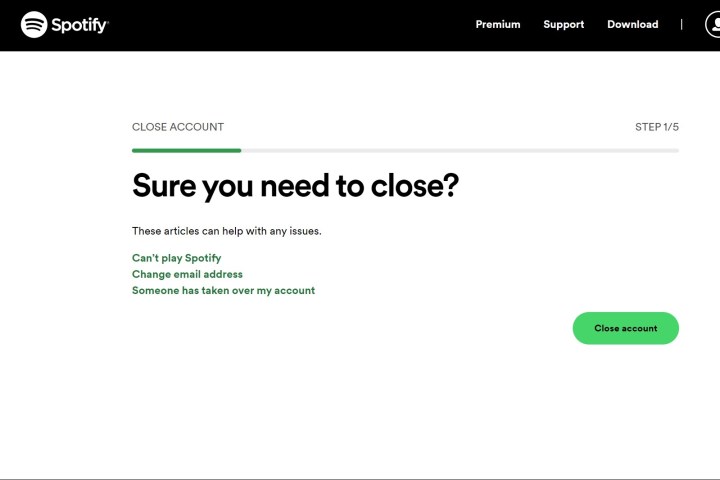
The final cancellation disclaimer when canceling a Spotify account.

Delete your Spotify account manually

If you made your account recently and aren’t a long-time Spotify subscriber, then chances are you won’t be put through to a support bot to cancel your Spotify. Instead, you’ll be taken straight to the cancel account page. You’ll still need to cancel your Spotify premium first, but once you do, you can follow the steps below.

Step 1: On the Spotify close account page, click the Close account button. It will be a five-step process. To begin, confirm your information and click Continue.

Step 2: Next up, check the I understand box. This warns you that you’ll lose all your music, podcasts, playlists, followers, and username. An email will be sent to your email address associated with Spotify.

Step 3: Check your email for something from Spotify. Click the Close my Account link in the email to close your Spotify account for good. You’ll get a confirmation email, and if you want to re-open your account, you can do so within seven days with the link in the confirmation.

Editors’ Recommendations



Share. Facebook Twitter Pinterest LinkedIn Tumblr Email
Previous ArticleThere’s a Rare $25 Discount on the Nintendo Switch OLED Right Now
Next Article Net Neutrality Returns to a Very Different Internet

Related Articles

Harvard developers have made an AI app to help visually impaired users navigate
News

Harvard developers have made an AI app to help visually impaired users navigate

25 August 2026
Data Centers Are Driving an Alarming Gas Power Expansion in the US
News

Data Centers Are Driving an Alarming Gas Power Expansion in the US

25 August 2026
The best limited series on Netflix you can binge-watch at once
News

The best limited series on Netflix you can binge-watch at once

25 August 2026
Netflix might let you stream Peacock and Fox One on its app
News

Netflix might let you stream Peacock and Fox One on its app

25 August 2026
Threads wants to make podcasts easier to follow with transcripts
News

Threads wants to make podcasts easier to follow with transcripts

25 August 2026
Solid-state cooling could be the secret to faster AI laptops
News

Solid-state cooling could be the secret to faster AI laptops

25 August 2026
Demo
Top Articles
5 laptops to buy instead of the M4 MacBook Pro

5 laptops to buy instead of the M4 MacBook Pro

17 November 2024133 Views
ChatGPT o1 vs. o1-mini vs. 4o: Which should you use?

ChatGPT o1 vs. o1-mini vs. 4o: Which should you use?

15 December 2024112 Views
Costco partners with Electric Era to bring back EV charging in the U.S.

Costco partners with Electric Era to bring back EV charging in the U.S.

28 October 2024100 Views

Subscribe to Updates

Get the latest tech news and updates directly to your inbox.

Latest News
Solid-state cooling could be the secret to faster AI laptops News

Solid-state cooling could be the secret to faster AI laptops

News Room25 August 2026
Your Pixel 11 Pro just got its own AI tech support agent News

Your Pixel 11 Pro just got its own AI tech support agent

News Room25 August 2026
The Best Kitchen Gadget to Prevent Salmonella Is a Good Meat Probe News

The Best Kitchen Gadget to Prevent Salmonella Is a Good Meat Probe

News Room25 August 2026
Most Popular
The Spectacular Burnout of a Solar Panel Salesman

The Spectacular Burnout of a Solar Panel Salesman

13 January 2025137 Views
5 laptops to buy instead of the M4 MacBook Pro

5 laptops to buy instead of the M4 MacBook Pro

17 November 2024133 Views
ChatGPT o1 vs. o1-mini vs. 4o: Which should you use?

ChatGPT o1 vs. o1-mini vs. 4o: Which should you use?

15 December 2024112 Views
Our Picks
Netflix might let you stream Peacock and Fox One on its app

Netflix might let you stream Peacock and Fox One on its app

25 August 2026
Threads wants to make podcasts easier to follow with transcripts

Threads wants to make podcasts easier to follow with transcripts

25 August 2026
Solid-state cooling could be the secret to faster AI laptops

Solid-state cooling could be the secret to faster AI laptops

25 August 2026

Subscribe to Updates

Get the latest tech news and updates directly to your inbox.

Facebook X (Twitter) Instagram Pinterest
  • Privacy Policy
  • Terms of use
  • Advertise
  • Contact Us
© 2026 Best in Technology. All Rights Reserved.

Type above and press Enter to search. Press Esc to cancel.