


Close Menu
Best in TechnologyBest in Technology
  • News
  • Phones
  • Laptops
  • Gadgets
  • Gaming
  • AI
  • Tips
  • More
    • Web Stories
    • Global
    • Press Release

Subscribe to Updates

Get the latest tech news and updates directly to your inbox.

What's On
Darksiders 4 and the next Kingdom Come game could arrive by March 2028

Darksiders 4 and the next Kingdom Come game could arrive by March 2028

14 August 2026
Researchers built a tiny wearable patch that measures cholesterol levels from your sweat

Researchers built a tiny wearable patch that measures cholesterol levels from your sweat

14 August 2026
The Safety Reckoning Inside OpenAI

The Safety Reckoning Inside OpenAI

14 August 2026
Facebook X (Twitter) Instagram
Just In
  • Darksiders 4 and the next Kingdom Come game could arrive by March 2028
  • Researchers built a tiny wearable patch that measures cholesterol levels from your sweat
  • The Safety Reckoning Inside OpenAI
  • Microsoft is bringing its Copilot apps together before its planned ‘super app’ debut
  • Mark Zuckerberg’s AI Manifesto Is 6,500-Words—and Barely Says Anything
  • Netflix Closes Two Gaming Studios, Including – Aug 13, 2026
  • Pixel 11 Pro Fold vs. Galaxy Z Fold 8 Ultra: Google plays it safe, Samsung goes all-in
  • Rivian refreshes its 2027 R1 lineup with new trims and a big seating upgrade
Facebook X (Twitter) Instagram Pinterest Vimeo
Best in TechnologyBest in Technology
  • News
  • Phones
  • Laptops
  • Gadgets
  • Gaming
  • AI
  • Tips
  • More
    • Web Stories
    • Global
    • Press Release
Subscribe
Best in TechnologyBest in Technology
Home » How to create folders in Gmail
News

How to create folders in Gmail

News RoomBy News Room15 April 20243 Mins Read
Share Facebook Twitter Pinterest LinkedIn Tumblr Reddit Telegram Email
How to create folders in Gmail
Share
Facebook Twitter LinkedIn Pinterest Email

Keeping your emails organized is essential to finding the ones you need when you need them. One easy way to do this is by creating folders and moving your messages to them.

If you use Gmail, you’ll see default folders, those already created for you, in the menu on the left side. When you set up your own, they’ll fall in line in that same spot, giving you a quick and easy way to organize your inbox. Here’s how to create folders in Gmail and move emails to them.

Create a folder in Gmail

Before we begin, it’s important to note that Gmail doesn’t refer to folders as “folders.” They’re called “labels,” but function the same way as folders.

To make a label on desktop, just click the plus sign next to the word “Labels” in the menu on the left. Then enter a name for the label and, optionally, another label to nest it under.

Oddly enough, you cannot make a label on Android phones. If you own an iOS device, however, you can find a “Create New” button in the menu that pops up after tapping the three horizontal lines icon in the top left.

Move an email to a folder

You have a few different ways to move emails to folders in Gmail. Probably the simplest way is to use the Move to option in the toolbar.

Step 1: Select the email you want to move in your inbox by ticking its corresponding checkbox.

Step 2: Pick the Move to option in the toolbar at the top. The Move to icon looks like a file with an arrow in the middle.

Step 3: From the menu that appears, choose the folder where you want to place the email.

When you do this, it removes the email from your Inbox and places it in the chosen folder. This is a great way to keep your inbox neat and tidy.
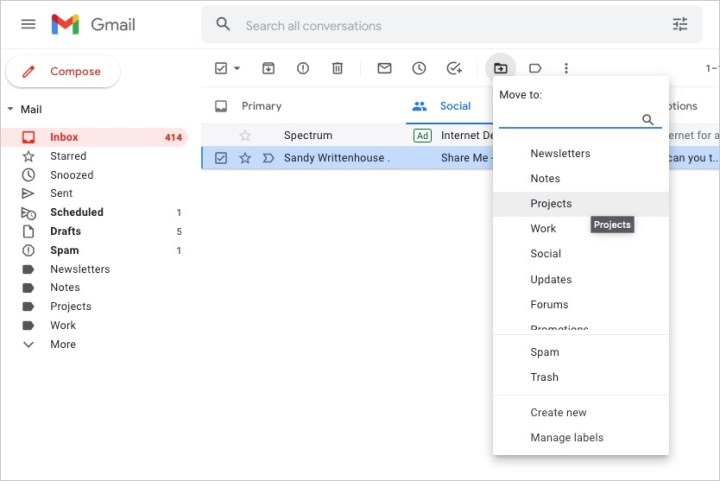
Label list for moving an email in Gmail.

Step 4: You can also move an email to the folder by doing one of the following:

  • Drag the email from your inbox to the folder in the left-hand menu.
  • Right-click the email, hover your cursor over Move to, and choose the folder.
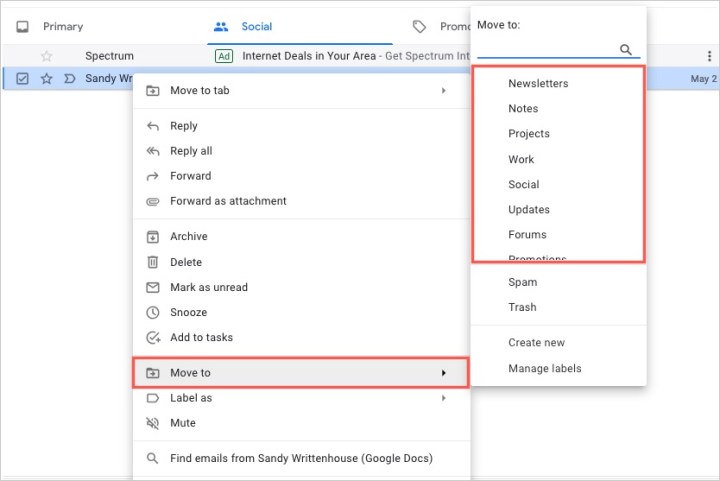
Right-click menu to move an email in Gmail.

By creating folders (or labels) in Gmail, you can keep your messages organized for work, school, your personal life, or whatever you find most helpful.

For more, take a look at Gmail keyboard shortcuts you should know or how to find archived emails in Gmail.

Editors’ Recommendations


Share. Facebook Twitter Pinterest LinkedIn Tumblr Email
Previous ArticleThe Sympathizer review: a masterful spy thriller
Next Article How to select multiple files on a Mac

Related Articles

Darksiders 4 and the next Kingdom Come game could arrive by March 2028
News

Darksiders 4 and the next Kingdom Come game could arrive by March 2028

14 August 2026
Researchers built a tiny wearable patch that measures cholesterol levels from your sweat
News

Researchers built a tiny wearable patch that measures cholesterol levels from your sweat

14 August 2026
The Safety Reckoning Inside OpenAI
News

The Safety Reckoning Inside OpenAI

14 August 2026
Microsoft is bringing its Copilot apps together before its planned ‘super app’ debut
News

Microsoft is bringing its Copilot apps together before its planned ‘super app’ debut

14 August 2026
Mark Zuckerberg’s AI Manifesto Is 6,500-Words—and Barely Says Anything
News

Mark Zuckerberg’s AI Manifesto Is 6,500-Words—and Barely Says Anything

13 August 2026
Pixel 11 Pro Fold vs. Galaxy Z Fold 8 Ultra: Google plays it safe, Samsung goes all-in
News

Pixel 11 Pro Fold vs. Galaxy Z Fold 8 Ultra: Google plays it safe, Samsung goes all-in

13 August 2026
Demo
Top Articles
5 laptops to buy instead of the M4 MacBook Pro

5 laptops to buy instead of the M4 MacBook Pro

17 November 2024133 Views
ChatGPT o1 vs. o1-mini vs. 4o: Which should you use?

ChatGPT o1 vs. o1-mini vs. 4o: Which should you use?

15 December 2024112 Views
Costco partners with Electric Era to bring back EV charging in the U.S.

Costco partners with Electric Era to bring back EV charging in the U.S.

28 October 2024100 Views

Subscribe to Updates

Get the latest tech news and updates directly to your inbox.

Latest News
Netflix Closes Two Gaming Studios, Including – Aug 13, 2026 Gaming

Netflix Closes Two Gaming Studios, Including – Aug 13, 2026

News Room13 August 2026
Pixel 11 Pro Fold vs. Galaxy Z Fold 8 Ultra: Google plays it safe, Samsung goes all-in News

Pixel 11 Pro Fold vs. Galaxy Z Fold 8 Ultra: Google plays it safe, Samsung goes all-in

News Room13 August 2026
Rivian refreshes its 2027 R1 lineup with new trims and a big seating upgrade News

Rivian refreshes its 2027 R1 lineup with new trims and a big seating upgrade

News Room13 August 2026
Most Popular
The Spectacular Burnout of a Solar Panel Salesman

The Spectacular Burnout of a Solar Panel Salesman

13 January 2025137 Views
5 laptops to buy instead of the M4 MacBook Pro

5 laptops to buy instead of the M4 MacBook Pro

17 November 2024133 Views
ChatGPT o1 vs. o1-mini vs. 4o: Which should you use?

ChatGPT o1 vs. o1-mini vs. 4o: Which should you use?

15 December 2024112 Views
Our Picks
Microsoft is bringing its Copilot apps together before its planned ‘super app’ debut

Microsoft is bringing its Copilot apps together before its planned ‘super app’ debut

14 August 2026
Mark Zuckerberg’s AI Manifesto Is 6,500-Words—and Barely Says Anything

Mark Zuckerberg’s AI Manifesto Is 6,500-Words—and Barely Says Anything

13 August 2026
Netflix Closes Two Gaming Studios, Including – Aug 13, 2026

Netflix Closes Two Gaming Studios, Including – Aug 13, 2026

13 August 2026

Subscribe to Updates

Get the latest tech news and updates directly to your inbox.

Facebook X (Twitter) Instagram Pinterest
  • Privacy Policy
  • Terms of use
  • Advertise
  • Contact Us
© 2026 Best in Technology. All Rights Reserved.

Type above and press Enter to search. Press Esc to cancel.