




PDFs are a great way to share documents because the format can be read by mostly anyone. It’s generally used with digital manuals, sales receipts, manuscripts, and so on — documents that aren’t meant for editing. Think of PDFs as digital printouts with pretty designs.
However, there may be times when you need that document in another format other than a PDF. For instance, you might use Microsoft Word and wish to edit the PDF. Or a potential employer may want to read your resume. Originally saved as a PDF, they may prefer to view it in Word rather than Adobe’s software. Here, we’ll walk you through a few of the ways you can convert PDFs to Word documents.
Convert PDF to Word with Adobe Acrobat
Using Acrobat is the best way to make sure the document’s format remains as accurate as possible. However, you’ll need the paid version of Acrobat to use this method. Adobe currently offers a free, seven-day trial of Adobe Acrobat Document Cloud (DC), which you can use for one-time conversions.
Note: This trial is designed to prevent you from signing up for it repeatedly, so think of it as a one-time-only option.
If you need to make conversions on a regular basis, you’ll want to pay for the full version, which runs approximately $15 a month with an annual commitment or as part of an Adobe Creative Cloud package. You cannot use Acrobat Reader DC to convert PDFs.
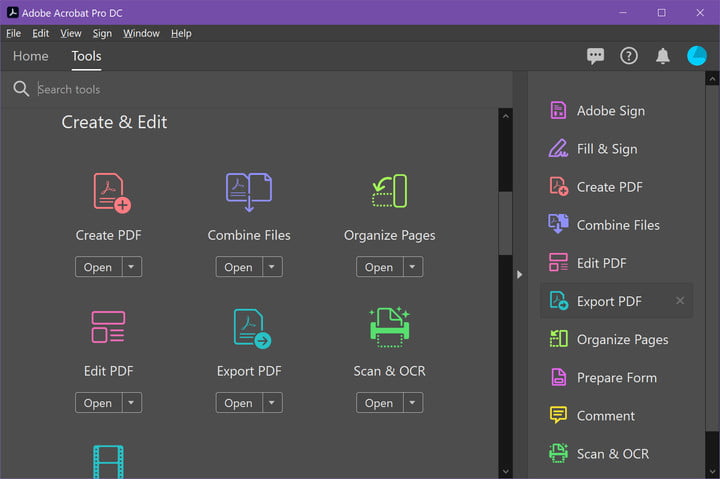
Step 1: Open the PDF you’d like to convert in Acrobat. Depending on your preferences, PDF files may automatically open in Acrobat. Alternatively, if you already have Acrobat open, click the Tools tab along the top.
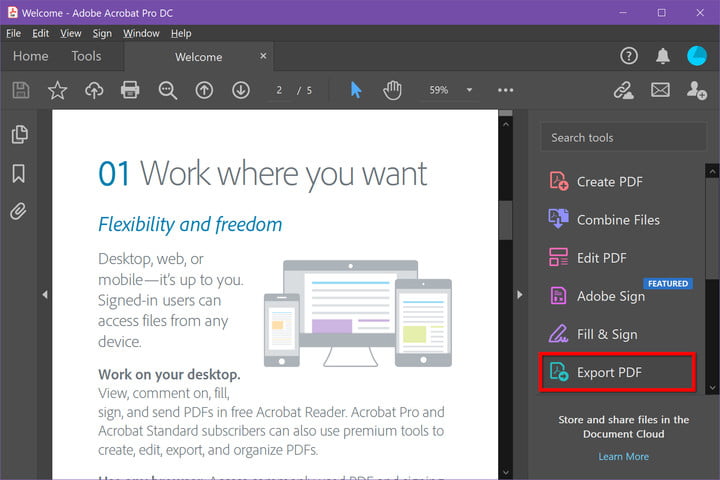
Step 2: Select Export PDF, which is listed on the right. It’s also a shortcut found under Create and edit on the Tools panel.
Step 3: On the following screen, select Microsoft Word. By default, it converts to the newer .docx format. If you need the older .doc format, click the Circle next to Word 97-2003 document instead.
Step 4: In both cases, you can click the Cog symbol and change four specific settings: Layout settings, Comments settings, Image settings, and Text recognition settings. When you’re done, click the OK button.
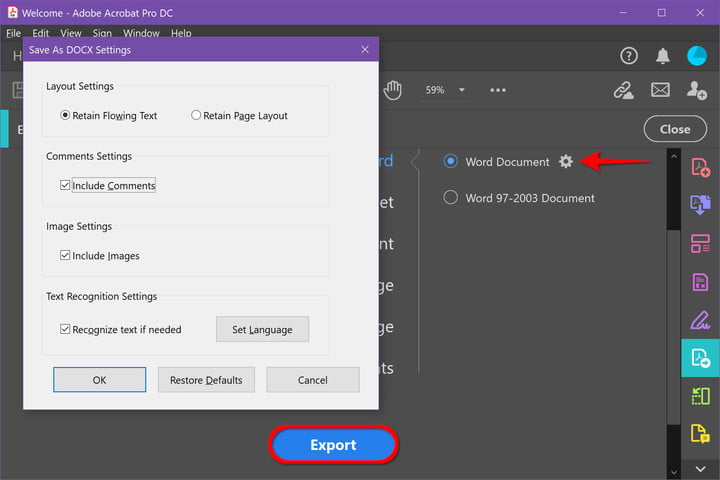
Step 5: Click the Export button to finish.
Step 6: Adobe will automatically run text recognition for any scanned text during this step. It doesn’t always work, but for most legible text, it’s an ideal solution. Keep in mind that you may need to do some quick reformatting in your new Word document afterward.
Name your new Word file and save it in your desired location.

Convert PDF to Word with Microsoft Word
If you have downloaded Microsoft Word or have a subscription to Microsoft 365, this is a decent alternative to convert PDFs to Word documents. The formatting doesn’t always line up and the text may not be exact. If you have Acrobat or don’t mind trying a web-based converter, we suggest trying another option if the formatting is unusable. After all, other solutions may be more accurate.
Step 1: Launch Word and click Open listed on the left.
Step 2: Locate the PDF you want to convert using one of the three locations listed under the Personal and Other locations headers: OneDrive, This PC, or Browse.

Step 3: Select the PDF you want to convert, just like opening a Word file. Word will then bring up a notification that lets you know it’s going to convert the PDF to an editable Word document. It may take some time, and it may not look exactly like the PDF due to formatting differences. Select OK to continue.
Step 4: Word will then convert the document into a Word file and open it. Take a look at the formatting and make sure you can edit the document as you want without graphics or text behaving strangely. If everything works, you’re good to go!
Although they don’t all have conversion tools, these are the best Microsoft Office alternatives.
Convert PDF to Word with web apps
If you don’t want to pay for Acrobat or Microsoft 365, there are several freemium programs for converting PDFs to Word files. Just upload your file and then choose a conversion process to get started. You can even use these programs to send converted PDFs to many locations, from email to cloud storage.
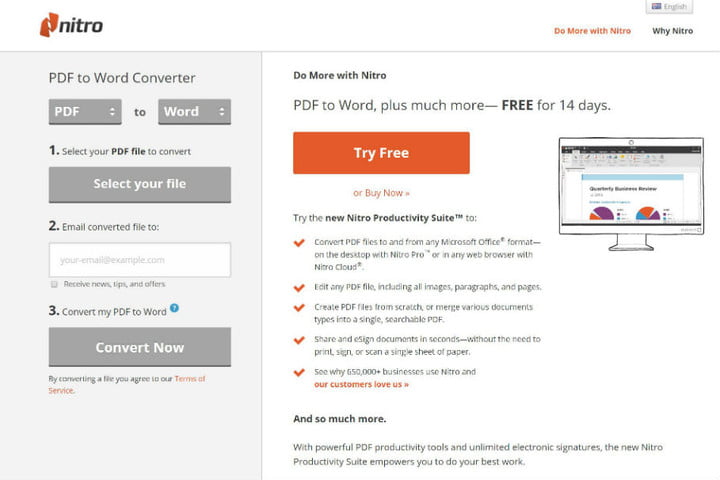
Nitro PDF to Word:
This program will email the Word file to a specified address, which is useful when collaborating on business or school projects. This is a free online service you can use to have a Word file sent to your email, but you can also download the software for free with the 14-day trial.
Smallpdf:
Smallpdf is fast, simple, and free — all good qualities for a web app. Smallpdf also allows you to upload and export directly to cloud storage like Dropbox or Google Drive. Smallpdf safeguards your privacy by implementing an automated elimination feature that destroys all uploads after an hour. The only downside is that you only get two free conversion tasks per day for free.
LightPDF:
The best document converter out there is LightPDF. This free, user-friendly tool can convert your PDF into a Word file as well as a PNG, JPG, PPT, or TXT – and then convert it back to a PDF (except for TXT, which doesn’t appear to be able to convert back to a PDF). When you finish using the tools to convert your files, the converter automatically deletes the uploaded file, if you used the service without logging in. Logged-in users can manually delete these files from their accounts.
FormSwift PDF Editor:
Using FormSwift PDF Editor is easy. It allows you to open a PDF file and export it as a .docx file. If you want to edit the PDF file before exporting it to .docx, you can do so. You don’t have to commit right away, either. FormSwift offers a free trial period in which you can create an account for any editing needs without any restrictions. You can even send the files you edit to your email account or a colleague.
In addition to our steps above, you can check out our guide to the best PDF editors, which will help you choose the right editor for your needs. We also have other guides on how to save a webpage as a PDF, and how to print to PDF in Windows.