



Close Menu
Best in TechnologyBest in Technology
  • News
  • Phones
  • Laptops
  • Gadgets
  • Gaming
  • AI
  • Tips
  • More
    • Web Stories
    • Global
    • Press Release

Subscribe to Updates

Get the latest tech news and updates directly to your inbox.

What's On
Smartphone app claims to help men last longer in bed

Smartphone app claims to help men last longer in bed

16 March 2026
Step aboard NASA’s imminent moon mission and follow the crew day by day

Step aboard NASA’s imminent moon mission and follow the crew day by day

16 March 2026
MSI is planning to raise the price of its laptop and gaming gear by a huge margin

MSI is planning to raise the price of its laptop and gaming gear by a huge margin

16 March 2026
Facebook X (Twitter) Instagram
Just In
  • Smartphone app claims to help men last longer in bed
  • Step aboard NASA’s imminent moon mission and follow the crew day by day
  • MSI is planning to raise the price of its laptop and gaming gear by a huge margin
  • The hot AI video generator that got everyone talking may now take a while to arrive
  • Samsung’s wireless power bank tries to fill the magnetic charging gap on the Galaxy S26
  • Adobe to offer users free services $75 million over hard-to-cancel subscription mess
  • You will soon be able to talk extensively about your Garmin health data with an AI
  • Gmail is finally fixing a big gap in its Help Me Schedule tool
Facebook X (Twitter) Instagram Pinterest Vimeo
Best in TechnologyBest in Technology
  • News
  • Phones
  • Laptops
  • Gadgets
  • Gaming
  • AI
  • Tips
  • More
    • Web Stories
    • Global
    • Press Release
Subscribe
Best in TechnologyBest in Technology
Home » Hands-on with the Belkin iPhone Mount with MagSafe for Apple TV 4K
News

Hands-on with the Belkin iPhone Mount with MagSafe for Apple TV 4K

News RoomBy News Room6 March 20245 Mins Read
Share Facebook Twitter Pinterest LinkedIn Tumblr Reddit Telegram Email
Hands-on with the Belkin iPhone Mount with MagSafe for Apple TV 4K
Share
Facebook Twitter LinkedIn Pinterest Email

The Belkin iPhone Mount with MagSafe for Apple TV 4K is one mouthful of an official name. What it does is much more simple. It is a mount for your iPhone to be used with an Apple TV 4K. And it has MagSafe to keep the phone in place. That’s it.

Perhaps the hardest part of this whole thing is knowing you can use your iPhone with Apple TV 4K. While Continuity Camera — that’s the oh-so-Apple name for the feature — has been around since late 2022 for using your iPhone as a webcam for a Mac, it wasn’t until tvOS 17 was introduced in September 2023 that we were able to use an iPhone with an Apple TV. And now you can use your iPhone in conjunction with apps like FaceTime, Webex, and Zoom to make video calls from your living room. Or, erm, your bedroom. Anywhere you have a TV and an Apple TV 4K.

This maybe isn’t something you’ll do every day. But once you’ve sat on the couch with family for a video call, you’ll never want to pick up the phone to do so again. (Especially if a kid grabs hold of it, and the ensuing motion threatens to make everyone sick. If you know, you know. And it’s much more elegant than dragging out a full tripod.

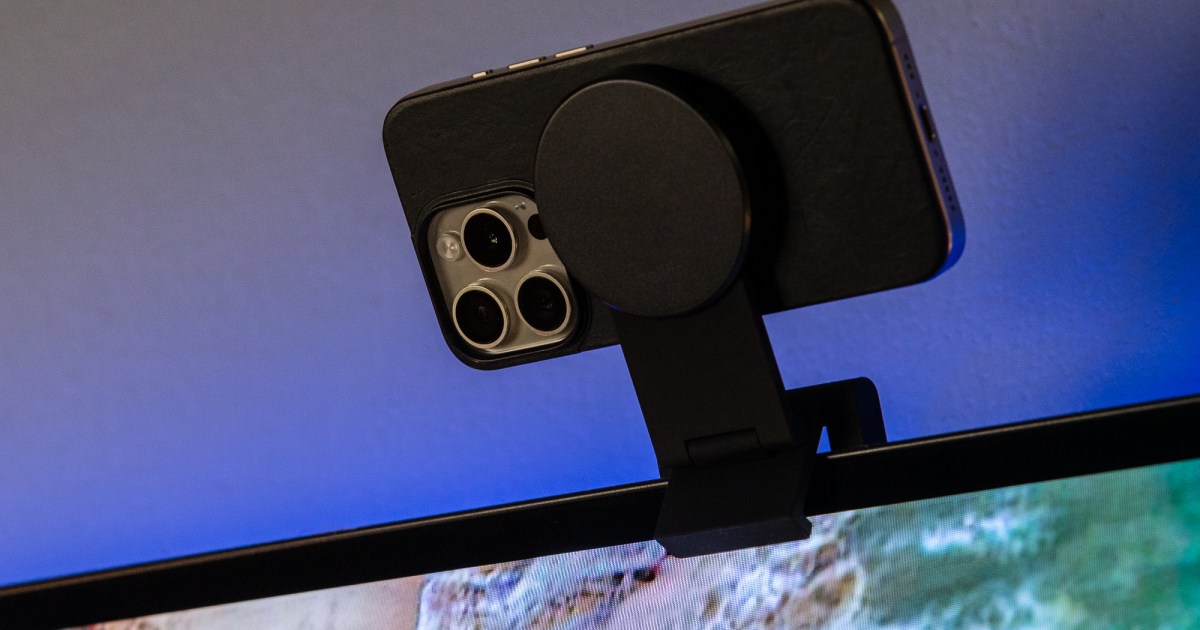
The Belkin Mount, as we’ll call it from here on out, is a simple enough product. If you’ve ever perched a webcam or light atop a monitor, you’re basically doing the same thing here. Only there’s a bit more functionality built into this mount.

The mount itself is clad in that soft-touch rubber we all enjoy so much. Just know that it will pick up some dust and lint at some point. (Fortunately, that sort of thing never gets anywhere near the rear of a TV, right?) It comes already stowed flat and doesn’t really take up all that much room, just over 3 inches by 3 inches, with the puck extending slightly beyond the square base. It’s definitely compact enough to stash in a bag and take with you, should you need to. Or maybe tuck it away in a drawer when not in use.

Unfold the mount to actually use it. Belkin has cleverly designed the mount so you can use it on a media console — or “entertainment center,” or whatever you call the storage device below your TV that probably needs to be dusted and cleaned out. (Or you could potentially use it on a desk with your Mac. The name may say “Apple TV 4K,” but we won’t tell.) The base, folded flat, sits nicely, and you quickly see why it weighs as much as it does. (Almost 11 ounces.) The MagSafe puck has plenty of play to it so you can tilt your phone forward or back to get the perfect angle.

You can also unfold the base and maneuver things so the mount will sit perched atop a TV. (There are some excellent diagrams included in the box to help with this.) Belkin says the mount will fit on TVs as thick as 4 inches and as thin as a half-inch. I was able to successfully get it atop my aging LG CX OLED TV, whose screen is maybe a quarter-inch thick. Just take your time and be careful — especially if you’re going to put your iPhone up at any sort of height. Maybe consider using the mount in stand mode instead, if you can.

And if you’re really hard-core, there’s a secondary mount by which you can affix the whole thing to a wall. (You’ll need to provide your own anchors and screws.)

Finally there’s the MagSafe bit. That’s the magnetic mechanism by which your iPhone — again, one that supports MagSafe, so that means iPhone 12 or newer — sticks to … things. With magnets. And it works fine here. The only thing you need to know upfront is that the side of the puck with the Belkin logo faces the same direction you want the rear camera to point. So the back of the camera will face you. The puck extends upward, too, so you can use the phone in the portrait orientation if you so desire. Or keep things horizontal like the olds do. Your call.

And that’s it. Everything works as intended. Note that there’s no power running through this mount. You could definitely use it as a way to hold your phone while it’s charging on a desk, which makes it that much more useful. But it’s not really meant to be a charging in that regard. (Nor will you get StandBy mode on your iPhone.)

This isn’t quite a must-have accessory. But if you know you’re going to be using your iPhone for Continuity Camera with your Apple TV 4K — or with a Mac — it’s definitely one worth looking into.

Editors’ Recommendations


Share. Facebook Twitter Pinterest LinkedIn Tumblr Email
Previous ArticleSamsung Galaxy A55 5G Hands-on Images Leaked Online Ahead of Launch, Suggests Metallic Frame
Next Article Panasonic 2.2 Ton 4 Star Inverter Split AC (CS/CU-QU26AKYF) at Lowest Price in India (6th March 2024)

Related Articles

Smartphone app claims to help men last longer in bed
News

Smartphone app claims to help men last longer in bed

16 March 2026
Step aboard NASA’s imminent moon mission and follow the crew day by day
News

Step aboard NASA’s imminent moon mission and follow the crew day by day

16 March 2026
MSI is planning to raise the price of its laptop and gaming gear by a huge margin
News

MSI is planning to raise the price of its laptop and gaming gear by a huge margin

16 March 2026
The hot AI video generator that got everyone talking may now take a while to arrive
News

The hot AI video generator that got everyone talking may now take a while to arrive

16 March 2026
Samsung’s wireless power bank tries to fill the magnetic charging gap on the Galaxy S26
News

Samsung’s wireless power bank tries to fill the magnetic charging gap on the Galaxy S26

15 March 2026
Adobe to offer users free services  million over hard-to-cancel subscription mess
News

Adobe to offer users free services $75 million over hard-to-cancel subscription mess

15 March 2026
Demo
Top Articles
5 laptops to buy instead of the M4 MacBook Pro

5 laptops to buy instead of the M4 MacBook Pro

17 November 2024128 Views
ChatGPT o1 vs. o1-mini vs. 4o: Which should you use?

ChatGPT o1 vs. o1-mini vs. 4o: Which should you use?

15 December 2024111 Views
Costco partners with Electric Era to bring back EV charging in the U.S.

Costco partners with Electric Era to bring back EV charging in the U.S.

28 October 2024100 Views

Subscribe to Updates

Get the latest tech news and updates directly to your inbox.

Latest News
Adobe to offer users free services  million over hard-to-cancel subscription mess News

Adobe to offer users free services $75 million over hard-to-cancel subscription mess

News Room15 March 2026
You will soon be able to talk extensively about your Garmin health data with an AI News

You will soon be able to talk extensively about your Garmin health data with an AI

News Room15 March 2026
Gmail is finally fixing a big gap in its Help Me Schedule tool News

Gmail is finally fixing a big gap in its Help Me Schedule tool

News Room15 March 2026
Most Popular
The Spectacular Burnout of a Solar Panel Salesman

The Spectacular Burnout of a Solar Panel Salesman

13 January 2025137 Views
5 laptops to buy instead of the M4 MacBook Pro

5 laptops to buy instead of the M4 MacBook Pro

17 November 2024128 Views
ChatGPT o1 vs. o1-mini vs. 4o: Which should you use?

ChatGPT o1 vs. o1-mini vs. 4o: Which should you use?

15 December 2024111 Views
Our Picks
The hot AI video generator that got everyone talking may now take a while to arrive

The hot AI video generator that got everyone talking may now take a while to arrive

16 March 2026
Samsung’s wireless power bank tries to fill the magnetic charging gap on the Galaxy S26

Samsung’s wireless power bank tries to fill the magnetic charging gap on the Galaxy S26

15 March 2026
Adobe to offer users free services  million over hard-to-cancel subscription mess

Adobe to offer users free services $75 million over hard-to-cancel subscription mess

15 March 2026

Subscribe to Updates

Get the latest tech news and updates directly to your inbox.

Facebook X (Twitter) Instagram Pinterest
  • Privacy Policy
  • Terms of use
  • Advertise
  • Contact Us
© 2026 Best in Technology. All Rights Reserved.

Type above and press Enter to search. Press Esc to cancel.