


Close Menu
Best in TechnologyBest in Technology
  • News
  • Phones
  • Laptops
  • Gadgets
  • Gaming
  • AI
  • Tips
  • More
    • Web Stories
    • Global
    • Press Release

Subscribe to Updates

Get the latest tech news and updates directly to your inbox.

What's On
Bartesian Discount Codes: 35% Off

Bartesian Discount Codes: 35% Off

4 August 2026
Apple is finally bringing one of my favorite Continuity features to Windows

Apple is finally bringing one of my favorite Continuity features to Windows

4 August 2026
Maytag Promo Codes: 15% Off Appliances

Maytag Promo Codes: 15% Off Appliances

4 August 2026
Facebook X (Twitter) Instagram
Just In
  • Bartesian Discount Codes: 35% Off
  • Apple is finally bringing one of my favorite Continuity features to Windows
  • Maytag Promo Codes: 15% Off Appliances
  • These $89 AI glasses sold out overnight, and they’re already sparking privacy fears
  • Starz Promo Codes: $5 Off for August 2026
  • Google’s next XL Pixel may get lighter and pricier, with less RAM to start
  • Uplift Promo Codes: $570 Off
  • Xiaomi just launched an SUV with seven seats and a bedroom upstairs
Facebook X (Twitter) Instagram Pinterest Vimeo
Best in TechnologyBest in Technology
  • News
  • Phones
  • Laptops
  • Gadgets
  • Gaming
  • AI
  • Tips
  • More
    • Web Stories
    • Global
    • Press Release
Subscribe
Best in TechnologyBest in Technology
Home » Google’s Circle to Search-Like Image Lookup Feature Comes to iOS via Official Shortcut: How to Download
Phones

Google’s Circle to Search-Like Image Lookup Feature Comes to iOS via Official Shortcut: How to Download

News RoomBy News Room8 May 20243 Mins Read
Share Facebook Twitter Pinterest LinkedIn Tumblr Reddit Telegram Email
Google’s Circle to Search-Like Image Lookup Feature Comes to iOS via Official Shortcut: How to Download
Share
Facebook Twitter LinkedIn Pinterest Email

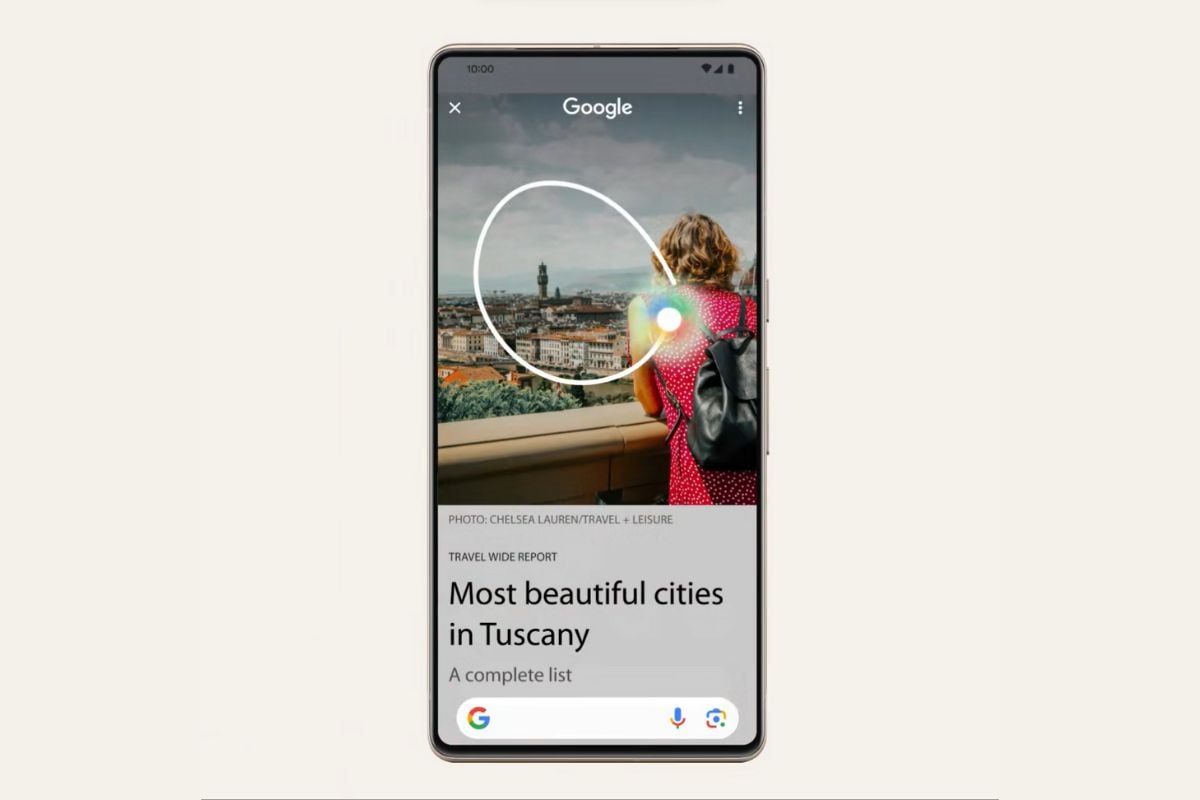
Circle to Search — Google’s new visual lookup feature introduced on the Samsung Galaxy S24 series and Pixel 8 series earlier this year — has made its way to many other smartphones over the past couple of months. Now iPhone owners can also use a form of Circle to Search feature via the Google app for iOS and an Apple Shortcut. Unlike the Android version of Circle to Search, the Shortcut on iOS has some limitations, and relies on Google Lens.

Google Lens Design Manager Minsang Choi announced the arrival of a new Shortcut on the Google app for iOS via a post on X (formerly Twitter). Dubbed “Search your screenshot”, it will let you perform a custom action called “Search Image With Lens” via the Shortcuts app. When activated, the Shortcut takes a screenshot and uses Google Lens to look up the contents of the image.

Google App iOS team just released super cool shortcut that allows you to lens visual search using your action button on iPhone 15 Pro series. It’s basically circle to search but faster! Please download google app and try this out! : https://t.co/T0GR141Pim pic.twitter.com/AN2C9bEsA9

— Minsang Choi (@radiofun8) May 8, 2024

In order to use the Shortcut on an iPhone, you will need to ensure that your phone is running iOS 13 or later and download the latest version of the Google app for iOS. The Shortcut can be accessed directly by tapping the link shared by Choi on an iPhone. Alternatively, you can choose to set up the Shortcut manually by selecting Take screenshot and followed by Search Image With Lens.

While Android users can simply hold the navigation bar to use the Circle to Search feature, iPhone owners can expedite the process of launching the Shortcut by mapping to the Action button on the iPhone 15 Pro and iPhone 15 Pro Max. Meanwhile, navigating to Accessibility > Touch > Back Tap in the Settings app will allow you to launch the Shortcut using a double tap or triple tap gesture on most modern iPhone models.

While launching Google’s new Shortcut is quite straightforward once it has been set up, it is limited in terms of functionality compared to the Circle to Search feature on Android smartphones. While the Shortcut will pass your screenshot to Google Lens for a visual lookup, you can’t draw a circle or highlight a part of the screen to look up. However, it’s a convenient way to quickly look up something on your iPhone with a couple of taps.
Share. Facebook Twitter Pinterest LinkedIn Tumblr Email
Previous ArticleGodrej 1.5 Ton 4 Star Inverter Split AC (EI 18PINV4R32 WYP) at Lowest Price in India (8th May 2024)
Next Article Google DeepMind’s Groundbreaking AI for Protein Structure Can Now Model DNA

Related Articles

Vivo V60 Launched in India With Snapdragon 7 Gen 4 SoC, 50-Megapixel Telephoto Camera: Price, Features
Phones

Vivo V60 Launched in India With Snapdragon 7 Gen 4 SoC, 50-Megapixel Telephoto Camera: Price, Features

12 August 2025
OnePlus Said to Be Testing Display With 165Hz Refresh Rate; Might Arrive on Midrange Smartphone
Phones

OnePlus Said to Be Testing Display With 165Hz Refresh Rate; Might Arrive on Midrange Smartphone

12 August 2025
Flipkart Independence Day Sale 2025 Begins Tomorrow: Deals on iPhone 16, Samsung Galaxy S24, and More
Phones

Flipkart Independence Day Sale 2025 Begins Tomorrow: Deals on iPhone 16, Samsung Galaxy S24, and More

12 August 2025
Honor X7c 5G Specifications Teased Ahead of India Launch; Will Feature 5,200mAh Battery, Snapdragon 4 Gen 2 SoC
Phones

Honor X7c 5G Specifications Teased Ahead of India Launch; Will Feature 5,200mAh Battery, Snapdragon 4 Gen 2 SoC

12 August 2025
Samsung Galaxy A07 Design, Colour Options, Key Features Leaked; Tipped to Get Six Android OS Upgrades
Phones

Samsung Galaxy A07 Design, Colour Options, Key Features Leaked; Tipped to Get Six Android OS Upgrades

12 August 2025
Realme P4 Series Key Specifications Confirmed Ahead of Launch in India on August 20
Phones

Realme P4 Series Key Specifications Confirmed Ahead of Launch in India on August 20

12 August 2025
Demo
Top Articles
5 laptops to buy instead of the M4 MacBook Pro

5 laptops to buy instead of the M4 MacBook Pro

17 November 2024133 Views
ChatGPT o1 vs. o1-mini vs. 4o: Which should you use?

ChatGPT o1 vs. o1-mini vs. 4o: Which should you use?

15 December 2024111 Views
Costco partners with Electric Era to bring back EV charging in the U.S.

Costco partners with Electric Era to bring back EV charging in the U.S.

28 October 2024100 Views

Subscribe to Updates

Get the latest tech news and updates directly to your inbox.

Latest News
Google’s next XL Pixel may get lighter and pricier, with less RAM to start News

Google’s next XL Pixel may get lighter and pricier, with less RAM to start

News Room4 August 2026
Uplift Promo Codes: 0 Off News

Uplift Promo Codes: $570 Off

News Room4 August 2026
Xiaomi just launched an SUV with seven seats and a bedroom upstairs News

Xiaomi just launched an SUV with seven seats and a bedroom upstairs

News Room4 August 2026
Most Popular
The Spectacular Burnout of a Solar Panel Salesman

The Spectacular Burnout of a Solar Panel Salesman

13 January 2025137 Views
5 laptops to buy instead of the M4 MacBook Pro

5 laptops to buy instead of the M4 MacBook Pro

17 November 2024133 Views
ChatGPT o1 vs. o1-mini vs. 4o: Which should you use?

ChatGPT o1 vs. o1-mini vs. 4o: Which should you use?

15 December 2024111 Views
Our Picks
These  AI glasses sold out overnight, and they’re already sparking privacy fears

These $89 AI glasses sold out overnight, and they’re already sparking privacy fears

4 August 2026
Starz Promo Codes:  Off for August 2026

Starz Promo Codes: $5 Off for August 2026

4 August 2026
Google’s next XL Pixel may get lighter and pricier, with less RAM to start

Google’s next XL Pixel may get lighter and pricier, with less RAM to start

4 August 2026

Subscribe to Updates

Get the latest tech news and updates directly to your inbox.

Facebook X (Twitter) Instagram Pinterest
  • Privacy Policy
  • Terms of use
  • Advertise
  • Contact Us
© 2026 Best in Technology. All Rights Reserved.

Type above and press Enter to search. Press Esc to cancel.