

Close Menu
Best in TechnologyBest in Technology
  • News
  • Phones
  • Laptops
  • Gadgets
  • Gaming
  • AI
  • Tips
  • More
    • Web Stories
    • Global
    • Press Release

Subscribe to Updates

Get the latest tech news and updates directly to your inbox.

What's On
Nintendo’s latest product wants to cheer you up with random quips

Nintendo’s latest product wants to cheer you up with random quips

23 January 2026
TikTok Is Now Collecting Even More Data About Its Users. Here Are the 3 Biggest Changes

TikTok Is Now Collecting Even More Data About Its Users. Here Are the 3 Biggest Changes

23 January 2026
What’s Going On With Ubisoft? | The Game Informer Show

What’s Going On With Ubisoft? | The Game Informer Show

23 January 2026
Facebook X (Twitter) Instagram
Just In
  • Nintendo’s latest product wants to cheer you up with random quips
  • TikTok Is Now Collecting Even More Data About Its Users. Here Are the 3 Biggest Changes
  • What’s Going On With Ubisoft? | The Game Informer Show
  • Don’t let a messy tech stack slow your growth in 2026
  • How to Prep for This Weekend’s Big Winter Storm: Power, Heat, and Underwear
  • You could see faster AMD Ryzen AI Max chips soon
  • AI coding work is shifting fast, and your career path may split
  • Our Favorite Earbuds for Most People Are Over 25 Percent Off
Facebook X (Twitter) Instagram Pinterest Vimeo
Best in TechnologyBest in Technology
  • News
  • Phones
  • Laptops
  • Gadgets
  • Gaming
  • AI
  • Tips
  • More
    • Web Stories
    • Global
    • Press Release
Subscribe
Best in TechnologyBest in Technology
Home » Does Apple Music sound weak? It’s not your headphones’ fault
News

Does Apple Music sound weak? It’s not your headphones’ fault

News RoomBy News Room4 January 20245 Mins Read
Share Facebook Twitter Pinterest LinkedIn Tumblr Reddit Telegram Email
Does Apple Music sound weak? It’s not your headphones’ fault
Share
Facebook Twitter LinkedIn Pinterest Email

A lot of folks got a new set of Apple or Beats wireless headphones or earbuds for the holidays, only to discover that things don’t sound as good as expected when listening to Apple Music. If that’s been your experience too, don’t worry — it’s very unlikely that your new wireless earbuds or headphones are to blame.

The real culprit is Apple Music itself. That sounds like hooey, especially if you’re a longtime Apple Music listener and it’s never been a problem for you in the past. But if your previous earbuds or headphones were made by a company other than Apple or Beats, you may not realize that Apple Music treats Apple and Beats products a little differently.

The Dolby Atmos default

In 2021, Apple added two new formats to Apple Music: Dolby Atmos Music (aka spatial audio), and lossless audio. Apple Music wasn’t the first subscription streaming music service to do so (Amazon Music and Tidal already offered Dolby Atmos and lossless), but it was the first service to make Dolby Atmos Music the default option when listening on an iPhone or iPad via Apple or Beats wireless headphones equipped with the Apple H2 chip, like the Beats Studio Pro or Apple AirPods Pro.

If you weren’t using an H2-enabled set of headphones, you could still hear Dolby Atmos Music (when available), but you had to manually turn it on, and a lot of folks never did. It’s possible you even thought you were listening to Dolby Atmos — the default Dolby Atmos setting for the Apple Music app is something called “Automatic,” which kind of sounds like something you can just leave alone. But not really.

It turns out that Automatic is only automatic if you’re using one of those H2-enabled products I mentioned earlier. Apple Music then plays a Dolby Atmos version of a song if it exists. But any other set of headphones will still get regular, two-channel stereo. The only way to get Dolby Atmos using a third-party set of headphones is to switch the setting to Always On — another misnomer given that it still only applies when a Dolby Atmos version of a track is available.

To summarize: If you’re using Apple or Beats headphones with Apple Music (on an iOS or iPadOS device) for the first time, you’re going to start hearing Dolby Atmos Music versions of songs by default.

Why so quiet?

Dolby Atmos Music can sound incredible — especially if you own a dedicated Dolby Atmos sound system like a Sonos Arc, plus a Sonos Sub and two Sonos Era 300 surround speakers. But even then, some Atmos Music tracks are better than others. It’s still a new format and it’s clear that not all artists and recording engineers have an ear for it yet. Hopefully, that improves over time.

Unfortunately, this quality discrepancy becomes magnified when listening with headphones. All too often, Dolby Atmos Music versions of your favorite songs can sound diminished.

It’s partly the nature of Dolby Atmos when rendered as binaural sound. It’s attempting to recreate a room full of speakers, (including overhead channels, using just one source of audio for each ear. In order to trick your brain into hearing a wider, deeper, and taller soundstage, some sounds simply have to be reduced in their intensity. You may notice most with vocals, which can sound a bit distant or hollow.

But the bigger issue is relative volume level. If you listened to just Dolby Atmos Music or just stereo tracks, there would be some natural variation in volume levels from one track to another — some tracks are just mastered at louder levels. However, if you listen to a mix of Atmos and stereo — which is probably the case given that Apple Music is far from possessing Dolby Atmos versions of every track in its 100 million-plus-song catalog — the relative volume levels can be much more noticeable, with Dolby Atmos Music typically sounding quieter than stereo.

Since most of us aren’t in the habit of checking our phone every time a new song begins to play to see if it’s in stereo or Dolby Atmos Music, all we know is what we hear — and it sounds kind of weak compared to stereo.

Two solutions
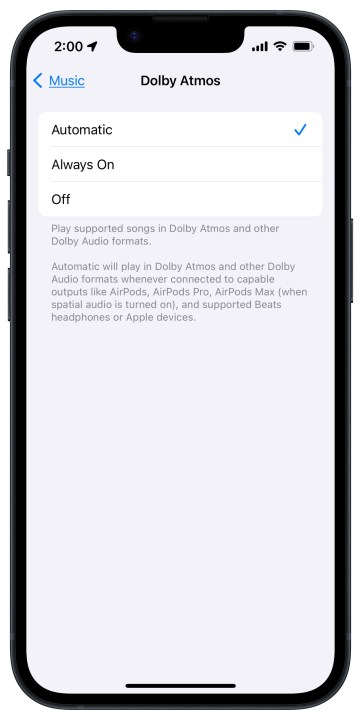
Apple Music Dolby Atmos settings in iOS 17.

So how do you fix this?

If you like Dolby Atmos Music and you simply want it to sound as clear and as loud as stereo tracks, try enabling Sound Check in the Apple Music settings (in iOS: Settings > Music). Sound Check attempts to compensate for the natural loudness differences between formats (and even between two tracks of the same format), so that you can simply choose your preferred listening level without constantly adjusting the volume.

I’ve found it to be a good solution, but not everyone agrees. Moreover, Sound Check might produce different results in different listening scenarios (e.g., wireless headphones versus Apple AirPlay versus Apple CarPlay), so it won’t always be a panacea.

Then there’s the thermonuclear option: disabling Dolby Atmos entirely. You can do this by setting Dolby Atmos from Automatic or Always On to Off. You won’t get to hear spatial audio tracks from Apple Music even if they exist, and things will likely sound exactly as you remember them sounding before you switched headphones.

Editors’ Recommendations


Share. Facebook Twitter Pinterest LinkedIn Tumblr Email
Previous ArticlePoco X6 Series, Poco M6 Pro Processor Details Confirmed Ahead of January 11 Launch
Next Article Why I’m excited about Dell’s new 120Hz UltraSharp monitors

Related Articles

Nintendo’s latest product wants to cheer you up with random quips
News

Nintendo’s latest product wants to cheer you up with random quips

23 January 2026
TikTok Is Now Collecting Even More Data About Its Users. Here Are the 3 Biggest Changes
News

TikTok Is Now Collecting Even More Data About Its Users. Here Are the 3 Biggest Changes

23 January 2026
Don’t let a messy tech stack slow your growth in 2026
News

Don’t let a messy tech stack slow your growth in 2026

23 January 2026
How to Prep for This Weekend’s Big Winter Storm: Power, Heat, and Underwear
News

How to Prep for This Weekend’s Big Winter Storm: Power, Heat, and Underwear

23 January 2026
You could see faster AMD Ryzen AI Max chips soon
News

You could see faster AMD Ryzen AI Max chips soon

23 January 2026
AI coding work is shifting fast, and your career path may split
News

AI coding work is shifting fast, and your career path may split

23 January 2026
Demo
Top Articles
ChatGPT o1 vs. o1-mini vs. 4o: Which should you use?

ChatGPT o1 vs. o1-mini vs. 4o: Which should you use?

15 December 2024107 Views
5 laptops to buy instead of the M4 MacBook Pro

5 laptops to buy instead of the M4 MacBook Pro

17 November 2024101 Views
Costco partners with Electric Era to bring back EV charging in the U.S.

Costco partners with Electric Era to bring back EV charging in the U.S.

28 October 202497 Views

Subscribe to Updates

Get the latest tech news and updates directly to your inbox.

Latest News
You could see faster AMD Ryzen AI Max chips soon News

You could see faster AMD Ryzen AI Max chips soon

News Room23 January 2026
AI coding work is shifting fast, and your career path may split News

AI coding work is shifting fast, and your career path may split

News Room23 January 2026
Our Favorite Earbuds for Most People Are Over 25 Percent Off News

Our Favorite Earbuds for Most People Are Over 25 Percent Off

News Room23 January 2026
Most Popular
The Spectacular Burnout of a Solar Panel Salesman

The Spectacular Burnout of a Solar Panel Salesman

13 January 2025136 Views
ChatGPT o1 vs. o1-mini vs. 4o: Which should you use?

ChatGPT o1 vs. o1-mini vs. 4o: Which should you use?

15 December 2024107 Views
5 laptops to buy instead of the M4 MacBook Pro

5 laptops to buy instead of the M4 MacBook Pro

17 November 2024101 Views
Our Picks
Don’t let a messy tech stack slow your growth in 2026

Don’t let a messy tech stack slow your growth in 2026

23 January 2026
How to Prep for This Weekend’s Big Winter Storm: Power, Heat, and Underwear

How to Prep for This Weekend’s Big Winter Storm: Power, Heat, and Underwear

23 January 2026
You could see faster AMD Ryzen AI Max chips soon

You could see faster AMD Ryzen AI Max chips soon

23 January 2026

Subscribe to Updates

Get the latest tech news and updates directly to your inbox.

Facebook X (Twitter) Instagram Pinterest
  • Privacy Policy
  • Terms of use
  • Advertise
  • Contact Us
© 2026 Best in Technology. All Rights Reserved.

Type above and press Enter to search. Press Esc to cancel.