



Close Menu
Best in TechnologyBest in Technology
  • News
  • Phones
  • Laptops
  • Gadgets
  • Gaming
  • AI
  • Tips
  • More
    • Web Stories
    • Global
    • Press Release

Subscribe to Updates

Get the latest tech news and updates directly to your inbox.

What's On
Shopping for Back-to-school? These are the gaming laptops I’d recommend

Shopping for Back-to-school? These are the gaming laptops I’d recommend

18 July 2026
Last-minute Samsung leak spoils all of its next-gen foldable phones

Last-minute Samsung leak spoils all of its next-gen foldable phones

18 July 2026
Did J-Hope of BTS just spoil Samsung’s biggest Galaxy Z Fold 8 surprise?

Did J-Hope of BTS just spoil Samsung’s biggest Galaxy Z Fold 8 surprise?

18 July 2026
Facebook X (Twitter) Instagram
Just In
  • Shopping for Back-to-school? These are the gaming laptops I’d recommend
  • Last-minute Samsung leak spoils all of its next-gen foldable phones
  • Did J-Hope of BTS just spoil Samsung’s biggest Galaxy Z Fold 8 surprise?
  • What Makes a Laser Printer Better for Small Business Workflows?
  • SteelSeries Coupon Codes: 15% Off in July 2026
  • OpenAI patches ChatGPT desktop after user backlash over its recent redesign
  • Google Contacts borrows a handy iPhone trick to make sharing your number easier
  • This true story thriller is one of the 3 underrated Netflix shows you should watch this weekend (July 17-19)
Facebook X (Twitter) Instagram Pinterest Vimeo
Best in TechnologyBest in Technology
  • News
  • Phones
  • Laptops
  • Gadgets
  • Gaming
  • AI
  • Tips
  • More
    • Web Stories
    • Global
    • Press Release
Subscribe
Best in TechnologyBest in Technology
Home » How to change your iPhone call and messaging apps in iOS 18.2
News

How to change your iPhone call and messaging apps in iOS 18.2

News RoomBy News Room2 November 20242 Mins Read
Share Facebook Twitter Pinterest LinkedIn Tumblr Reddit Telegram Email
How to change your iPhone call and messaging apps in iOS 18.2
Share
Facebook Twitter LinkedIn Pinterest Email

The upcoming iOS 18.2 release will allow users to change their default calling and messaging apps on their iPhones. In other words, you will no longer need to use Apple’s native apps if you don’t want to. Here are the relatively easy steps to do so.

Please note: iOS 18.2 remains in beta. As such, the steps below might change before the update is released to the public.

How to change your default calling and messaging apps

There are just a few steps you need to take to change your default calling and messaging apps. Apple has arranged all the defaults you can change into a combined hub, making it easy to change everything at once.

Step 1: Open the Settings app on your iPhone with iOS 18.2 or later installed.

Step 2: Scroll down and tap on the Apps option.

Step 3: In the Apps section, you’ll find a new Default apps option at the top. Select it.
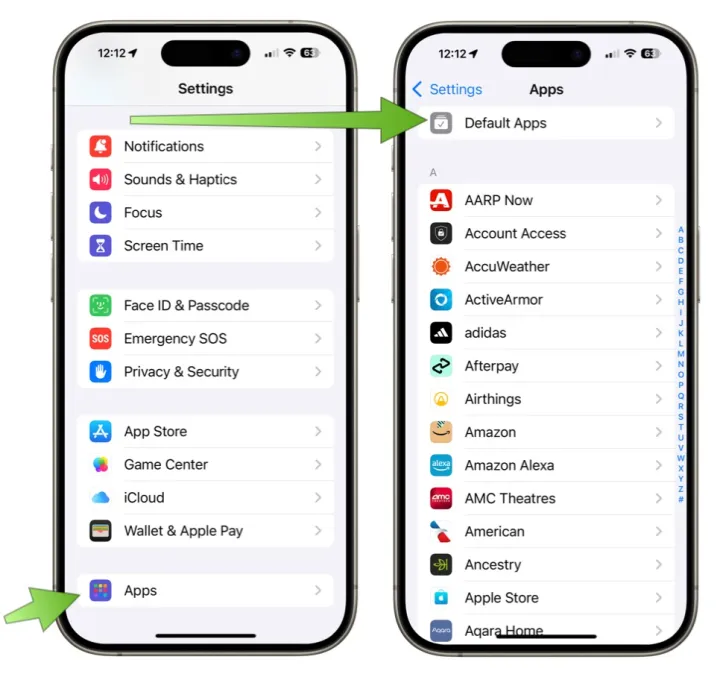
Screenshot showing how to change default apps on iOS 18.2.

Step 4: You’ll see options for both Calling and Messaging. Tap on the one you want to change.

Step 5: From there, you’ll see a list of the compatible apps installed on your iPhone. Choose the app you want to set as your default calling or messaging app.
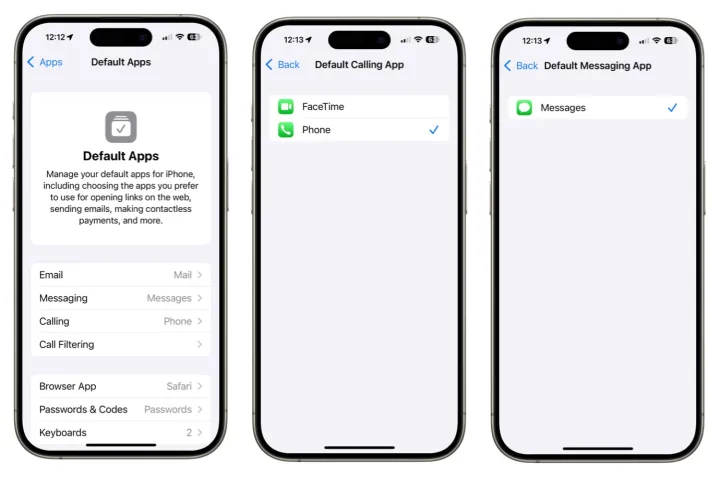
Screenshots showing how to change the default apps on iOS 18.2.

Native app alternatives

But why would you change your calling or messaging app? After all, Apple’s iMessage offers many great features, including SharePlay and Memoji. Additionally, the official Phone app is the go-to app for making direct calls with handsets. Heck, you’re probably very used to just using Apple’s versions, so why change?

Some alternatives, like WhatsApp, Signal, and Telegram, are preferred because they facilitate international communication, while others provide an extra layer of security. Additionally, some apps are chosen for their availability on platforms beyond those provided by Apple. In some cases, this makes it easier to communicate with a wider audience. Down at the simplest level, you may prefer to use a different app because it offers features Apple’s don’t. Whatever reason, you’ll be able to dive into the Apple Appe Store and check out the alternatives.

Once iOS 18.2 is released, Apple is making it possible to select a third-party solution as your default calling and messaging apps. That’s good for choice and competition.

The iOS 18.2 update is expected to be released to the public before the end of the year.


Share. Facebook Twitter Pinterest LinkedIn Tumblr Email
Previous ArticleBethesda is shutting down a game it had already forgotten about
Next Article How a PhD Student Discovered a Lost Mayan City From Hundreds of Miles Away

Related Articles

Shopping for Back-to-school? These are the gaming laptops I’d recommend
News

Shopping for Back-to-school? These are the gaming laptops I’d recommend

18 July 2026
Last-minute Samsung leak spoils all of its next-gen foldable phones
News

Last-minute Samsung leak spoils all of its next-gen foldable phones

18 July 2026
Did J-Hope of BTS just spoil Samsung’s biggest Galaxy Z Fold 8 surprise?
News

Did J-Hope of BTS just spoil Samsung’s biggest Galaxy Z Fold 8 surprise?

18 July 2026
What Makes a Laser Printer Better for Small Business Workflows?
News

What Makes a Laser Printer Better for Small Business Workflows?

18 July 2026
SteelSeries Coupon Codes: 15% Off in July 2026
News

SteelSeries Coupon Codes: 15% Off in July 2026

18 July 2026
OpenAI patches ChatGPT desktop after user backlash over its recent redesign
News

OpenAI patches ChatGPT desktop after user backlash over its recent redesign

18 July 2026
Demo
Top Articles
5 laptops to buy instead of the M4 MacBook Pro

5 laptops to buy instead of the M4 MacBook Pro

17 November 2024133 Views
ChatGPT o1 vs. o1-mini vs. 4o: Which should you use?

ChatGPT o1 vs. o1-mini vs. 4o: Which should you use?

15 December 2024111 Views
Costco partners with Electric Era to bring back EV charging in the U.S.

Costco partners with Electric Era to bring back EV charging in the U.S.

28 October 2024100 Views

Subscribe to Updates

Get the latest tech news and updates directly to your inbox.

Latest News
OpenAI patches ChatGPT desktop after user backlash over its recent redesign News

OpenAI patches ChatGPT desktop after user backlash over its recent redesign

News Room18 July 2026
Google Contacts borrows a handy iPhone trick to make sharing your number easier News

Google Contacts borrows a handy iPhone trick to make sharing your number easier

News Room18 July 2026
This true story thriller is one of the 3 underrated Netflix shows you should watch this weekend (July 17-19) News

This true story thriller is one of the 3 underrated Netflix shows you should watch this weekend (July 17-19)

News Room18 July 2026
Most Popular
The Spectacular Burnout of a Solar Panel Salesman

The Spectacular Burnout of a Solar Panel Salesman

13 January 2025137 Views
5 laptops to buy instead of the M4 MacBook Pro

5 laptops to buy instead of the M4 MacBook Pro

17 November 2024133 Views
ChatGPT o1 vs. o1-mini vs. 4o: Which should you use?

ChatGPT o1 vs. o1-mini vs. 4o: Which should you use?

15 December 2024111 Views
Our Picks
What Makes a Laser Printer Better for Small Business Workflows?

What Makes a Laser Printer Better for Small Business Workflows?

18 July 2026
SteelSeries Coupon Codes: 15% Off in July 2026

SteelSeries Coupon Codes: 15% Off in July 2026

18 July 2026
OpenAI patches ChatGPT desktop after user backlash over its recent redesign

OpenAI patches ChatGPT desktop after user backlash over its recent redesign

18 July 2026

Subscribe to Updates

Get the latest tech news and updates directly to your inbox.

Facebook X (Twitter) Instagram Pinterest
  • Privacy Policy
  • Terms of use
  • Advertise
  • Contact Us
© 2026 Best in Technology. All Rights Reserved.

Type above and press Enter to search. Press Esc to cancel.