



Malwarebytes Premium
MSRP $45.00

“Malwarebytes is quick and easy to set up, and is known to catch security problems that Microsoft Defender misses.”
Pros
- Good free antivirus scanner
- Low-cost real-time protection plans
- Quick and friendly support
- Easy setup
Cons
- VPN costs extra
- Didn’t get a perfect AV-Test protection score
In 2024, most people will need more than Microsoft’s built-in security to keep their data secure and maintain their privacy. Malwarebytes is among the most well-known and best antivirus solutions available for Windows to protect your PC from the latest malware threats.
I reviewed Malwarebytes’ personal plans and tested Premium Plus to find out how easy it is to use, how good customer support is, and whether it’s worth the subscription cost.
Tiers and pricing
You can get started with Malwarebytes for free. If you think your computer might be infected with malware, you can download a virus scanner to find and remove anything Windows Defender has missed.
Malwarebytes offers one of the best free antivirus options you can find, but there are others.
You’ll also get a 14-day free trial of Malwarebytes Premium. That lets you test out the software and get a sense of the user interface. After the trial, the malware scanner remains functional, but you must subscribe to keep more-advanced features.
A Malwarebytes Premium personal account starts at $45 per year. That covers the essential antivirus, malware, phishing, and ransomware protection that everyone needs.
Your budget probably has room for another $15 to use Malwarebytes’ virtual private network (VPN) for a year. That enables anonymous browsing from selected locations around the world.
The VPN isn’t a meant to be a way to circumvent copyright laws and other legal restrictions. Major video streaming services recognize and block most popular VPNs. Instead, Malwarebytes offers the VPN as a privacy feature.
For even more security and privacy, you can choose the Malwarebytes Complete Protection plan. The cost rises to $120 annually since it includes a bundle of advanced services. You’ll get up to $2 million in identity theft insurance, social media monitoring, dark web monitoring, and three credit bureau reports.
Malwarebytes also offers antivirus protection for businesses, with prices that vary with the number of team members on the plan.
I tested Malwarebytes Premium Plus, which includes the VPN and added protection for two other devices. For $80 a year, it’s a competitively priced and affordable way to enjoy improved cybersecurity as phishing and hacking efforts increase. Besides my PC, I can protect my phone and tablet. Malwarebytes has apps for Windows, Android, macOS, and iOS.
The most expensive Malwarebytes personal account doubles that cost to $120 ($160 for three devices). It’s impossible to put a price on your identity. If you fear critical details from your accounts have already leaked, the added identity theft insurance and monitoring could be worth the added expense.
For most people, the $45 Premium or $60 Premium Plus plans will suffice. It’s worth checking out the latest antivirus deals that can sometimes add up to big savings. For example, Bitdefender Internet Security for Windows only costs $60 to cover three devices. Norton Deluxe provides cross-platform support for five devices for $50.
Design
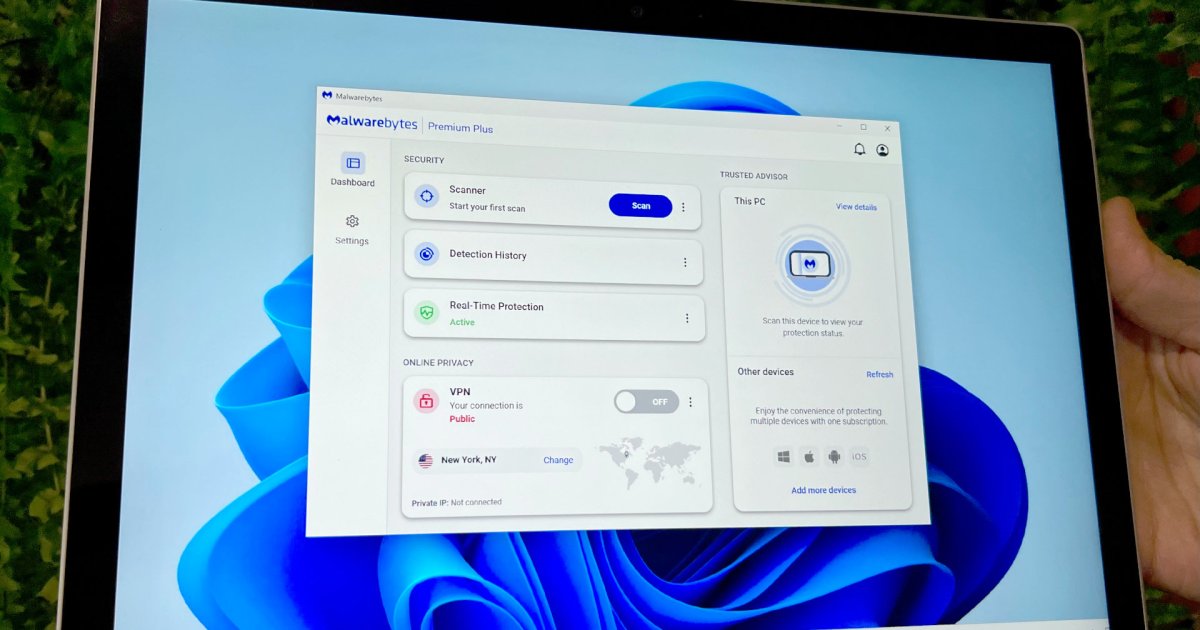
Malwarebytes’ software features a convenient dashboard that shows your protection status at a glance. When the protection score meter is full, your data should be safe from malware.
If your security isn’t at 100%, you can view more details to identify and correct critical issues like web security and ransomware weaknesses. You can also see warnings and recommendations to stay on top of potential problems.
Malwarebytes Premium comes with a browser extension that protects you from websites that contain malware, scams, and trackers with a pop-up alert. Check the Malwarebytes extension to see more details about these privacy and security threats.
Features
Malwarebytes offers a good, reliable service that excels at clearing and preventing malware. The company has a real-time “remediation map” on the Malwarebytes website that reveals when and where its free malware scanner has uncovered threats that other security software missed.
Microsoft was quite high on the list when I checked, suggesting Windows built-in Defender antivirus could be doing more to earn its name.
Since this map is hosted on the Malwarebytes website, there’s reason to be skeptical of the finer details. We don’t know how many of the competitor detections include out-of-date security software or disabled features.
Still, it’s a good reminder that antivirus software is important and worth the relatively small subscription fee for most people. For an unbiased measure of antivirus protection, third-party testing is required.
Independent security firm AV Test gave Malwarebytes a score of 5.5 out a potential 6 for protection during its last test in October 2023 and an overall score of 17 out of a maximum 18.
Scores vary from month to month for all antivirus software, and competing solutions fall within a range of 16 to 18. The bottom line is Malwarebytes has the ability to protect you from the ever-changing and ongoing threat of malware and viruses.
Support
Malwarebytes offers support via live chat. An AI chatbot begins the conversation, but you can request an agent at any time. I found the bot to be fairly robust, answering a question about how phishing protection works.
I was able to stump the AI with an unusual request, which required a live agent. Switching to a human support representative was as easy as asking for an agent. There was only one other person in the queue ahead of me, and within a couple of minutes, Malwarebytes support answered my question.
My issue was related to using a review code to test Malwarebytes. The subscription worked but it wasn’t automatically connected to my email address. Since this isn’t the normal flow for Malwarebytes, this won’t be a concern for customers. Still, it was a good opportunity to check on customer support.
In my experience, support was quick, friendly, and helpful — everything you want when dealing with a security company.
Privacy and security
Malwarebytes is generally considered a safe and private service you can trust. While the company did experience a minor breach in 2021, Malwarebytes reported “the attacker only gained access to a limited subset of internal company emails.”
The Malwarebytes privacy policy states your personal information will not be sold and is used only for the purposes of protection. Malwarebytes may comply with government requests for your information.
Compared to other top antivirus companies, Malwarebytes maintains a very good track record with customer data. Some competing solutions have had customer data breaches.
A solid choice
There are plenty of antivirus choices, some better than others. The big names, including Malwarebytes, tend to offer reliable and complete solutions. If you only need a quick malware scan, Malwarebytes Free is a well-known and trusted solution among experts.
Unless you’re looking for something specific or need specialized security, one of Malwarebytes’ personal protection plans will cover everything you need. The $80 Premium Plus plan I tested is a solid choice, but it’s always a good idea to check other options.
We’ll be reviewing antivirus solutions from Bitdefender, Norton, and others soon, with comparisons to help you find the best fit for your needs.
Keeping your computer safe is wise, but you can also get hacked on your phone and tablet. Make sure to pick a plan that matches your needs and add coverage for the devices you use.
Editors’ Recommendations