



Close Menu
Best in TechnologyBest in Technology
  • News
  • Phones
  • Laptops
  • Gadgets
  • Gaming
  • AI
  • Tips
  • More
    • Web Stories
    • Global
    • Press Release

Subscribe to Updates

Get the latest tech news and updates directly to your inbox.

What's On
Volkswagen’s new ,000 electric SUV shows what US buyers are missing

Volkswagen’s new $20,000 electric SUV shows what US buyers are missing

30 August 2026
Brave’s new Email Alias feature can keep websites away from your real inbox address

Brave’s new Email Alias feature can keep websites away from your real inbox address

30 August 2026
The HiLight Studio app reveals what Google hides about the Pixel 11 Pro’s RGB light, but it’s not for everyone

The HiLight Studio app reveals what Google hides about the Pixel 11 Pro’s RGB light, but it’s not for everyone

30 August 2026
Facebook X (Twitter) Instagram
Just In
  • Volkswagen’s new $20,000 electric SUV shows what US buyers are missing
  • Brave’s new Email Alias feature can keep websites away from your real inbox address
  • The HiLight Studio app reveals what Google hides about the Pixel 11 Pro’s RGB light, but it’s not for everyone
  • Take A Tour And Watch Us Hand Out Magazines At Gamescom 2026
  • Nvidia’s DLSS 5 leak is making games prettier and people weirder
  • You no longer need a subscription to try Google’s Dreambeans app
  • Hisense made a phone with a second screen you can literally take off
  • 3 underrated movies on HBO Max you should watch this weekend (August 29-30)
Facebook X (Twitter) Instagram Pinterest Vimeo
Best in TechnologyBest in Technology
  • News
  • Phones
  • Laptops
  • Gadgets
  • Gaming
  • AI
  • Tips
  • More
    • Web Stories
    • Global
    • Press Release
Subscribe
Best in TechnologyBest in Technology
Home » How to customize mouse gestures on Mac
News

How to customize mouse gestures on Mac

News RoomBy News Room25 April 20243 Mins Read
Share Facebook Twitter Pinterest LinkedIn Tumblr Reddit Telegram Email
How to customize mouse gestures on Mac
Share
Facebook Twitter LinkedIn Pinterest Email

Did you know that you can still pull off gestures and haptic tricks with a Mac computer, even without a touchscreen? Such feats are possible, just as long as you own an Apple Magic Mouse. Far more than a sleek-looking desk accessory, the Magic Mouse functions much like a MacBook trackpad. Taps, long presses, swipes, and pinches (among other actions) deliver a number of results, and you’ll be able to customize these commands, too.

Here’s a guide to help get you customizing your Magic Mouse gestures in five minutes or less. And be sure to stick around to the end for some expert advice on a few other Magic Mouse matters!

Adjust point and click gestures

Point and click gestures include those you use to scroll, secondary click (right-click), and zoom.

Step 1: Open System preferences using the icon in your Dock or the Apple icon in the menu bar.

Step 2: Select Mouse.

Step 3: Pick the Point and click tab at the top of the window. Then mark the following settings you want to use.

Step 4: Scroll direction: Mark this option to use a natural scroll direction. When scrolling a page or scroll box, the content tracks the movement of your finger.

Step 5: Secondary click: Select this setting to have your secondary click on the right or left side of the mouse. Choose the option you want in the drop-down list.
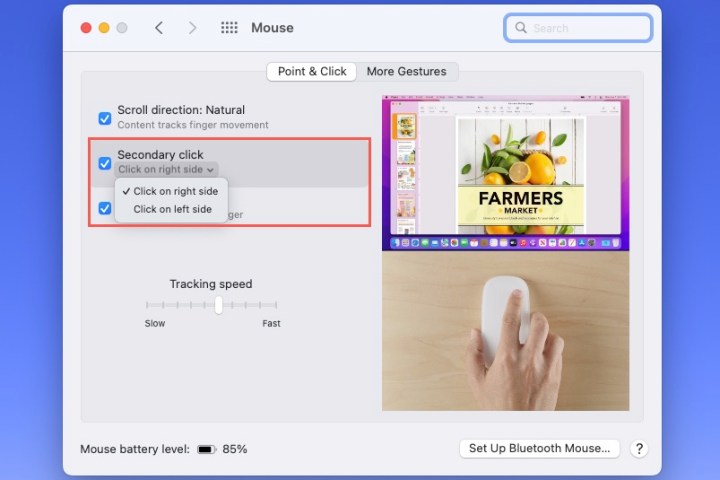
Secondary Click mouse setting on a Mac.

Step 6: Smart zoom: For an easy way to zoom, check this box. Then, double-tap your mouse with one finger to zoom in.
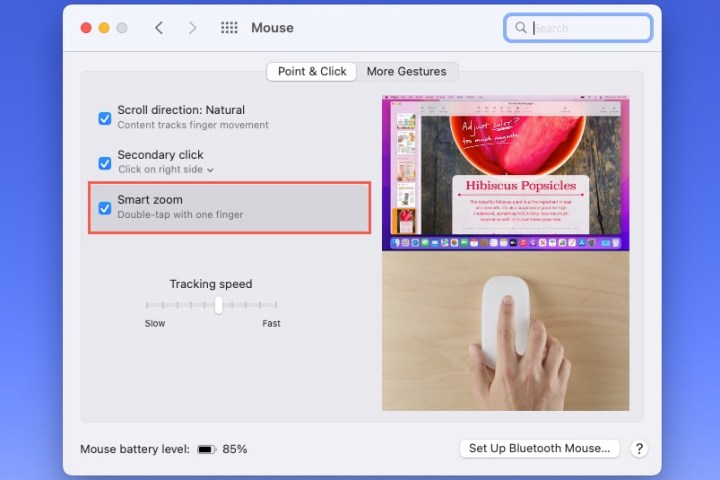
Smart Zoom mouse setting on a Mac.

Step 7: Tracking speed: To adjust the speed of your cursor, use the Tracking speed slider at the bottom of the Point and click tab.

If you select a setting, you can see a preview of how to use the point and click gesture on the right side of the window.
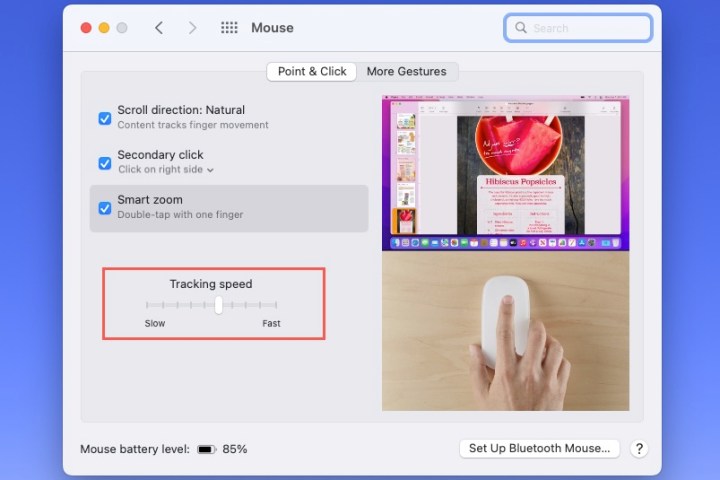
Tracking speed mouse setting on a Mac.

Customize swipe and other gestures

Additional gestures available for your Magic Mouse include swiping between web pages and full-screen apps as well as accessing Mission Control.

Step 1: Open System preferences using the icon in your Dock or the Apple icon in the menu bar.

Step 2: Select Mouse.

Step 3: Pick the More gestures tab at the top of the window. Then mark the following settings you want to use.

Step 4: Swipe between pages: When you’re viewing multiple pages in Safari, you can swipe between them using a mouse gesture. Use the drop-down box to pick Scroll left or right with one finger, Swipe left or right with two fingers, or Swipe with one or two fingers.
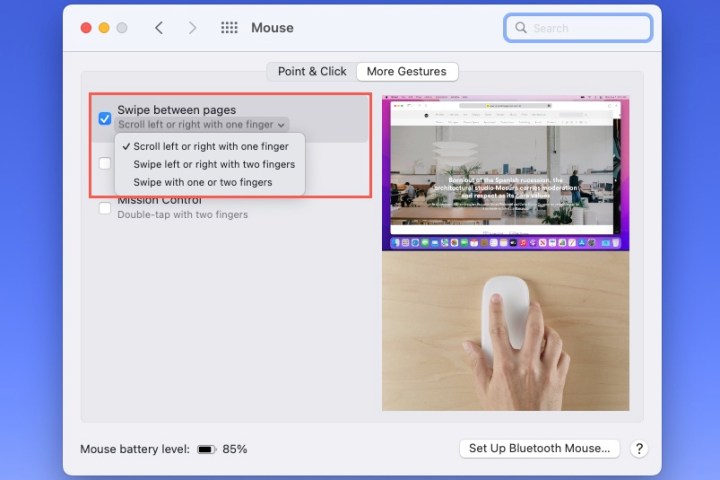
Swipe Between Pages mouse setting on a Mac.

Step 5: Swipe between full-screen apps: When you use your Mac apps in full-screen mode, you can swipe between them with this mouse setting enabled.
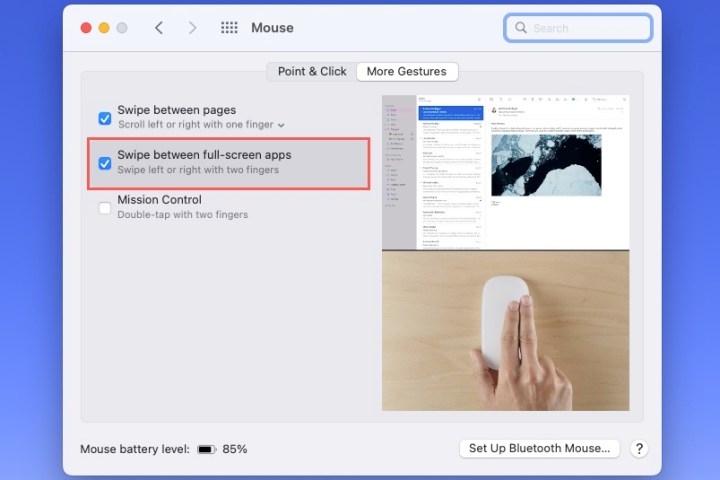
Swipe Between Full Screen Apps mouse setting on a Mac.

Step 6: Mission control: To access, mark this option and then double-tap your mouse with two fingers. You can choose an option to see a preview of how to use it on the right side of the window.
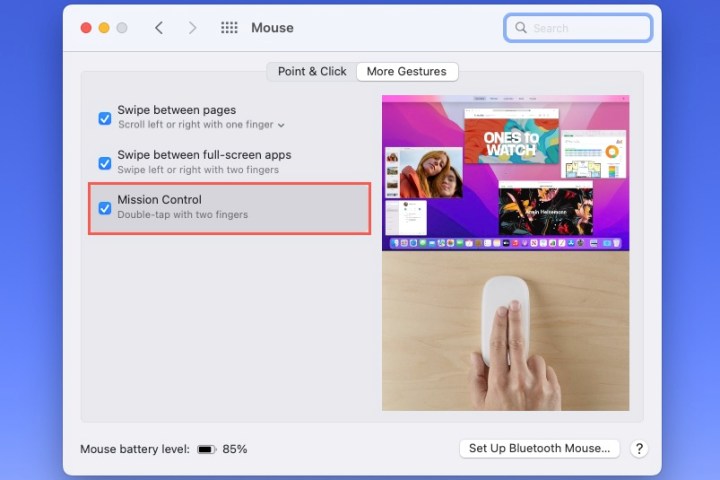
Mission Control access mouse setting on a Mac.

Maybe you’ll decide to change your gesture settings as soon as you purchase a new Mac or wait until you see which ones you really want to use. Either way, keep in mind how easy it is to customize mouse gestures on your Mac.

Editors’ Recommendations



Share. Facebook Twitter Pinterest LinkedIn Tumblr Email
Previous ArticleReview: Yale Approach Smart Lock
Next Article Stellar Blade, Sand Land, Monkey Ball, Crabs, And Knuckles | GI Show

Related Articles

Volkswagen’s new ,000 electric SUV shows what US buyers are missing
News

Volkswagen’s new $20,000 electric SUV shows what US buyers are missing

30 August 2026
Brave’s new Email Alias feature can keep websites away from your real inbox address
News

Brave’s new Email Alias feature can keep websites away from your real inbox address

30 August 2026
The HiLight Studio app reveals what Google hides about the Pixel 11 Pro’s RGB light, but it’s not for everyone
News

The HiLight Studio app reveals what Google hides about the Pixel 11 Pro’s RGB light, but it’s not for everyone

30 August 2026
Nvidia’s DLSS 5 leak is making games prettier and people weirder
News

Nvidia’s DLSS 5 leak is making games prettier and people weirder

30 August 2026
You no longer need a subscription to try Google’s Dreambeans app
News

You no longer need a subscription to try Google’s Dreambeans app

29 August 2026
Hisense made a phone with a second screen you can literally take off
News

Hisense made a phone with a second screen you can literally take off

29 August 2026
Demo
Top Articles
5 laptops to buy instead of the M4 MacBook Pro

5 laptops to buy instead of the M4 MacBook Pro

17 November 2024134 Views
ChatGPT o1 vs. o1-mini vs. 4o: Which should you use?

ChatGPT o1 vs. o1-mini vs. 4o: Which should you use?

15 December 2024112 Views
Costco partners with Electric Era to bring back EV charging in the U.S.

Costco partners with Electric Era to bring back EV charging in the U.S.

28 October 2024101 Views

Subscribe to Updates

Get the latest tech news and updates directly to your inbox.

Latest News
You no longer need a subscription to try Google’s Dreambeans app News

You no longer need a subscription to try Google’s Dreambeans app

News Room29 August 2026
Hisense made a phone with a second screen you can literally take off News

Hisense made a phone with a second screen you can literally take off

News Room29 August 2026
3 underrated movies on HBO Max you should watch this weekend (August 29-30) News

3 underrated movies on HBO Max you should watch this weekend (August 29-30)

News Room29 August 2026
Most Popular
The Spectacular Burnout of a Solar Panel Salesman

The Spectacular Burnout of a Solar Panel Salesman

13 January 2025137 Views
5 laptops to buy instead of the M4 MacBook Pro

5 laptops to buy instead of the M4 MacBook Pro

17 November 2024134 Views
ChatGPT o1 vs. o1-mini vs. 4o: Which should you use?

ChatGPT o1 vs. o1-mini vs. 4o: Which should you use?

15 December 2024112 Views
Our Picks
Take A Tour And Watch Us Hand Out Magazines At Gamescom 2026

Take A Tour And Watch Us Hand Out Magazines At Gamescom 2026

30 August 2026
Nvidia’s DLSS 5 leak is making games prettier and people weirder

Nvidia’s DLSS 5 leak is making games prettier and people weirder

30 August 2026
You no longer need a subscription to try Google’s Dreambeans app

You no longer need a subscription to try Google’s Dreambeans app

29 August 2026

Subscribe to Updates

Get the latest tech news and updates directly to your inbox.

Facebook X (Twitter) Instagram Pinterest
  • Privacy Policy
  • Terms of use
  • Advertise
  • Contact Us
© 2026 Best in Technology. All Rights Reserved.

Type above and press Enter to search. Press Esc to cancel.