




Close Menu
Best in TechnologyBest in Technology
  • News
  • Phones
  • Laptops
  • Gadgets
  • Gaming
  • AI
  • Tips
  • More
    • Web Stories
    • Global
    • Press Release

Subscribe to Updates

Get the latest tech news and updates directly to your inbox.

What's On
Warehouse Management Systems: The Secret Software Powering e-Commerce

Warehouse Management Systems: The Secret Software Powering e-Commerce

7 August 2026
Zohran Mamdani’s NYC Tech Team Is What DOGE Should Have Been

Zohran Mamdani’s NYC Tech Team Is What DOGE Should Have Been

7 August 2026
Caviar just gave Meta’s smart glasses the gold treatment but forgot to make it pretty

Caviar just gave Meta’s smart glasses the gold treatment but forgot to make it pretty

7 August 2026
Facebook X (Twitter) Instagram
Just In
  • Warehouse Management Systems: The Secret Software Powering e-Commerce
  • Zohran Mamdani’s NYC Tech Team Is What DOGE Should Have Been
  • Caviar just gave Meta’s smart glasses the gold treatment but forgot to make it pretty
  • Scientists Used AI to Create 16 New Viruses
  • OnePlus announces its first ColorOS beta, kicking off the transition from OxygenOS
  • The 5 Best Laptop Power Banks I’ve Personally Tested (2026)
  • Apple fixed three Mac Screen Sharing flaws, and now it’s patching another one
  • Best Webcams (2026): My Honest Take After Testing the Best
Facebook X (Twitter) Instagram Pinterest Vimeo
Best in TechnologyBest in Technology
  • News
  • Phones
  • Laptops
  • Gadgets
  • Gaming
  • AI
  • Tips
  • More
    • Web Stories
    • Global
    • Press Release
Subscribe
Best in TechnologyBest in Technology
Home » Can you take a picture of the solar eclipse with your phone? Here’s how to do it
News

Can you take a picture of the solar eclipse with your phone? Here’s how to do it

News RoomBy News Room5 April 20245 Mins Read
Share Facebook Twitter Pinterest LinkedIn Tumblr Reddit Telegram Email
Can you take a picture of the solar eclipse with your phone? Here’s how to do it
Share
Facebook Twitter LinkedIn Pinterest Email

There will be a total solar eclipse on Monday, April 8, in various states across the U.S. and provinces in Canada. This rare event can produce breathtaking images and videos using a smartphone.

However,  simply pointing your phone, such as an iPhone 15 or Samsung Galaxy S24, at the sky won’t be enough to capture the beauty of this phenomenon. Here are steps to capture the total solar eclipse with your smartphone.

Where can you see the total solar eclipse?

A total solar eclipse is an astronomical event where the moon covers the entire sun. The upcoming event is scheduled for April 8 and will only be visible from a narrow path of areas that will experience totality.

States that will experience totality include parts of Texas, Oklahoma, Arkansas, Missouri, Illinois, Kentucky, Indiana, Ohio, Pennsylvania, New York, Vermont, New Hampshire, and Maine. The eclipse will also be visible in southern Ontario, Quebec, New Brunswick, Prince Edward Island, and Cape Breton.

If you are not in the path of totality, you can still witness a partial eclipse in most parts of the U.S. Visit NASA’s special website highlighting the total solar eclipse to find the best times to see it in your area.

Can you use your phone to take a picture of the solar eclipse?

When photographing a solar eclipse, it is essential to use a solar photo filter. These affordable accessories can be directly attached to your phone’s camera lens and are specifically designed to capture the eclipse without damaging your eyes or device.

You can search for these yourself online or look at recommendations from the American Astronomical Society. Solar filters are often affordable and essential in ensuring your smartphone’s camera isn’t severely damaged during an eclipse.

Tips for taking a picture of the solar eclipse

Having a filter alone isn’t enough to capture the solar event effectively. You should also adjust a few settings on your phone to get the best results. Try performing these steps before the event so that you have a better idea of how to do them.

There are a few things to keep in mind when capturing a good photo of the eclipse. Firstly, turning off your camera’s flash is essential to avoid a bad outcome. Additionally, if your phone doesn’t have a telephoto lens that optically zooms in on far-away subjects, it’s recommended not to use your camera’s zoom feature. Even though your first instinct might be to zoom in on the eclipse, doing so will lower the resolution and quality of the image, resulting in grainy and poor-quality photos. That said, if you have a phone with a proper telephoto lens — such as a Galaxy S24 Ultra or iPhone 15 Pro Max — zooming in will be a smart call.

When taking a photo, it is recommended to lock the focus and exposure. This feature is called Auto Exposure/Auto Focus Lock on an iPhone. To enable it on your Apple device, open the Camera app, frame your shot, and tap on the screen where you want to set the focus and exposure. A yellow square will appear to indicate the focus point. Next, touch and hold the yellow square for a few seconds. A yellow AE/AF Lock banner appears at the top of the screen. This indicates that the focus and exposure are now locked.

If you are using an Android-based device, open the Camera app, then tap the area of the screen where you want the camera to focus. You will typically see a square or a circle around the area to indicate that the focus has been set. Press down for a few seconds while keeping your finger on the screen where you tapped to focus. You might notice a pulsating square or an “AE/AF Lock” confirmation, indicating that focus and exposure have been locked.

Photographers also recommend using your phone’s burst mode before the eclipse reaches totality and just after it ends. Capturing this moment can be tricky, but if you are successful, it might be the best photo you take all day.

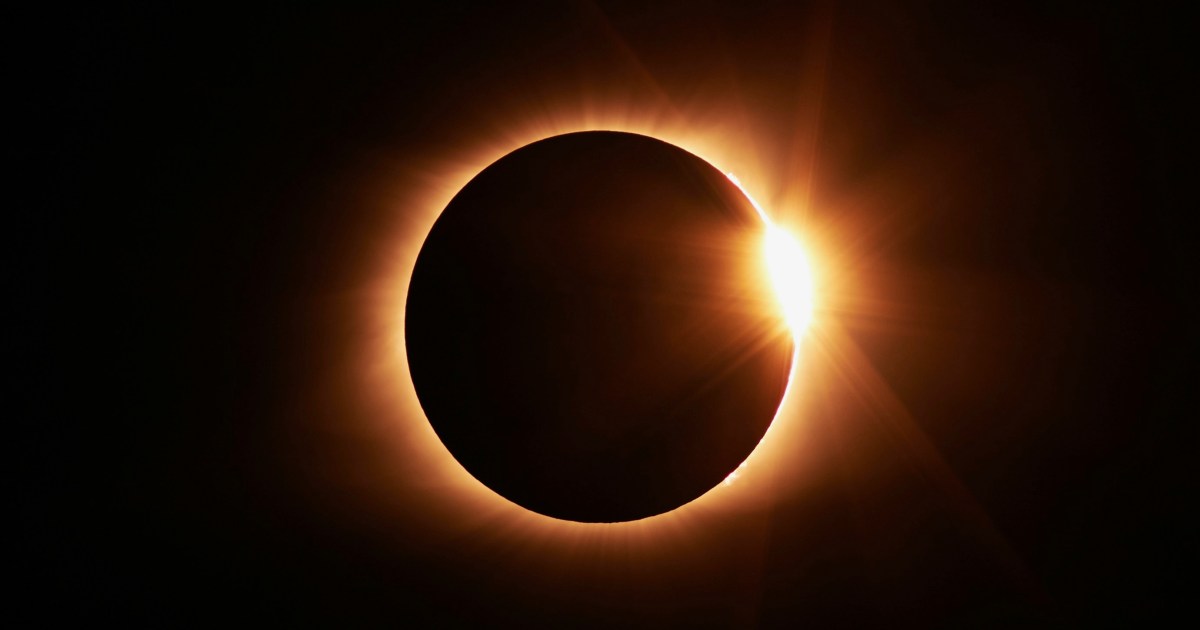
During the eclipse, one final bead of sunlight is visible. Combined with the thin ring around the rest of the moon, it gives off a “diamond ring” effect. Using your phone’s burst mode is the best way to capture this moment.

To activate burst mode on your iPhone, open the Camera app and swipe your finger from right to left on the white shutter button. Hold the button down as you swipe to start capturing burst photos. When you’re done capturing the action, lift your finger off the button.

On Android phones, open the Camera app, then tap and hold the shutter button to capture a rapid sequence of photos.

When are the next solar eclipses?

If you miss your chance to watch the solar eclipse on April 8, there will be more opportunities over the next few years.

Certain parts of Europe will experience a total eclipse on August 12, 2026. Areas of North Africa and the Middle East will see one as well on August 2, 2027. The final total solar eclipse of the decade will occur on July 22, 2028, in parts of Australia and New Zealand.

The contiguous U.S. will not witness another total solar eclipse until August 23, 2044. However, people in Alaska will have the chance to see one a little earlier, on March 30, 2033.

Editors’ Recommendations


Share. Facebook Twitter Pinterest LinkedIn Tumblr Email
Previous ArticleCan You View a Round Solar Eclipse Through a Square Hole?
Next Article Samsung Acknowledges Galaxy S23 Touchscreen Issue With One UI 6.1, Offers Temporary Fix

Related Articles

Warehouse Management Systems: The Secret Software Powering e-Commerce
News

Warehouse Management Systems: The Secret Software Powering e-Commerce

7 August 2026
Zohran Mamdani’s NYC Tech Team Is What DOGE Should Have Been
News

Zohran Mamdani’s NYC Tech Team Is What DOGE Should Have Been

7 August 2026
Caviar just gave Meta’s smart glasses the gold treatment but forgot to make it pretty
News

Caviar just gave Meta’s smart glasses the gold treatment but forgot to make it pretty

7 August 2026
Scientists Used AI to Create 16 New Viruses
News

Scientists Used AI to Create 16 New Viruses

7 August 2026
OnePlus announces its first ColorOS beta, kicking off the transition from OxygenOS
News

OnePlus announces its first ColorOS beta, kicking off the transition from OxygenOS

7 August 2026
The 5 Best Laptop Power Banks I’ve Personally Tested (2026)
News

The 5 Best Laptop Power Banks I’ve Personally Tested (2026)

7 August 2026
Demo
Top Articles
5 laptops to buy instead of the M4 MacBook Pro

5 laptops to buy instead of the M4 MacBook Pro

17 November 2024133 Views
ChatGPT o1 vs. o1-mini vs. 4o: Which should you use?

ChatGPT o1 vs. o1-mini vs. 4o: Which should you use?

15 December 2024112 Views
Costco partners with Electric Era to bring back EV charging in the U.S.

Costco partners with Electric Era to bring back EV charging in the U.S.

28 October 2024100 Views

Subscribe to Updates

Get the latest tech news and updates directly to your inbox.

Latest News
The 5 Best Laptop Power Banks I’ve Personally Tested (2026) News

The 5 Best Laptop Power Banks I’ve Personally Tested (2026)

News Room7 August 2026
Apple fixed three Mac Screen Sharing flaws, and now it’s patching another one News

Apple fixed three Mac Screen Sharing flaws, and now it’s patching another one

News Room7 August 2026
Best Webcams (2026): My Honest Take After Testing the Best News

Best Webcams (2026): My Honest Take After Testing the Best

News Room7 August 2026
Most Popular
The Spectacular Burnout of a Solar Panel Salesman

The Spectacular Burnout of a Solar Panel Salesman

13 January 2025137 Views
5 laptops to buy instead of the M4 MacBook Pro

5 laptops to buy instead of the M4 MacBook Pro

17 November 2024133 Views
ChatGPT o1 vs. o1-mini vs. 4o: Which should you use?

ChatGPT o1 vs. o1-mini vs. 4o: Which should you use?

15 December 2024112 Views
Our Picks
Scientists Used AI to Create 16 New Viruses

Scientists Used AI to Create 16 New Viruses

7 August 2026
OnePlus announces its first ColorOS beta, kicking off the transition from OxygenOS

OnePlus announces its first ColorOS beta, kicking off the transition from OxygenOS

7 August 2026
The 5 Best Laptop Power Banks I’ve Personally Tested (2026)

The 5 Best Laptop Power Banks I’ve Personally Tested (2026)

7 August 2026

Subscribe to Updates

Get the latest tech news and updates directly to your inbox.

Facebook X (Twitter) Instagram Pinterest
  • Privacy Policy
  • Terms of use
  • Advertise
  • Contact Us
© 2026 Best in Technology. All Rights Reserved.

Type above and press Enter to search. Press Esc to cancel.