

Close Menu
Best in TechnologyBest in Technology
  • News
  • Phones
  • Laptops
  • Gadgets
  • Gaming
  • AI
  • Tips
  • More
    • Web Stories
    • Global
    • Press Release

Subscribe to Updates

Get the latest tech news and updates directly to your inbox.

What's On
Review: Razer Boomslang 20th Anniversary Gaming Mouse

Review: Razer Boomslang 20th Anniversary Gaming Mouse

15 March 2026
A New Study Details How Cats Almost Always Land on Their Feet

A New Study Details How Cats Almost Always Land on Their Feet

15 March 2026
Windows 11 bug is rasing hell for users and Samsung laptops are worst hit

Windows 11 bug is rasing hell for users and Samsung laptops are worst hit

15 March 2026
Facebook X (Twitter) Instagram
Just In
  • Review: Razer Boomslang 20th Anniversary Gaming Mouse
  • A New Study Details How Cats Almost Always Land on Their Feet
  • Windows 11 bug is rasing hell for users and Samsung laptops are worst hit
  • There’s a new global factor for a potentially serious price hike for PCs and mobile
  • Windows 11 is readying support for 1,000+ Hz monitors, assuming you got one
  • Hollywood’s biggest filmmaker just came out clean about using AI in movies
  • You might want to double-check before buying laptops from this Chinese brand
  • Expert battling legal cases about AI harms has a grim warning for the future
Facebook X (Twitter) Instagram Pinterest Vimeo
Best in TechnologyBest in Technology
  • News
  • Phones
  • Laptops
  • Gadgets
  • Gaming
  • AI
  • Tips
  • More
    • Web Stories
    • Global
    • Press Release
Subscribe
Best in TechnologyBest in Technology
Home » How to mount your Blink Mini 2 security camera
News

How to mount your Blink Mini 2 security camera

News RoomBy News Room26 March 20243 Mins Read
Share Facebook Twitter Pinterest LinkedIn Tumblr Reddit Telegram Email
How to mount your Blink Mini 2 security camera
Share
Facebook Twitter LinkedIn Pinterest Email

The Blink Mini 2 offers an affordable way to keep tabs on your home. Clocking in at just $40, you’d be hard-pressed to find a security camera that offers better value. Along with 1080p footage capture, you can set up customized motion zones, activate Person Detection, and modify a bunch of other settings via the Blink mobile app. One of the best things about the Blink Mini 2, however, is that you can mount it on a wall or ceiling for improved visibility. It also comes with a basic stand for tabletop use.

Unsure how to mount your camera or afraid to snap the plastic stand in half while removing the camera? Here’s a closer look at how to mount the Blink Mini 2 and remove it from its stand.

How to remove the Blink Mini 2 from its stand

By default, the Blink Mini 2 will come preinstalled on its stand. This lets you manually swivel and pivot the camera to find the best viewing angle for your home. It also lifts it off the ground a few centimeters, ensuring your view isn’t blocked by nearby objects. However, if you want to remove it from the stand to make it more compact, Blink gives you that alternative. The process is easy – though it might be intimidating if it’s your first time attempting the procedure. Here’s how it works.

Step 1: Hold the base of the stand with one hand. Consider positioning the mounting spindle between two fingers for added stability.

Step 2: Grasp the camera with your other hand.

Step 3: Pull the stand and camera in opposite directions.

Step 4: You’ll need to apply quite a bit of pressure, but the camera will eventually pop off the stand. The process might also result in some nasty popping sounds and bending plastic. Don’t worry – this is normal, and no damage will be caused to the product.

Step 5: That’s it! The camera is now removed from the stand. To replace it, simply line up the camera with the mounting spindle, apply downward pressure, and it’ll snap back into place.
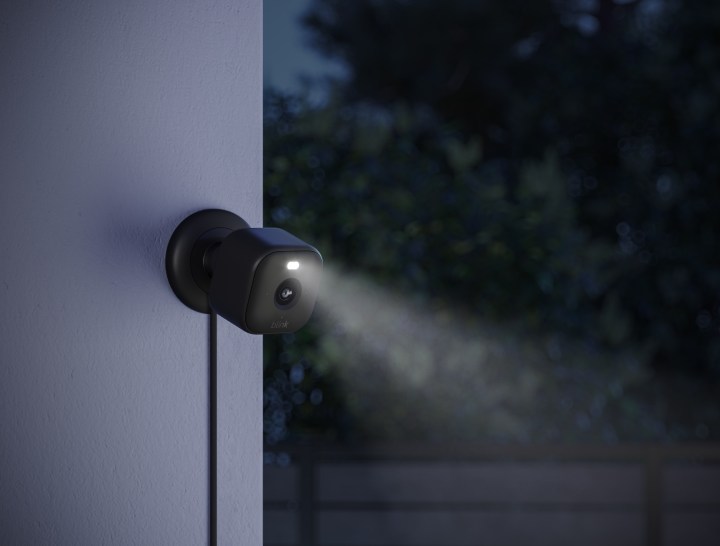
The Blink Mini 2 installed outside.

How to mount the Blink Mini 2 to a wall or ceiling

The Blink Mini 2 includes everything you need to attach the camera to a wall or ceiling. Here’s how it works.

Step 1: Remove your Blink Mini 2 from its stand.

Step 2: Slide the exterior plastic ring off the stand. This will reveal two screw holes.

Step 3: Determine where you want to place your camera (ensuring an electrical outlet is nearby for its plug), then use two screws to attach the mounting bracket to the wall or ceiling.

Step 4: Replace the exterior plastic ring by lining up the notches on it and the mounting bracket. This shouldn’t require much effort, as the two are designed to fit snuggly together. If you find yourself applying lots of pressure, try repositioning the exterior ring to better align with the mounting bracket notches.

Step 5: Snap your camera onto the mounting spindle.

Step 6: Plug in the power cable to the back of your Blink Mini 2.

Step 7: That’s it! Depending on how you installed the camera, you may need to dive into the settings menu and activate the Flip Video feature. This can be found by selecting the More button on the device’s thumbnail in the Blink app. Next, go to Device Settings and find Video and Photo. Here, you’ll have the option to Flip Video.

Editors’ Recommendations



Share. Facebook Twitter Pinterest LinkedIn Tumblr Email
Previous ArticleWhy the Baltimore Bridge Collapsed so Quickly
Next Article Bethesda Gives A Small Update On The Elder Scrolls 6

Related Articles

Review: Razer Boomslang 20th Anniversary Gaming Mouse
News

Review: Razer Boomslang 20th Anniversary Gaming Mouse

15 March 2026
A New Study Details How Cats Almost Always Land on Their Feet
News

A New Study Details How Cats Almost Always Land on Their Feet

15 March 2026
Windows 11 bug is rasing hell for users and Samsung laptops are worst hit
News

Windows 11 bug is rasing hell for users and Samsung laptops are worst hit

15 March 2026
There’s a new global factor for a potentially serious price hike for PCs and mobile
News

There’s a new global factor for a potentially serious price hike for PCs and mobile

15 March 2026
Windows 11 is readying support for 1,000+ Hz monitors, assuming you got one
News

Windows 11 is readying support for 1,000+ Hz monitors, assuming you got one

15 March 2026
Hollywood’s biggest filmmaker just came out clean about using AI in movies
News

Hollywood’s biggest filmmaker just came out clean about using AI in movies

14 March 2026
Demo
Top Articles
5 laptops to buy instead of the M4 MacBook Pro

5 laptops to buy instead of the M4 MacBook Pro

17 November 2024128 Views
ChatGPT o1 vs. o1-mini vs. 4o: Which should you use?

ChatGPT o1 vs. o1-mini vs. 4o: Which should you use?

15 December 2024111 Views
Costco partners with Electric Era to bring back EV charging in the U.S.

Costco partners with Electric Era to bring back EV charging in the U.S.

28 October 2024100 Views

Subscribe to Updates

Get the latest tech news and updates directly to your inbox.

Latest News
Hollywood’s biggest filmmaker just came out clean about using AI in movies News

Hollywood’s biggest filmmaker just came out clean about using AI in movies

News Room14 March 2026
You might want to double-check before buying laptops from this Chinese brand News

You might want to double-check before buying laptops from this Chinese brand

News Room14 March 2026
Expert battling legal cases about AI harms has a grim warning for the future News

Expert battling legal cases about AI harms has a grim warning for the future

News Room14 March 2026
Most Popular
The Spectacular Burnout of a Solar Panel Salesman

The Spectacular Burnout of a Solar Panel Salesman

13 January 2025137 Views
5 laptops to buy instead of the M4 MacBook Pro

5 laptops to buy instead of the M4 MacBook Pro

17 November 2024128 Views
ChatGPT o1 vs. o1-mini vs. 4o: Which should you use?

ChatGPT o1 vs. o1-mini vs. 4o: Which should you use?

15 December 2024111 Views
Our Picks
There’s a new global factor for a potentially serious price hike for PCs and mobile

There’s a new global factor for a potentially serious price hike for PCs and mobile

15 March 2026
Windows 11 is readying support for 1,000+ Hz monitors, assuming you got one

Windows 11 is readying support for 1,000+ Hz monitors, assuming you got one

15 March 2026
Hollywood’s biggest filmmaker just came out clean about using AI in movies

Hollywood’s biggest filmmaker just came out clean about using AI in movies

14 March 2026

Subscribe to Updates

Get the latest tech news and updates directly to your inbox.

Facebook X (Twitter) Instagram Pinterest
  • Privacy Policy
  • Terms of use
  • Advertise
  • Contact Us
© 2026 Best in Technology. All Rights Reserved.

Type above and press Enter to search. Press Esc to cancel.