I’ve grown out of low-profile keyboards. After a stint with the Logitech G915, I was quickly swept up into the community of enthusiast mechanical keyboards, and I’ve winced at the sound of a low-profile mechanical keyboard ever since. Call me a snob, but it just hasn’t been my preference.
So, it came as a shock to me that the Asus ROG Falchion RX LP managed to stay set up on my desk. I’ll move back to the keyboard I’ve tweaked every part of eventually, but the ROG Falchion RX LP makes a compelling argument for a low-profile form factor with a few key changes to this established design.
Meeting the Falchion RX LP
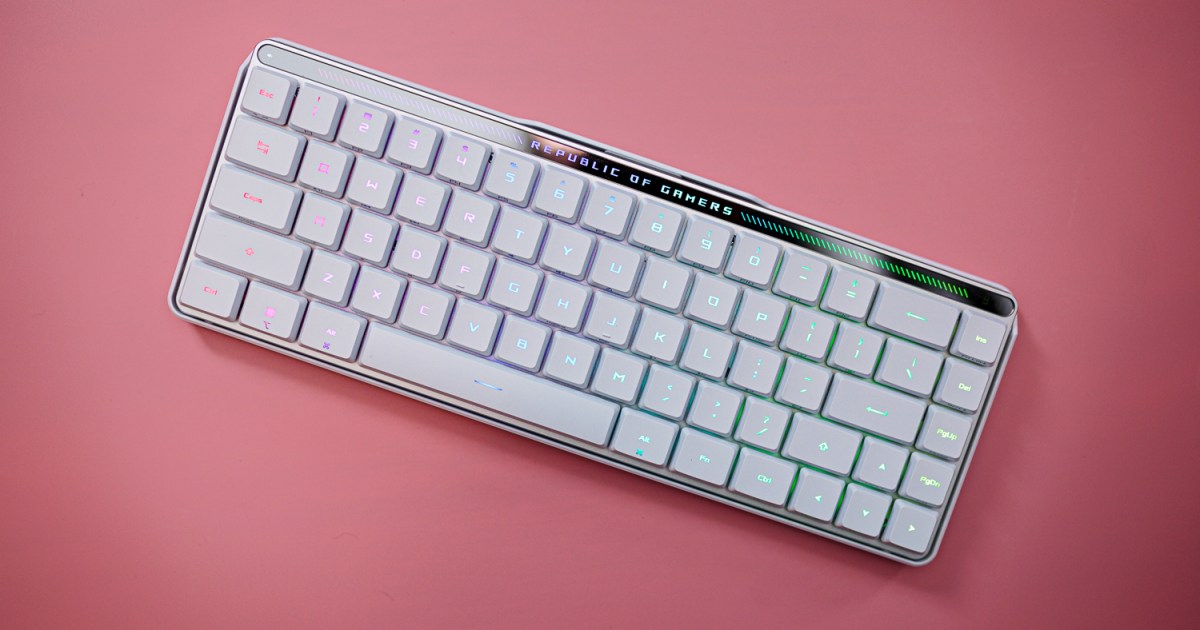
Let’s get acquainted with the Falchion RX LP keyboard first. It’s a low-profile mechanical keyboard, meaning both the switches and the keycaps are shorter. That changes the keyboard profile, with the keys lying flat across the top of the body. This take has a 65% layout, fit with arrow keys but no Function keys, and Asus managed to cram everything into the frame of a 60% keyboard.
The result is a keyboard with no wasted space. Short of a light bar on top with a few unique features (more on those soon), all the keys are stuffed together. That can create some problems, such as hitting the Page Up key when you mean to hit Enter, or tapping the Insert key when going for Backspace, but I’ve been able to type 10,000 (or more) words with the keyboard without too many issues.
For connection, the keyboard supports Asus’ Omni adaptor, allowing you to connect multiple Asus peripherals with a single dongle. It also supports three modes of connection — the low-latency 2.4GHz wireless connection through the Omni adaptor, Bluetooth (up to three devices), or wired over USB-C. You can toggle between these modes with a switch on the back of the keyboard.
Next to that switch is a toggle for a Mac or PC layout, another trick the Falchion RX LP pulls. It supports macOS. I suspect most people will use this keyboard with a PC, but it’s nice to have the flexibility, especially considering how portable the keyboard is.
Outside of connectivity, the Falchion RX LP has a unique touch strip on the back of the keyboard. The slight cavity has a few bumps and takes up about a quarter of the back of the keyboard, and by default, it serves as a way to adjust your volume. However, a button next to the strip changes its functionality. You can use it as a media control and even as a macro. By default, the macro defaults to scrolling a webpage.
It’s an ingenious piece of kit, and it works much better than I expected. You have commands to swipe up and down, but also commands if you tap the strip. You can bind these to different commands, such as launching an application or triggering a Windows shortcut. Other keyboards have this type of functionality, but they’re usually overlayed on other keys in such a small form factor. The addition of the touch strip gives you a dedicated spot to access the additional functionality of the Falchion RX LP, and it works.
As you’d expect from an Asus keyboard, there are a host of customization options. You get per-key RGB lighting, settings for when the keyboard sleeps, and a game mode that disables key combinations like Alt + F4. It nails all of the basic features of a solid gaming keyboard and even goes beyond with the touch strip. That’s not why I love the Falchion RX LP so much, though.
All about the feel
The feel. For my snobby keyboard fingers, it all comes down to the feel of typing and gaming, and Asus has it nailed on the Falchion RX LP. Every low-profile keyboard I’ve tried has a short throw, leading to a snappy typing experience, but Asus elevates the design with a couple of key changes.
First, the switches. These are low-profile optical switches, and Asus has a linear red switch with a low actuation force of 40 grams, and a heavy tactile blue switch with an actuation force of 55 grams. The switches come lubricated from the factory, but the important thing is how they’re stabilized. Asus uses four mounting holes rather than snapping the key cap in like you see on keyboards like the Logitech G915 or relying on a low-profile Cherry stem.
It’s a body that extends up through the actual switch rather than a mount directly on top of the switch. There is no wobble on the keycaps. With regular switches, a bit of wobble is easy to forgive, but it makes a world of difference on a low-profile keyboard due to not only the short actuation point but also the flat nature of the profile. The lack of wobble on the Falchion RX LP makes it feel like you can fly across the keys.
The other factor impacting feel is the integrated board foam. Asus includes two layers of silicon to absorb the pinging sound you find on lesser mechanical keyboards. Sound absorption is one of the critical factors separating the run-of-the-mill mechanical gaming keyboards from more enthusiast options, which was on full display with Asus’ ROG Strix Scope II 96.
Every low-profile mechanical keyboard I’ve tried has this almost cheap feel due to the lack of sound absorption. It’s a clacky mess, even with a linear switch. There’s a hint of that sound on the Falchion RX LP, but it’s much more subdued compared to other low-profile options.
A low-profile winner
Over the last couple of years, Asus has been at the forefront of bringing enthusiast designs into the mainstream realm with its gaming keyboards, but the Falchion RX LP is something different. It feels like a chance for Asus to flex its muscles, taking what it has learned from keyboards like the Strix Scope II 96 and ROG Azoth to build a low-profile keyboard for which there isn’t a true competitor.
That doesn’t mean this is a great keyboard for everyone. There aren’t many options for customization due to the low-profile switches, so don’t expect you’ll be able to swap out your keycaps or switches down the line. In addition, although this is by far the best low-profile mechanical keyboard I’ve used, it’s still a low-profile mechanical keyboard — the typing experience on a regular mechanical keyboard is superior.
Still, I’m shocked at how much Asus managed to cram in for this keyboard at $170. Windows and macOS support is huge; the travel-friendly nature gives you a premium feel on the go, and the intuitive touch bar unlocks a suite of options on such a small frame. If you’re in the market for a low-profile mechanical keyboard, this is the one to buy.
Editors’ Recommendations