







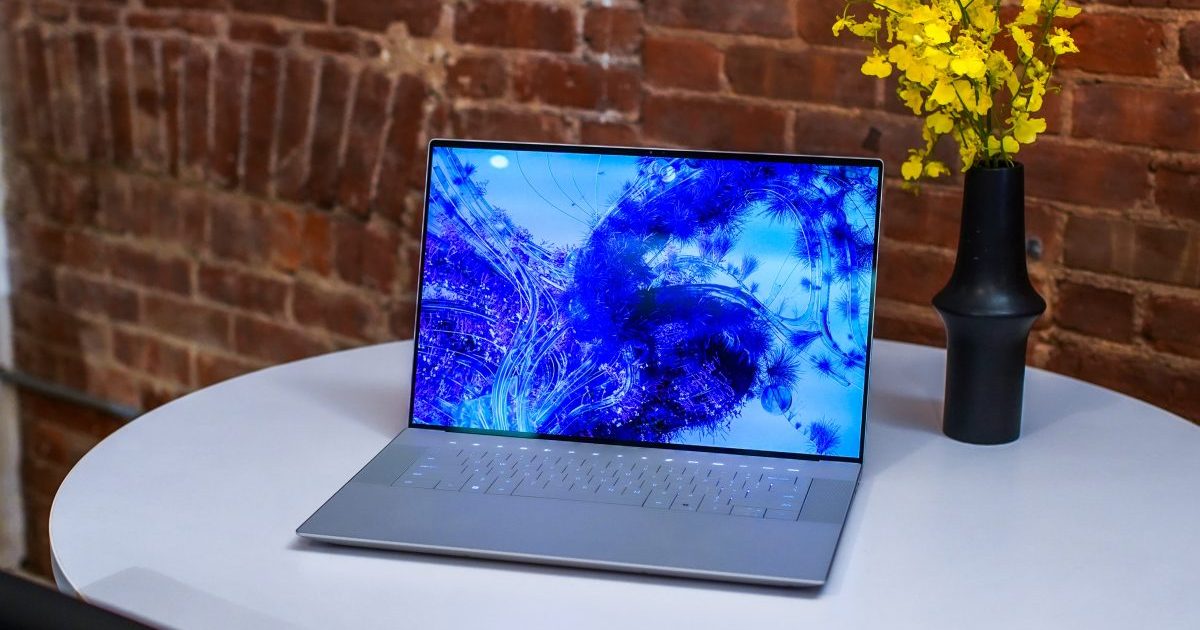
Dell’s XPS 16 is a brand-new machine, replacing the larger XPS 17 in size and configuration. What it gives up in potential performance, it tries to make up for with a sleek (and controversial) design. Meanwhile, HP updated its largest convertible 2-in-1, the Spectre x360 16, with a smoothed-out appearance and updated components.
The XPS and Spectre lines have reputations for solid builds and attractive aesthetics, but they’re different machines. One can be flipped around into tablet mode; one can be configured with a faster GPU. As we look ahead to testing these products ourselves, here’s how the two compare.
Specs and configurations
| HP Spectre x360 16 | Dell XPS 16 | |
| Dimensions | 14.05 inches by 9.67 inches by 0.78 inches | 14.1 inches by 9.4 inches by 0.74 inches |
| Weight | 4.3 pounds | 4.8 pounds |
| Processor | Intel Core Ultra 7 155H | Intel Core Ultra 7 155H Intel Core Ultra 7 165H Intel Core Ultra 9 185H |
| Graphics | Intel Arc Graphics Nvidia GeForce RTX 4050 |
Intel Arc Graphics Nvidia GeForce RTX 4050 Nvidia GeForce RTX 4060 Nvidia GeForce RTX 4070 |
| RAM | 16GB DDR5 32GB DDR5 |
16GB 32GB 64GB |
| Display | 16.0-inch 16:10 WQXGA (2560 x 1600) IPS touch, 120Hz 16.0-inch 16:10 2.8K (2880 x 1800) OLED touch, 120Hz |
16.3-inch 16:10 FHD+ (1920 x 1200) IPS non-touch, 120Hz 16.3-inch 16:10 4K+ (3840 x 2400) OLED touch, 120Hz |
| Storage | 512GB PCIe Gen4 SSD 1TB PCIe Gen4 SSD 2TB PCIe Gen4 SSD |
512GB PCIe Gen4 SSD 1TB PCIe Gen4 SSD 2TB PCIe Gen4 SSD 4TB PCIe Gen4 SSD |
| Touch | Yes | Optional |
| Ports | 2 x USB-C with Thunderbolt 4 2 x USB-A 3.2 Gen 2 1 x HDMI 1 x 3.5mm audio jack |
3 x USB-C with Thunderbolt 4 1 x 3.5mm audio jack 1 x microSD card reader |
| Wireless | Wi-Fi 6E and Bluetooth 5.3 Wi-Fi 7 and BlueTooth 5.4 |
Wi-Fi 7 and BlueTooth 5.4 |
| Webcam | 9MP with infrared camera for Windows 11 Hello | 1080p with infrared camera for Windows 11 Hello |
| Operating system | Windows 11 | Windows 11 |
| Battery | 83 watt-hour | 99.5 watt-hour |
| Price | $1,500+ | $1,899+ |
| Rating | Not reviewed | Not reviewed |
The Spectre x360 16 has a lower starting price of $1,500, while the XPS 16 starts higher at $1,899 but lets you configure with more powerful graphics, more storage, and more memory.
Design
The XPS 16 adopts the space-age design of the XPS 13 Plus, which is now defunct as new 13-inch and 14-inch variants share the new design. The laptop looks a lot like its predecessor, the XPS 17, on the outside, with the same all-aluminum lid and chassis in silver and graphic color schemes and anodized chrome accents along the edge.
Open it up, though, and you’ll find a keyboard with closely spaced keys, a row of LED function keys along the top, and a haptic touchpad that’s hidden on the all-glass palm rest. The keyboard and touchpad have both received a lot of heat from onlookers since the announcement, disappointed that Dell has opted for the more divisive decision on its more “Pro”-level laptop. Still, the ultra-modern appearance is augmented by the thinnest display bezels around — a hallmark of the XPS brand.
The Spectre x360 16 shares its predecessor’s sleek design but has edges that have been sanded off into a smoother finish. It retains the notches in the display and rear chassis, the latter housing a Thunderbolt 4 port and audio jack for added convenience. Inside, it’s a more traditional design with a standard island keyboard and a large haptic touchpad. The all-aluminum build comes in Nightfall black, and while its side bezels are thin, its top and bottom bezels are larger — the latter to accommodate the 2-in-1 hinge that supports clamshell, tent, media, and tablet modes.
We haven’t handled the Spectre x360 16 in person yet, but we’ve checked out the XPS 16 in person ahead of CES. The two devices are similar in width and depth, with the XPS 16 being slightly thinner and the Spectre x360 16 being half a pound lighter.
As mentioned, the XPS 16 has a keyboard with large keycaps that offer no key spacing, and if it’s similar to the XPS 13 Plus keyboard, you’ll enjoy shallow but snappy and precise switches. The Spectre x360 16’s keyboard also offers large keycaps with bold lettering and more key spacing, and if it shares the same feel as the Spectre x360 14, it will lack the same precision as earlier Spectre keyboards but plenty of travel.
The Spectre’s large haptic touchpad should be excellent in its responsiveness and natural feel, if it shares the design of its smaller sibling, while the XPS 16’s hidden touchpad should be the same as the decent version on the XPS 13 Plus. If both comparisons are apt, the Spectre’s touchpad will be better. Many users will appreciate the Spectre’s physical function key and visible touchpad.
Both laptops have dropped a full-size SD card slot.
Connectivity is mixed, with the XPS 16 having an additional Thunderbolt 4 port and the Spectre offering HDMI and legacy USB-A ports. The XPS 16 has a microSD card reader, which is changed from the XPS 17’s full-size SD card reader, while the Spectre x360 16 drops an SD card reader altogether. Both laptops offer Wi-Fi 7 and Bluetooth 5.4, placing them on the cutting edge of wireless connectivity.
The Spectre x360 16 offers a 9-megapixel webcam supporting up to 2160p video and hardware-assisted low-light capabilities, compared to the XPS 16’s 1080p webcam. Both have infrared cameras supporting Windows 11 Hello facial recognition, and both have fingerprint readers embedded in their power buttons. In addition, both support user presence-sensing technologies that can lock and put them to sleep when a user leaves, wake them up, and log back in when a user returns.
To varying degrees, both laptops also use the Neural Processing Unit (NPU) in the Intel Meteor Lake chipset for various AI functionalities, such as videoconferencing enhancements, power management, and more.
Performance
The Specture x360 16 uses the Intel Core Ultra 7 155H, a 28-watt CPU with 16 cores (six Performance, eight Efficient, and two Low Power Efficient) and 22 threads, running at up to 4.8GHz. The XPS 16 matches the Spectre while offering the Core Ultra 7 165H, which runs up to 5.0GHz, and the 45-watt Core Ultra 9 185H, which runs up to 5.1GHz.
Both laptops will likely offer similar CPU performance, with the XPS 16 offering slightly more headroom. More important are the GPUs available with each machine. Both offer integrated Intel Arc graphics and the entry-level Nvidia GeForce RTX 4050 discrete GPU, but the XPS 16 has the RTX 4060 and RTX 4070 as options. That means it will provide significantly better performance in creative apps that can utilize the GPU and in gaming. The XPS 16 can also be configured with up to 64GB of RAM, compared to the Spectre x360 16’s 32GB maximum.
The XPS 16 will be a better machine for demanding creators and gamers, while both laptops will serve productivity users and media consumers equally well.
Display
The Spectre x360 16 has two display options, WQXGA+ (2560 x 1600) IPS and 2.8K (2880 x 1800) OLED. Both run at up to 120Hz. The XPS 16 has optional FHD+ (1920 x 1200) IPS and 4K+ (3840 x 2400) OLED, running at 120Hz.
The Spectre’s low-end display has a higher resolution, while its higher-end display has a lower resolution, providing mixed sharpness compared to the XPS 16. We suspect that both OLED displays will provide the usual bright and accurate colors and deep contrast, while we can’t predict the performance of the IPS panels.
As a 2-in-1, both Spectres’ display options are pen- and touch-enabled, while the XPS 16’s 4K+ OLED display is touch-enabled.
Portability
Both laptops are large machines, with the Spectre x360 16 being considerably lighter. They’ll both occupy plenty of space in your backpack, but the Spectre will be easier to cart around.
The XPS 16 has a larger battery than the Spectre x360 16 while offering a more efficient IPS panel and a more power-hungry OLED display. The Dell also utilizes more powerful CPUs at the high end. Battery life will, therefore, vary greatly based on each laptop’s configuration. Neither is likely to get all-day battery life.
The Dell XPS 16 looks like the more popular laptop
The XPS 16 promises to be a faster laptop with a higher-resolution OLED display option, promising the best experience for creators and gamers. It’s a more futuristic design, with some elements such as the LED function keys and hidden touchpad being less attractive to many users. The Spectre x360 16 offers a convertible 2-in-1s flexibility but won’t be as fast, particularly given the XPS 16’s faster GPU options.
We’ll have to wait for our reviews to pick a winner and receive more pricing information. For now, we’ll say that the XPS 16 is likely to appeal to a wider range of users.
Editors’ Recommendations


