

Close Menu
Best in TechnologyBest in Technology
  • News
  • Phones
  • Laptops
  • Gadgets
  • Gaming
  • AI
  • Tips
  • More
    • Web Stories
    • Global
    • Press Release

Subscribe to Updates

Get the latest tech news and updates directly to your inbox.

What's On
Review: Bambu P1S Combo 3D Printer Review

Review: Bambu P1S Combo 3D Printer Review

25 January 2026
Your WhatsApp voice notes could help screen for early signs of depression

Your WhatsApp voice notes could help screen for early signs of depression

25 January 2026
How Long Should You Cold Plunge? We Asked Experts (2026)

How Long Should You Cold Plunge? We Asked Experts (2026)

25 January 2026
Facebook X (Twitter) Instagram
Just In
  • Review: Bambu P1S Combo 3D Printer Review
  • Your WhatsApp voice notes could help screen for early signs of depression
  • How Long Should You Cold Plunge? We Asked Experts (2026)
  • Your charging cable might get a workout if you try ‘Charchery’
  • Review: Phonak Audeo Infinio Ultra Sphere
  • No One Is Quite Sure Why Ice Is Slippery
  • Your future BMW electric M3 will still sound like a real M car
  • The Instant Smear Campaign Against Border Patrol Shooting Victim Alex Pretti
Facebook X (Twitter) Instagram Pinterest Vimeo
Best in TechnologyBest in Technology
  • News
  • Phones
  • Laptops
  • Gadgets
  • Gaming
  • AI
  • Tips
  • More
    • Web Stories
    • Global
    • Press Release
Subscribe
Best in TechnologyBest in Technology
Home » How to use Apple Music’s Favorite Songs playlist in iOS 17
News

How to use Apple Music’s Favorite Songs playlist in iOS 17

News RoomBy News Room17 December 20232 Mins Read
Share Facebook Twitter Pinterest LinkedIn Tumblr Reddit Telegram Email
How to use Apple Music’s Favorite Songs playlist in iOS 17
Share
Facebook Twitter LinkedIn Pinterest Email

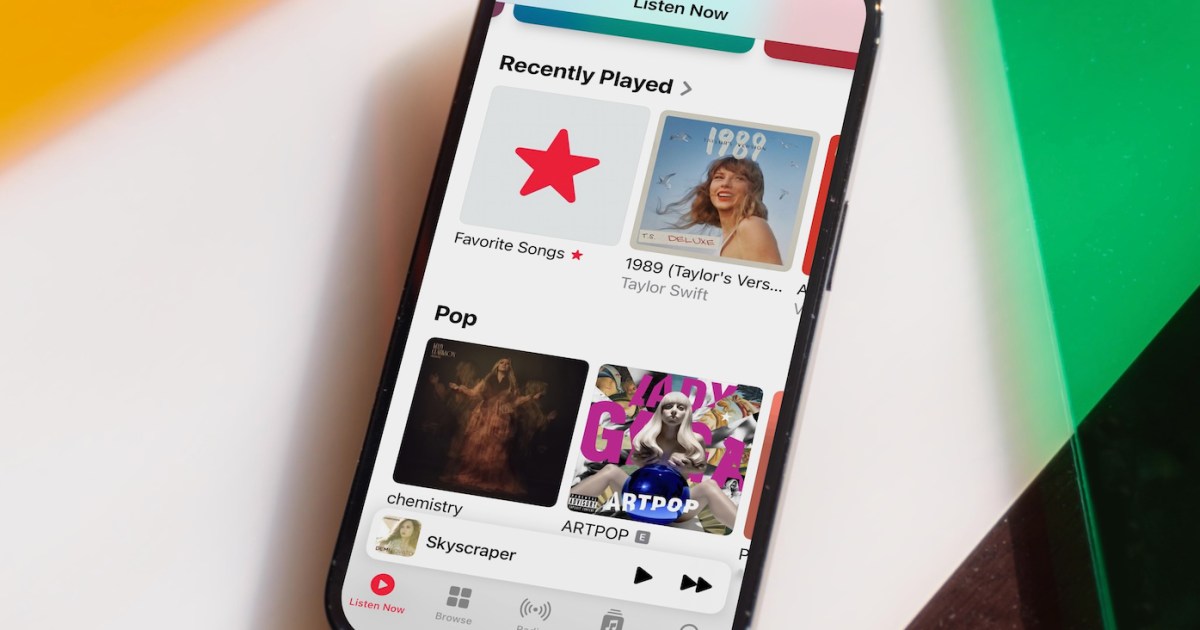
Apple Music has always been a powerful platform for streaming and discovering new music. With the latest updates of iOS 17.1 and 17.2, Apple has introduced new features that make it even easier to add your favorite songs to your music library. Doing so takes just a few steps.

Before getting started, be sure to install the iOS/iPadOS 17.2 update or later on your iPhone or iPad. Otherwise these steps aren’t possible.

How to add songs to Favorite Songs

You can now favorite songs in Apple Music. Here are the steps to do so.

Step 1: To add a song to your favorites in Apple Music, touch and hold the song title or tap the More button (three dots).

Step 2: Next, tap Favorite.
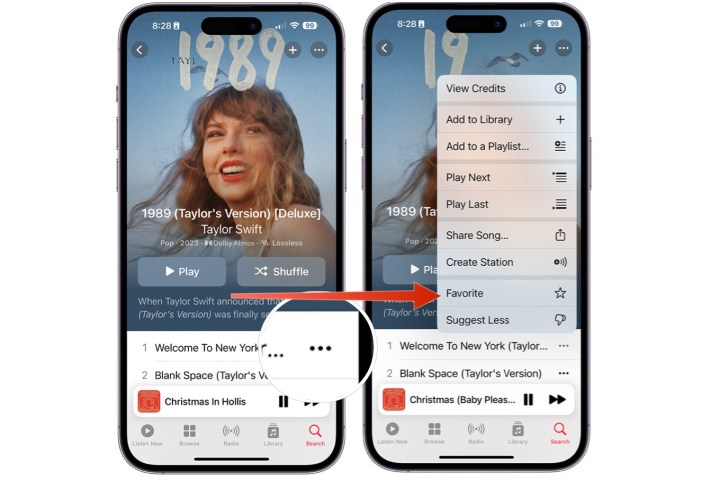
Screenshots showing how to favorite a song in Apple Music on iPhone.

Step 3: Alternatively, you can tap the star icon on the Now Playing screen.
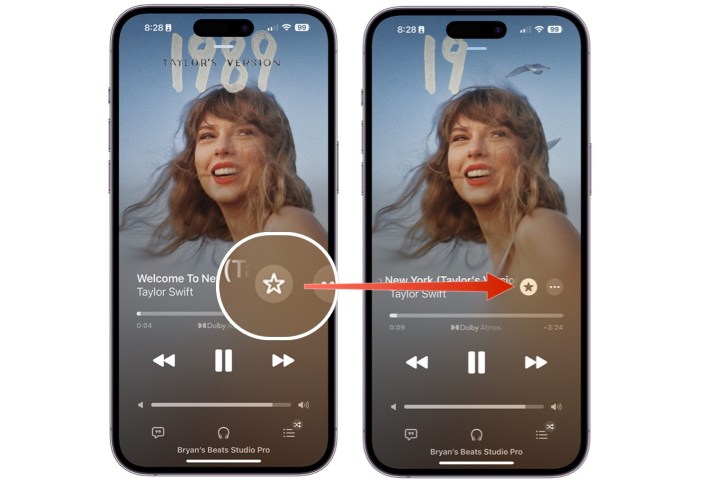
Screenshots showing how to favorite a song on Apple Music from the Now Playing screen.

How to find your Favorite Songs playlist

Your favorited songs in Apple Music are now added to a new Favorite Songs playlist.

Step 1: To find your Favorite Songs playlist, choose Library at the bottom of the Apple Music app.

Step 2: Select Playlists.
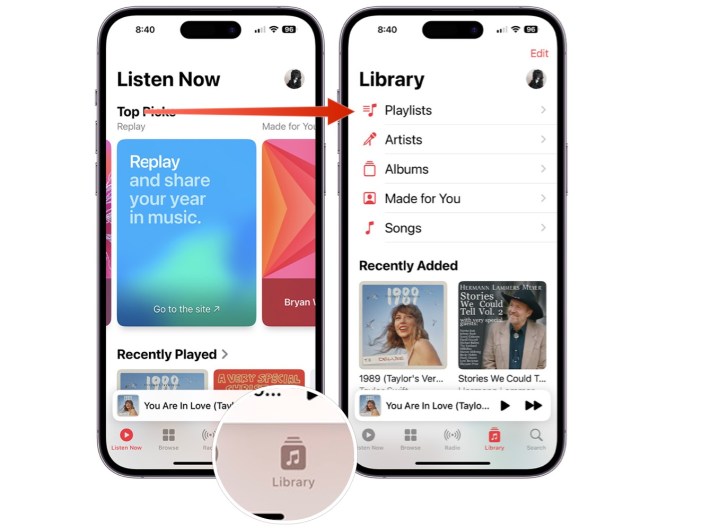
Screenshots showing how to find the Favorite Songs playlist in Apple Music.

Step 3: Scroll down, choose “Favorite Songs*.

Screenshots showing how to find the Favorite Songs playlist in Apple Music.

How to add playlists to your Favorites

Beginning with iOS 17.2, you can also favorite a playlist in Apple Music.

Step 1: To favorite a playlist, choose Library in the Apple Music app.

Step 2: Choose Playlists.

Screenshots showing the steps to favorite a playlist in Apple Music.

Step 3: Select the playlist to favorite.

Step 4: Tap the three dot icon at the top right, then select Favorite.
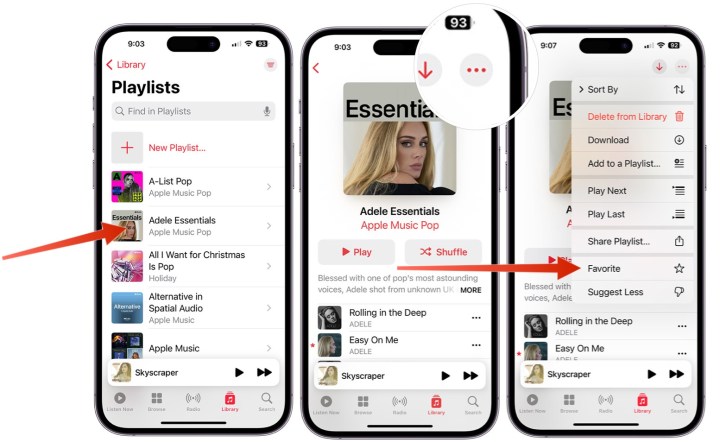
Screenshots showing the steps to favorite a playlist in Apple Music.

How to find all your Favorites

Apple Music offers a location that stores all of your favorite items in your music library.

Step 1: To get started, choose Library in the app.

Step 2: Choose any of the following: Playlists, Artists, Albums, or Songs.
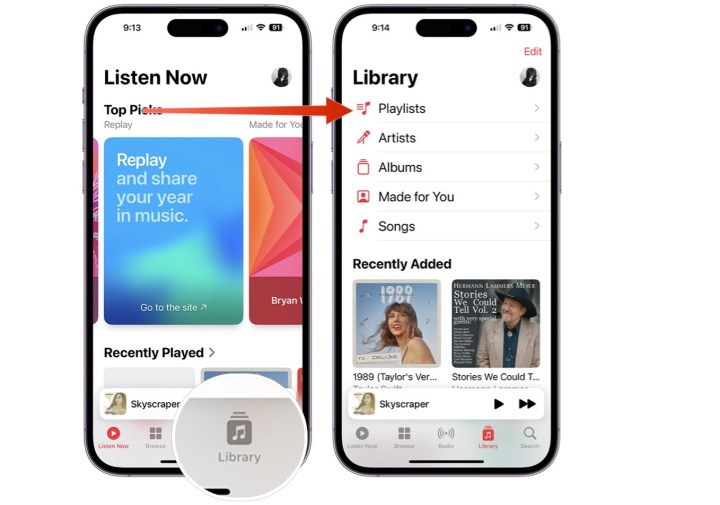
Screenshots showing how to find favorites in the Apple Music app.

Step 3: Select the three-line icon at the top right.

Step 4: Select Favorite. You’ll now see only the favorited items in the category you choose.
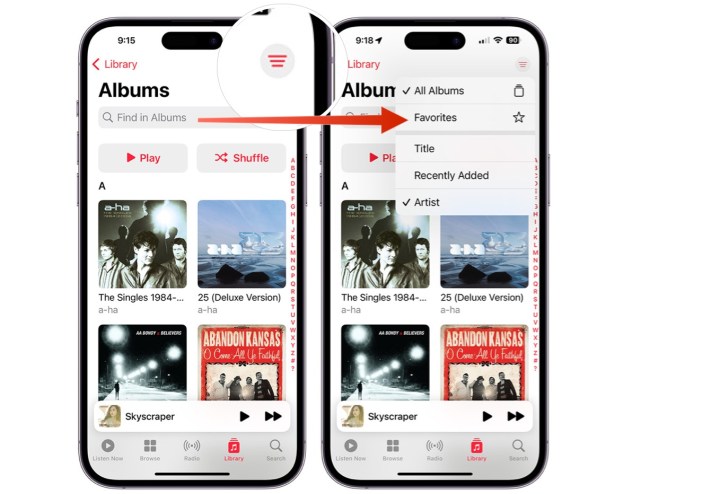
Screenshots showing how to find favorites in the Apple Music app.

How to add Favorites to your library

When you add a song to a playlist or favorite it, it will be automatically added to your Apple Music library. However, starting with iOS 17.2, you can modify these settings.

Step 1: To get started, tap on the Settings app on your iPhone or iPad.

Step 2: Tap Music.

Step 3: Scroll down, then untoggle Add Playlist Songs or untoggle Add Favorite Songs, depending on your preferences.
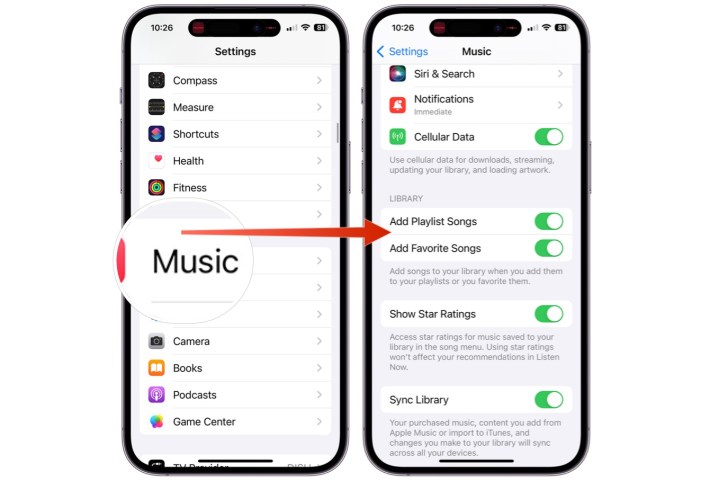
Screenshots showing how to toggle/untoggle the ability to automatically save favorited items in Apple Music.

Editors’ Recommendations


Share. Facebook Twitter Pinterest LinkedIn Tumblr Email
Previous ArticleDallas Cowboys vs. Buffalo Bills live stream: watch the NFL for free
Next Article 5 best Amazon Prime Video movies of 2023, ranked

Related Articles

Review: Bambu P1S Combo 3D Printer Review
News

Review: Bambu P1S Combo 3D Printer Review

25 January 2026
Your WhatsApp voice notes could help screen for early signs of depression
News

Your WhatsApp voice notes could help screen for early signs of depression

25 January 2026
How Long Should You Cold Plunge? We Asked Experts (2026)
News

How Long Should You Cold Plunge? We Asked Experts (2026)

25 January 2026
Your charging cable might get a workout if you try ‘Charchery’
News

Your charging cable might get a workout if you try ‘Charchery’

25 January 2026
Review: Phonak Audeo Infinio Ultra Sphere
News

Review: Phonak Audeo Infinio Ultra Sphere

25 January 2026
No One Is Quite Sure Why Ice Is Slippery
News

No One Is Quite Sure Why Ice Is Slippery

25 January 2026
Demo
Top Articles
ChatGPT o1 vs. o1-mini vs. 4o: Which should you use?

ChatGPT o1 vs. o1-mini vs. 4o: Which should you use?

15 December 2024107 Views
5 laptops to buy instead of the M4 MacBook Pro

5 laptops to buy instead of the M4 MacBook Pro

17 November 2024101 Views
Costco partners with Electric Era to bring back EV charging in the U.S.

Costco partners with Electric Era to bring back EV charging in the U.S.

28 October 202497 Views

Subscribe to Updates

Get the latest tech news and updates directly to your inbox.

Latest News
No One Is Quite Sure Why Ice Is Slippery News

No One Is Quite Sure Why Ice Is Slippery

News Room25 January 2026
Your future BMW electric M3 will still sound like a real M car News

Your future BMW electric M3 will still sound like a real M car

News Room25 January 2026
The Instant Smear Campaign Against Border Patrol Shooting Victim Alex Pretti News

The Instant Smear Campaign Against Border Patrol Shooting Victim Alex Pretti

News Room25 January 2026
Most Popular
The Spectacular Burnout of a Solar Panel Salesman

The Spectacular Burnout of a Solar Panel Salesman

13 January 2025136 Views
ChatGPT o1 vs. o1-mini vs. 4o: Which should you use?

ChatGPT o1 vs. o1-mini vs. 4o: Which should you use?

15 December 2024107 Views
5 laptops to buy instead of the M4 MacBook Pro

5 laptops to buy instead of the M4 MacBook Pro

17 November 2024101 Views
Our Picks
Your charging cable might get a workout if you try ‘Charchery’

Your charging cable might get a workout if you try ‘Charchery’

25 January 2026
Review: Phonak Audeo Infinio Ultra Sphere

Review: Phonak Audeo Infinio Ultra Sphere

25 January 2026
No One Is Quite Sure Why Ice Is Slippery

No One Is Quite Sure Why Ice Is Slippery

25 January 2026

Subscribe to Updates

Get the latest tech news and updates directly to your inbox.

Facebook X (Twitter) Instagram Pinterest
  • Privacy Policy
  • Terms of use
  • Advertise
  • Contact Us
© 2026 Best in Technology. All Rights Reserved.

Type above and press Enter to search. Press Esc to cancel.