


Ever looked at an ad and wondered if a real person made it or if it was AI generated in seconds? Google is now giving you a way to find out.
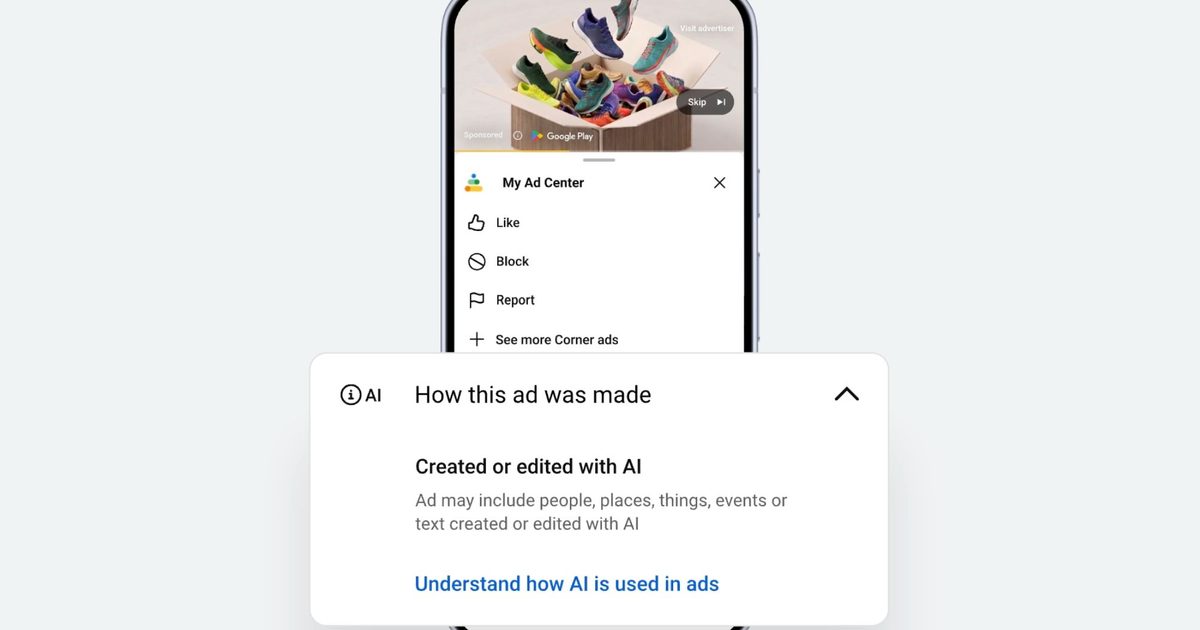
The company just announced a new AI transparency label that tells you whether an ad was created or edited using generative AI tools. The label lives inside Google’s My Ad Center, and it is rolling out across Google Search, YouTube, and Discover globally.
How to find the AI label on Google ads?
Finding it is straightforward. Tap the three-dot menu or the info button on any ad, and you will see a “How this ad was made” section. If the ad was made using AI, you may see a label saying “Created or edited with AI.”
For ads made using Google’s own generative AI advertising tools, the label gets applied automatically, so you do not have to rely on the advertiser to disclose anything. If an advertiser uses a third-party AI tool instead, they can manually disclose that information through My Ad Center. In some countries, local regulations may also require AI labels to appear directly on the ad itself.
Why is Google adding AI labels?
As AI-generated images and videos become more realistic, it is becoming harder to tell how advertising content was created. Google says the new labels are meant to give people more transparency while helping advertisers keep up with evolving industry standards.
The company has already introduced disclosures for digitally altered political ads and expanded support for technologies such as SynthID, which also powers Google Photos’ AI image watermarks, and C2PA, a standard that Google is also bringing to Google Messages to help identify AI-generated images in chats.
Google is also testing ways to show AI-generated image labels directly in Google Search and has expanded Gemini’s ability to help users spot AI-generated videos. The new ad labels build on those efforts by bringing similar transparency to commercial advertising.